Forum Discussion

 New Contributor
Signal Tap false trigger

 Super Contributor
Hi,
a popular reason for experiencing "false trigger" or incorrectly acquired signals is tapping signals that are asynchronous to signal tap acquisition clock. Respective signals usually generate timing failure in timing analysis.
Seeing no data before trigger event simply means that trigger condition is immediately met.
Regard
Frank
 New Contributor
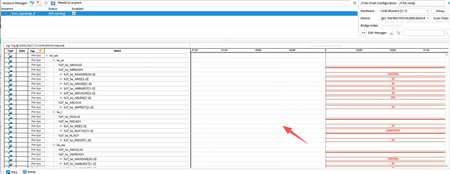
I temporarily resolved this issue by disabling the hps debug port. Please see the image below.
Based on my experience, even with immediate triggering, all waveforms should be displayed. For example, if I set all conditions to "don't care," it triggers immediately, but the captured waveform is different from what I described.
- sstrell11 months ago
At the bottom of the Signal Configuration section of Signal Tap, did you have the Trigger In feature enabled using the DAP as the source? That might partially explain this.
- xiaohao11 months ago
"I usually don't care about this. It's the default setting. Are you referring to this?"
How should I select the nodes and triggers here? I don't need JTAG to debug the HPS.
Can you provide me with some relevant materials?- RichardT_altera11 months ago
You can now add the .qar file in the forum.
Let me know if further assistance is needed.
Regards,
Richard Tan


