Forum Discussion

 Occasional Contributor
Quartus Programmer fails to auto detect device on Cyclone10 GX Dev kit
Hello,
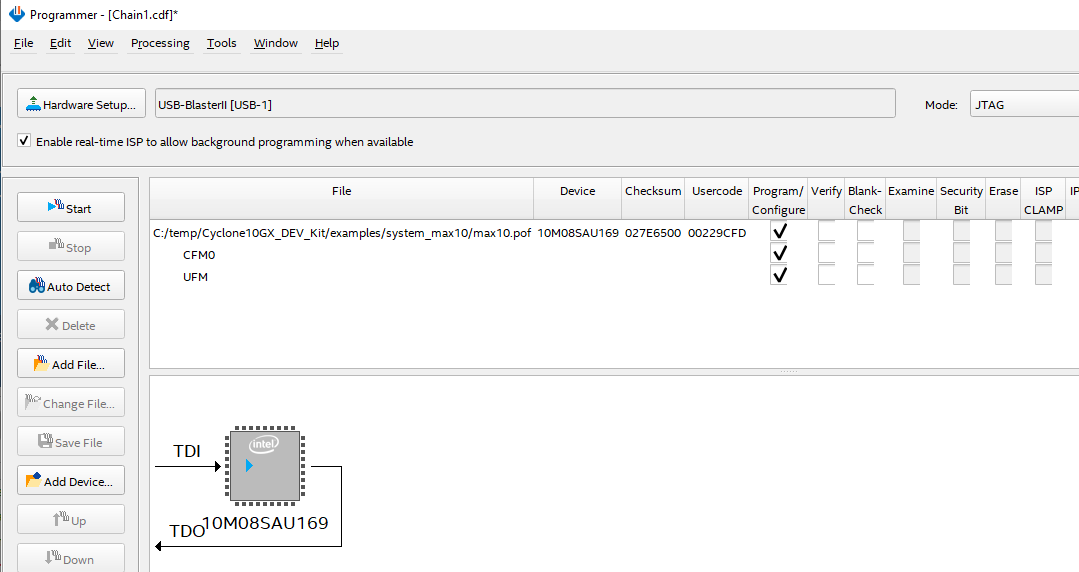
I am testing ASx4 configuration on Cyclone10 GX Dev kit. I use Quartus Programmer tool to download .jic file to flash. In Quartus: Tool -> Programmer GUI, when I click auto detect, it cannot detect the device correctly (see attached screenshot auto_detect_fail.png). Only Max10 is detected. Sometimes Quartus main message window gives one error message as below, sometimes no error message at all.
Error(209053): Unexpected error in JTAG server -- error code 4
Error(209053): Unexpected error in JTAG server -- error code 2
Error(209053): Unexpected error in JTAG server -- error code 7
When I execute the BoardTestSystem application (coming with Cyclone10 GX Dev Kit), it pops up an error message "FPGA is not detected in the Jtag Chain".
It was working well before. Both Max10 and Cyclone10 GX FPGA device could be auto detected successfully (see attached screenshot auto_detect_sucess.png). Recently it suddenly stops working. I was testing with Quartus 20.4. After having the problem, I also tested with Quartus 21.1. The results are the same.
What could be wrong? How can I fix it?
Thanks!
11 Replies
 JohnT_Altera
Regular Contributor
Hi,
Do you have other PC to program the pof file on the Max 10 device? I would recommend to program flash and power cycle the board to see if everything works fine.
May I know if you using the on board USB-Blaster to program the device?
 yong
yongHi John,
Thanks for response. The board seems to be broken. Please see my another post fyi:
 mindchasers
New Contributor
We have had a Cyclone 10 GX Dev Kit here for a few months and using the Quartus programmer is continually getting more unreliable over time. I'm not sure if it's tied to the Quartus release, which we keep updating.
Many times JTAG scan fails, or the programmer just fails to program.
The Dev Kit is unmodified, but there is an FMC card populated, and JTAG is bypassed for the FMC card.
Is there a troubleshooting FAQ for the programmer and this board? I was also thinking about uninstalling the USB drivers associated with the programmer and re-installing.
Thank you
- yong
Hi John,
I failed to program max10.pof. It keeps saying "unexpected error in JTAG server -- error code ##". The error code <##> might be different every time.
I am able to program max10.sof. However, after .sof programmed, the LEDs on the Dev board shows FPGA configuration failed (i.e., D13 (red) is on). I am not sure if it indicates MAX10 is not configured correctly or Cyclone10 GX is not configured correctly. Executing BoardTestSystem, it says "FPGA is not detected in the Jtag Chain".
Thanks!
- JohnT_Altera
Hi,
You can use quartus programmer and go to "<installation kit folder>\examples\system_max10" then program the Max 10 device using max10.pof file.
- JohnT_Altera
Hi,
If the switch is set correctly then you should always observed the Cyclone 10 in the JTAG chain. May I know if you have another PC to test it out?
Are you able to auto-detect anything on your JTAG? Or you are always seeing JTAG server error?
- yong
Hi John,
Yes, I tested with another PC. I also re-installed Quartus and USB-Blaster II device driver. The result is the same.
The auto detect can find MAX10 (10M08SA), as shown in the screenshot "auto_detect_fail.png" I attached earlier. The expect result should be as the screenshot "auto_detect_success.png" - MAX10 with 2*CFI_1Gb flash associated, and also Cyclone10 GX (10CX220Y).
I tested the JTAG chain with Quartus JTAG chain debugger. It says "JTAG chain connection is good. Detected 1 device(s)". Please see the attached screenshot "JTAG_chain_debugger.png".
The JTAG server errors I posted earlier do not always come out. No matter if there is JTAG server error, the auto detect result is the same, i.e., only 1 device (MAX10) is detected. While in the success case, 2 devices are expected.
Since it was working well and stopped working suddenly after I tested with an erase operation in Quartus Programmer tool. I suspect I accidently erased something, e.g., the contents in MAX10?
There is a simple instruction (included in Cyclone10 GX Dev Kit collaterals) on how to recover the board to factory default. I also attach the file here. However it is too simple. Can you please guide me how to do it. Especially the 2nd step - "program MAX10 via Quartus Programmer" and which file I need to program into MAX10?
Thanks!
- JohnT_Altera
Hi,
Could you confirm that the S5.2 is set to OFF correctly? Are you using the on board USB-Blaster?
- yong
Hi John,
Yes, S5.2 is set to OFF. I am using on-board USB-Blaster II.
Thanks!
- JohnT_Altera
Hi,
May I know both is connected to the same JTAG port? May I know if you are able to share with me your board schematic?
- yong
Thanks John for looking into this!
I believe both is connected to the same JTAG port. I am working on the Cyclone10 GX development kit purchased from Intel website. I only replaced QSPI configuration flash on the board, nothing else changed. Attached is the schematic for the Cyclone10 GX development kit I downloaded from Intel website.
Actually it was working well before I executed an erase operation from Quartus Programmer. I am not sure if I accidentally erased the factory default build in MAX10 (or the CFI flashes connected to MAX10).
Thanks!