Forum Discussion

Altera_Forum Honored Contributor
8 years agoHonored Contributorpin assignment problem
Hi,
I am new to quartus ii. I have created a bdf file instead of verilog/vhdl . i am taking input through terasic data conversion card and through sma cable i am giving a sine wave but i am not able to see the input through signal tap analyzer . when i see the pin planner there is no location , bank and pin assigned to inputs and outputs . i have imported the pin assignments. what can i do so the output and input will be assigned. Help will be highly appreciated. Thanks in Advance16 Replies
 Altera_Forum--- Quote Start --- when i see the pin planner there is no location , bank and pin assigned to inputs and outputs --- Quote End --- There will be at least an automatically selected fitter location shown for each port signal after compilation if you didn't assign a location. Did you select a FPGA type in device assignments? --- Quote Start --- I have imported the pin assignments --- Quote End --- How?
- Altera_Forum--- Quote Start --- Hi, I am new to quartus ii. I have created a bdf file instead of verilog/vhdl . i am taking input through terasic data conversion card and through sma cable i am giving a sine wave but i am not able to see the input through signal tap analyzer . when i see the pin planner there is no location , bank and pin assigned to inputs and outputs . i have imported the pin assignments. what can i do so the output and input will be assigned. Help will be highly appreciated. Thanks in Advance --- Quote End --- Hi shipra7993, I have never heard importing pin assignments method in Quartus II/Prime software. As far I have done which is known to be working is either, assigning the pin manually one-by-one or copy and paste a list of the pins into the Pin Assignment. I would recommend that you cross check the schematics for the correct pins to be assign in the Pin Assignment especially the clock pins which is a must in order to run the Signal Tap. Regards, nyusof (This message was posted on behalf of Intel Corporation)
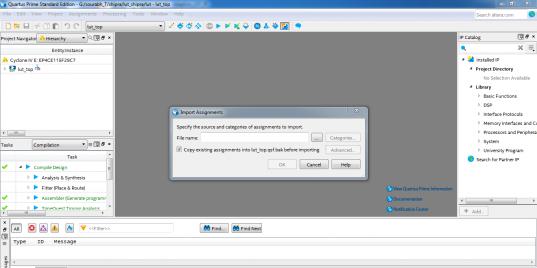
- Altera_Forum--- Quote Start --- Hi shipra7993, I have never heard importing pin assignments method in Quartus II/Prime software. As far I have done which is known to be working is either, assigning the pin manually one-by-one or copy and paste a list of the pins into the Pin Assignment. I would recommend that you cross check the schematics for the correct pins to be assign in the Pin Assignment especially the clock pins which is a must in order to run the Signal Tap. Regards, nyusof (This message was posted on behalf of Intel Corporation) --- Quote End --- Hi Nyusof, Thanks! I have attached the screenshot of the import assignments, that is what i did for pin assignments but i am not getting the desired input and when i manually assign pin it doesn't accepts. Regards, Shipra
- Altera_Forum--- Quote Start --- There will be at least an automatically selected fitter location shown for each port signal after compilation if you didn't assign a location. Did you select a FPGA type in device assignments? How? --- Quote End --- Hi, Yeah there is automatic selected fitter but the i cant find the correct input in signal tap. i have attached a screenshot of pin planner.
- Altera_Forum
Have you at least synthesized the design? You can't make assignments until you do. How are you trying to select the signals in SignalTap? Are you using the Node Finder? If so, are you using one of the SignalTap filters (pre-synthesis or post-fit) to select your signals?
- Altera_Forum--- Quote Start --- Have you at least synthesized the design? You can't make assignments until you do. How are you trying to select the signals in SignalTap? Are you using the Node Finder? If so, are you using one of the SignalTap filters (pre-synthesis or post-fit) to select your signals? --- Quote End --- Hi, Yeah i have synthesized the design. i have selected signals using node finder and using post fit filter Thanks!
- Altera_Forum
Please reply to my question.
- Altera_Forum
You pin planner screenshot shows locations for the pins.
Where does the file you used to import the pin locations come from? Can you share it? What do you mean by "it doesn't accepts."? - Altera_Forum
Hi,
i have imported the .csv file given in documents of FPGA for pin assignments . IT doesn't accepts means when i manually make the pin assignments for my input and output it doesnt change the value due to which i am not able to see the correct input and output at Signal Tap Analyzer. - Altera_Forum
You didn't yet post significant information that shows what your pin assignment problem is.
I experience limitations of the pin planner if pins are already previously assigned. E.g. deletion of assignments isn't fully supported. In this case you can perform all intended actions in the assignment editor.