Forum Discussion

 Occasional Contributor
JTAG Chain Broken on Agilex 7-I Dev Kit

 Occasional Contributor
Hello Fakhul,
So,
About (1) : Yes it is the first time, the board was working well for several months, and one day when I was debugging a new IP, I did several power cycle, and suddenly I could not configure the board, it was amazing.
About (2) : My serial number is 8100650, so DK-DEV-AGI027-RA and AGIB027R29A1E1VB
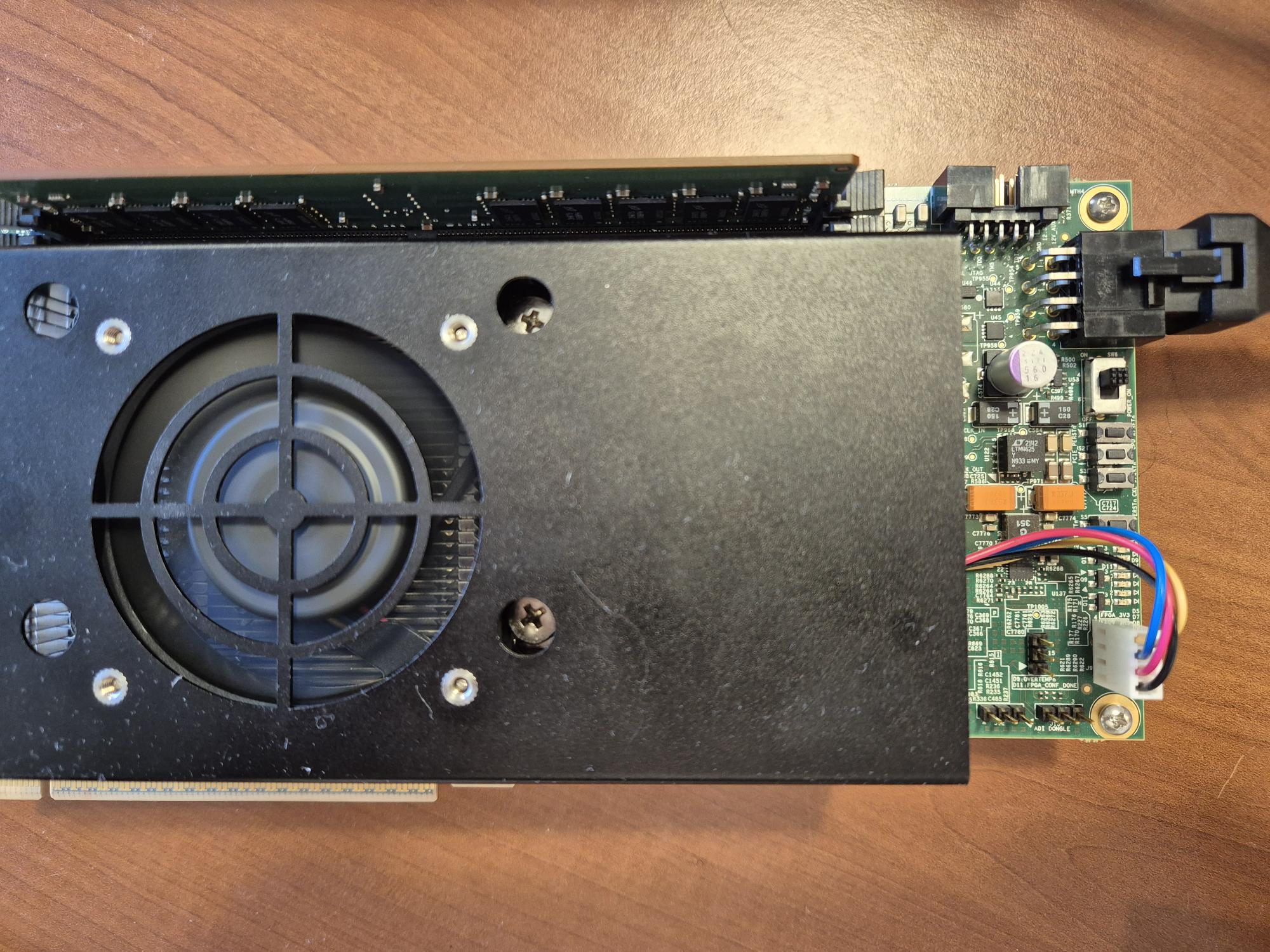
About (3) : Please see the picture attached
About (4) : I was unable to find you 'Device info -> Read Device Info' menu, where it is ?
About (5) : I using the board only in 'Bench Power Mode'. So no, LED D6 is off.
Thank you for help.
Serge

 Regular Contributor
Hi Serge,
Thanks. Since you are on bench power and D6 Power Good LED is OFF, the board rails are not up. That explains BTS showing no rails and the JTAG errors. The user guide defines D6 = Power Good (blue ON = all powers good, OFF = power fault) and shows bench power on J11 with SW6 = ON.
About (4) : I was unable to find you 'Device info -> Read Device Info' menu, where it is ?
It in the Configuration Debugger: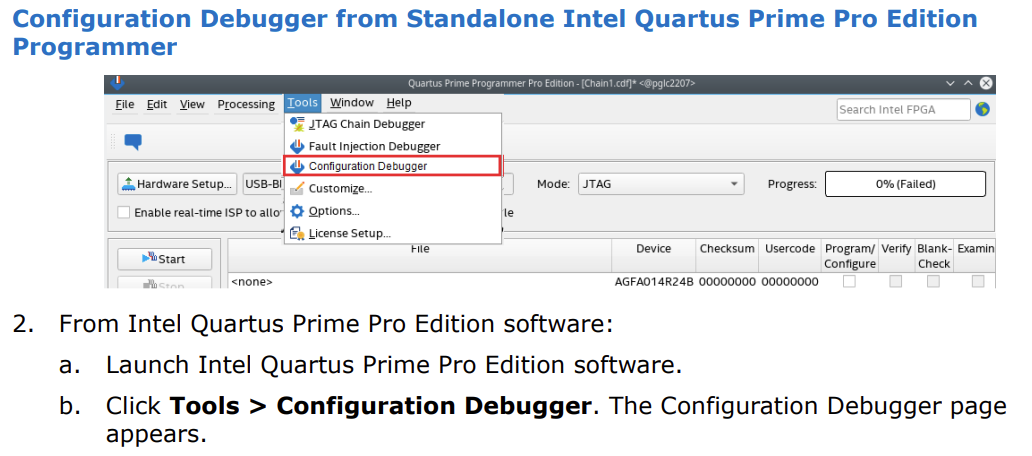
Please check these exactly as in the guide:
- Connect the 240 W adapter to J11, set SW6 = ON, card not in a PCIe slot, then cold power cycle. Does D6 turn blue.
- If D6 is still OFF, measure 12 V at J11 if you can, and share one photo showing the J11 plug and SW6.
- If D6 remains OFF after step 1, this points to a board power fault.
Regards,
Fakhrul
- Serge935 months ago
Hello Fakhrul,
I tried to read the Device info, but it was impossible.
I measured the 12V at J11. The 12V is always present with SW6 Off or SW On. D6 reamins always Off.
Please see the picture attached of the baord with SW6 On. You will see D6 Off and the Fan On, i.e. the Power is on.
Thank you for help.
Serge- FakhrulA_altera5 months ago
Hi Serge93,
Can you disable the auto adjust frequency at chain scanning? Please try lowering the hardware frequency to 16 or 6 MHz and see if you can program the device after that.
For your information, we are under an RMA freeze in support of the ERP system transition since January. At this stage, we can only validate the RMA request based on the warranty status.
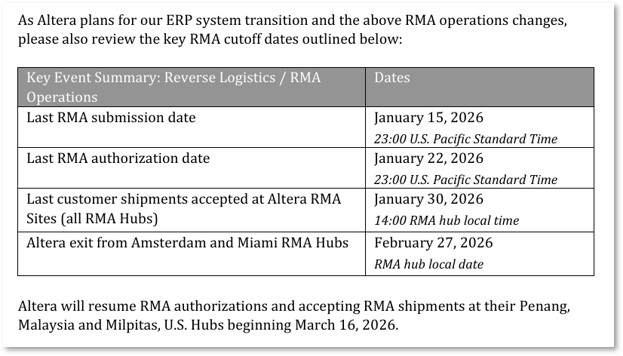
The next steps in the RMA process will resume on March 16, 2026.
Please let me know your thoughts or if you would like to proceed with closing this case for now.
Regards,
Fakhrul
- Serge935 months ago
Hello Fakhrul,
I have disabled the auto adjust frequency at chain scanning and reduced the frequency to 6MHz, it did not solved the problem.
About RMA, can you explain me what is the process, what should I do on my side, do you manage the process, how I will be in touch with you ?
Thank you for your help.
Serge
- FakhrulA_altera5 months ago
Hi Serge93,
Could you try one more step?;Try configure the smartVID setting first before you can connect to the board via JTAG. Please refer to this link to connect your board via JTAG: 3.6. The Required SmartVID QSF Assignments to Compile a Design
Regards,
Fakhrul
- Serge935 months ago
Hello Fakhrul,
I guess my Smart VID was already ok for my board.
Please check the attached image.
Thanks for help.
Serge