Forum Discussion

 New Contributor
How to Simulate the ADC IP from MAX 10
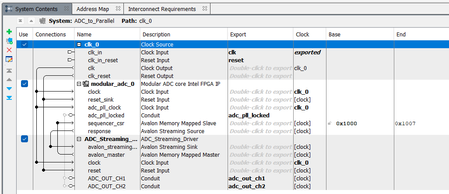

 Super Contributor
can you attached your design here to take a look?
 New Contributor
this is not the original file (which I cannot share)
but a minimalistic case with the same error
- KennyT_altera4 months ago
Thanks for attaching design,
Platform designer usually run with msim_setup.tcl
I did not see that in your design, can you follow the steps above and create one?
- Jonas4 months ago
There is an msim_setup.tcl file it is in the
\ADC_to_Parallel\simulation\mentor
subfolder, this get generated when I Perform Generate->Generate HDL in the Platform Designer.
Why do I need manual creation when the Verilog version does't need this? Should this not be Generated by the Navlink when I do Tools-> Runs Simulation Tools--> RTL Simulation in Quartus Prime Light
The simulation command from msim_setup.tcl script should be inside the TB_ADC_to_Parallel_run_msim_rtl_vhdl.do file.
And where should I run the
ip-setup-simulation --quartus-project=ADC_to_Parallel.qpf command?
when I run this on the CMD console nothing happens. I get a short opening from a commanding window which closes immediately and no report on the starting command line window.the Tools--> Lunch Simulation Compiler won’t acespt the path to the vsim command
- KennyT_altera4 months ago
I manage to open the msim_setup script.
For Platform Designer systems, the msim_setup.tcl script is the recommended and supported way to set up ModelSim/Questa simulations, regardless of whether your top-level is VHDL or Verilog. This script is automatically generated when you use Generate → Generate HDL in Platform Designer.
How to proceed:
- Locate the generated msim_setup.tcl file in your project’s simulation/mentor subfolder.
- Open this script and, if needed, update it to reference your specific testbench and top-level module or entity.
- Run ModelSim/Questa, change to the script’s directory, and execute:vsim -do msim_setup.tclor in the ModelSim prompt:do msim_setup.tcl
- The .do file (e.g., TB_ADC_to_Parallel_run_msim_rtl_vhdl.do) can be used to automate running the key steps (dev_com, etc.), but the core setup is always handled by msim_setup.tcl.
Summary:
Manual creation of the script is not required. Always use the msim_setup.tcl generated by Platform Designer, modify as needed for your testbench, and launch your simulation using this script for best results.

