Forum Discussion

 New Contributor
How to Simulate the ADC IP from MAX 10
 New Contributor
Thx for the Quick answer.
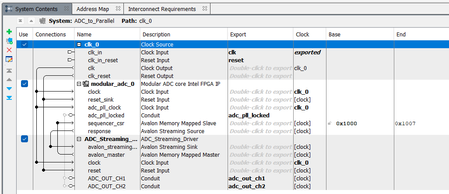
I Tried the way over the msim_setup.tcl with the same result. Also, all the compile commands are in the automatically generated do file.
What I have found is when I strip the Project down to the QSYS and TB only and then port it to Verilog it works (but only in Quartus Prime Lite 25.1. 24.1 starts the simulation and the hangs)
when I then back port to VHDL I have the original issue.
I think the problem is that the ADC IP generates only Verilog files that there is some problem with the VHDL vs Verilog Library’s. Or the Mixed Language Sim is not setup properly.
the VHDL sim command:
vsim -t 1ps -L altera -L lpm -L sgate -L altera_mf -L altera_lnsim -L fiftyfivenm -L rtl_work -L work -L ADC_to_Parallel -voptargs="+acc" TB_ADC_to_Parallel2
the Verilog sim command:
vsim -t 1ps -L altera_ver -L lpm_ver -L sgate_ver -L altera_mf_ver -L altera_lnsim_ver -L fiftyfivenm_ver -L rtl_work -L work -L ADC_to_Parallel -voptargs="+acc" TB_ADC_to_Parallel2
Verilog and VHDL seams to need different library’s
when I use the Verilog vsim command line I get other errors
But the simulation is starting but the interface between the Verilog and VHDL files seems to not working. I think because the now needed VHDL library from the interface is missing.
So how do I Setup an Proper mixt language simulation?
the documentation says even the Started Edition support it. But I where, up to now, unable to find an example or tutorial.
We use VHDL in our Company so a Verilog only Desing is only the last resort.
Kind Regards
Jonas
 KennyT_altera4 months ago
Super Contributor
can you attached your design here to take a look?
- Jonas4 months ago
this is not the original file (which I cannot share)
but a minimalistic case with the same error
- KennyT_altera4 months ago
Thanks for attaching design,
Platform designer usually run with msim_setup.tcl
I did not see that in your design, can you follow the steps above and create one?

