Forum Discussion

 Occasional Contributor
how to download user code to the flash memories on cyclone 10GX development kit
Hi,
How can I load user pof file to configuration EPCQL(U4) as well as to the two CFI memories(U42,U43) on the Cyclone 10GX development kit?
I have not found any info about how to do these in the manual.
Please help.
Thanks in advance.
Yao
10 Replies
 NurAiman_M_Intel
Super Contributor
Hi,
Please share the screenshot of the error and Switch S1 that was used.
What Quartus version was used?
Regards,
Aiman
- YYang79
- NurAiman_M_Intel
Hi,
Upon checking the error, in the link below,
it mention:
CAUSE: You used the Programmer with one or more programming option(s) turned on. However, the Programmer did not successfully perform the operation(s). This problem can be caused by one of the following situations:- Communications cables not securely connected
- Incorrect device selected
- No power to target system
ACTION: Make sure all cables are securely connected, select a different device, or check the power on the target system.
The reason might be due to the photos below, try to delete the red box in the photo below and start to program again.
Regards,
Aiman
- NurAiman_M_Intel
Hi,
Apologize for the delay in response as I was checking this with my team.
At the back of the board, there are default switch setting (MSEL setting pin). Hence you need to manually set the MSEL pin at the physical board as AS and program the board as AS. Kindly follow the switch setting in the userguide below:
https://www.intel.com/content/dam/www/programmable/us/en/pdfs/literature/ug/ug-c10-lp-eval-kit.pdf
Thanks.
Regards,
Aiman
- YYang79
Yes, Aiman, I selected S1 switch to "11" for EPCQL downloading. It fails to allow me program it. Is the board something wrong or is there any other setting that is not mentioned in the manual?
- NurAiman_M_Intel
Hi,
If you are using Passive Serial(PS) sorry to tell you that it is not supported for EPCQL. You will need to use other device that supported PS. CFI is for PS.
If you are using Active Serial, kindly select AS mode and convert .sof file to .jic (select AS mode and device accordingly). EPCQL only supported AS mode configuration.
Thank you.
Regards,
Aiman
- YYang79
Hi Aiman,
Thank you for your response.
I think you were misunderstood what I talked about CFI chips on the development board.
If you open the BTS to EPCQ tab, you will find the picture on the left indicates the location to "EPCQ", but unfortunately they are two CFI chips there,U42 and U43. They are MT28EW01GABA1LPC-0SITES. It looks wrong. It is not the location of EPCQ chip.
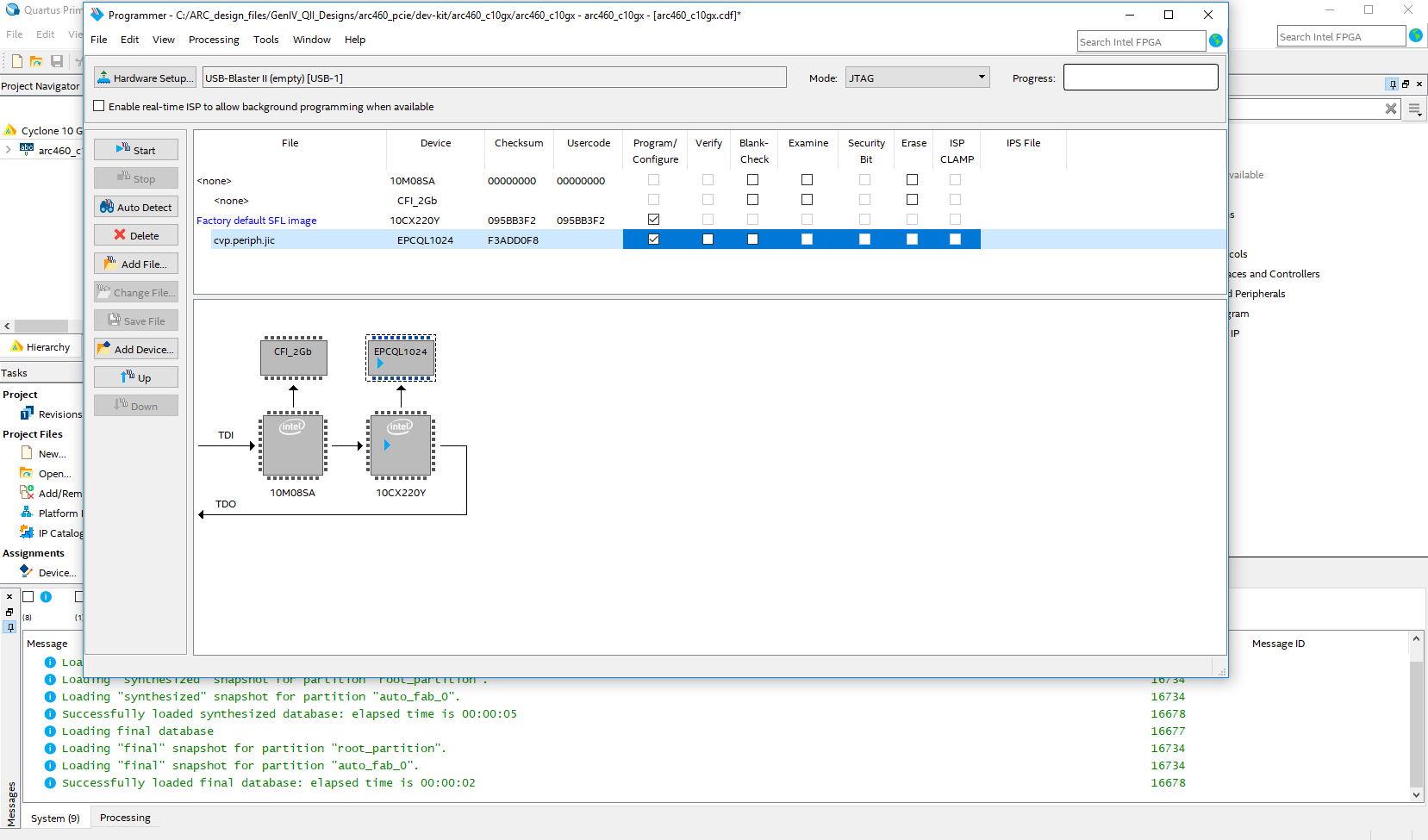
Based on the manual, on this development kit board there are two ways in which we can configure the C10, one is AS by an EPCQ-L on the board which is U4, if using this way i should program the fpga with SFL ip first and then download my code in jic to the EPCQ chip. I tried but failed i don't know why? Another way is using FPP over the PFL in a MAX10. I converted my sof file into CFI 2Gb pof file to load the two CFI memory chip it failed too. I have no idea why.
Please confirm what i say above.
I am a little bit frustrated with this board. Lots of uncertainties and ambiguous statements. This is my first time dealing with Cyclone 10. I do need your help please.
Appreciate a lot.
- NurAiman_M_Intel
Hi,
Thank you for contacting Intel community.
Have you refer to Intel PFL userguide below?
https://www.intel.com/content/dam/www/programmable/us/en/pdfs/literature/ug/ug_pfl.pdf
Also Cyclone 10 GX Dev kit userguide:
Let me know your concern.
Thanks.
Regards,
Aiman
- YYang79
Hi Aiman,
Do you mean i have to redesign the MAX10 on the development kit board for FPP?
I'm just gonna download my own design code to the CFIs on the board to see the power up response, such as to see if pcie is alive. I have not got your advice clearly.
Also, I design an SFL in my code to program the EPCQL device on the board following the instruction of AN370, but fails too.
Any further instructions? Appreciate a lot!