Forum Discussion

 New Contributor
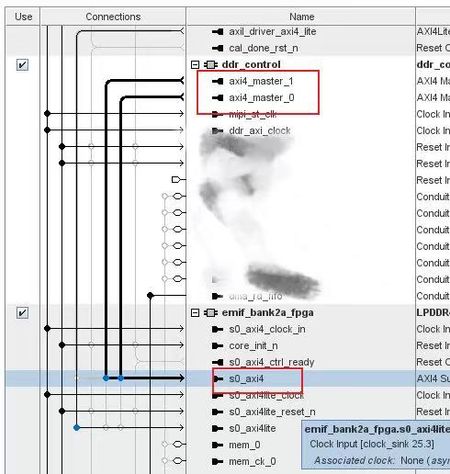
Does direct connection of two AXI4 Masters to DDR Slave support auto-arbitration on Agilex 5?
 10 months ago
The issue has been resolved. The root cause was that parameters from the upstream module were not propagated correctly, which caused this specific Master path to be optimized away during synthesis. Thank you all for your suggestions

 Super Contributor
Yes, this is how it should work.
Be sure to check the addressing for both of those AXI managers on the Address Map tab to make sure the EMIF is at the address location you want, especially if it should be different for the two managers.
New ContributorThanks. Is it necessary to use an AXI Bridge to solve the addressing issue? Currently, my custom defined AXI Master shows no options in the Address Map tab, even after I connect it to the DDR in the System View
- sstrell10 months ago
What are you seeing on the Address Map tab? You have to select the manager from the list on the left to see its address map. Every host/manager has its own address map.
- wangduoyu10 months ago
Hi,
As shown in the screenshot below, the address ranges for these two AXI Masters are automatically assigned based on the EMIF's "Die Density" parameter.
My current configuration is: Total DDR Density = 8Gb x 2 Channels = 16Gb (2GB).
Consequently, Platform Designer automatically maps both AXI Masters to the address range 0x0000_0000 - 0x7FFF_FFFF. If I attempt to manually modify this range, the system reports an "address out of range" error.
Could you please advise on how to handle this situation correctly?
Thanks
 AdzimZM_Altera10 months ago
Regular Contributor
Hi wangduoyu,
The address range already set correctly. It's referring to address range of the DDR that the master can access.
Both master will have same address range in this case.
If you like to set a priority to one of the AXI master, you can modify the Arbitration Share in the Platform Designer.
If you right click on the signal and check on Show Arbitration Share, the arbitration priority will be displayed.
You can increase the number if you like to prioritize the module.
Here the reference: https://www.intel.com/content/www/us/en/docs/programmable/683609/25-1-1/arbitration-shares-and-bursts.html
Regards,
Adzim


