Forum Discussion

 New Contributor
Agilex 5 RSU, application image addition fails
 4 months ago
Hi,
Thanks for the screenshots. The rsu_status output shows:
- failing code: 0xF0030003 which means major error 0xF003 = BITSTREAM_CORRUPTION, with a minor code 0x0003. This is why it is not listed in the “Mailbox RSU Error Code Responses” table, because it is a different status format (major and minor), and the minor part is often not user defined. Refer: RSU Status and Error Codes & RSU Error Code Responses
- first failing image address: 0x0048C000 confirms the failure is on the newly added image.
Most common causes for this scenario:
1. Wrong .rpd content
- Please confirm RemoteImage_jic.rpd is an application image .rpd generated from the application .sof only, not an .rpd generated from the initial .jic flash image flow. The “add application image” procedure expects an application-only .rpd. Refer: Adding an Application Image & Generating an Application Image
- If you use rsu1.tcl/program_flash, generate the .rpd with Bit swap = Off because the script already handles the byte ordering.
2. Erase alignment / overlap
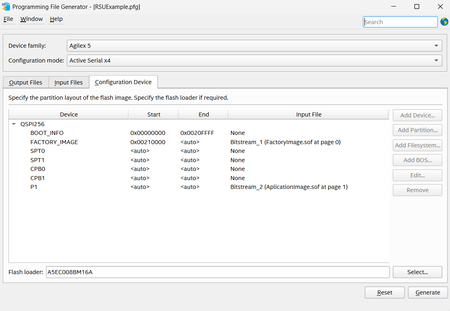
- Ensure the new image start address 0x0048C000 is aligned to your flash erase granularity, and that programming the new image does not erase a larger block that overlaps the end of the existing P1 image. Refer: Modifying the List of Application Images & Creating Initial Flash Image Containing Bitstreams for Factory Image and One Application Image
Next actions we recommend:
- Regenerate an application-only .rpd from the application .sof (Bit swap Off if using rsu1.tcl), then reprogram at an erase-aligned address, update both CPB0 and CPB1 pointers, and retry. Refer: Generating an Application Image & Adding an Application Image
If you share
(a) how RemoteImage_jic.rpd was generated and
(b) your QSPI flash part number and erase sizes, we can suggest a safe aligned start address and confirm the correct file settings. Check, Creating Initial Flash Image Containing Bitstreams for Factory Image and One Application Image
Regards,
Fakhrul
 Regular Contributor
Hi,
Thanks for the screenshots. The rsu_status output shows:
- failing code: 0xF0030003 which means major error 0xF003 = BITSTREAM_CORRUPTION, with a minor code 0x0003. This is why it is not listed in the “Mailbox RSU Error Code Responses” table, because it is a different status format (major and minor), and the minor part is often not user defined. Refer: RSU Status and Error Codes & RSU Error Code Responses
- first failing image address: 0x0048C000 confirms the failure is on the newly added image.
Most common causes for this scenario:
1. Wrong .rpd content
- Please confirm RemoteImage_jic.rpd is an application image .rpd generated from the application .sof only, not an .rpd generated from the initial .jic flash image flow. The “add application image” procedure expects an application-only .rpd. Refer: Adding an Application Image & Generating an Application Image
- If you use rsu1.tcl/program_flash, generate the .rpd with Bit swap = Off because the script already handles the byte ordering.
2. Erase alignment / overlap
- Ensure the new image start address 0x0048C000 is aligned to your flash erase granularity, and that programming the new image does not erase a larger block that overlaps the end of the existing P1 image. Refer: Modifying the List of Application Images & Creating Initial Flash Image Containing Bitstreams for Factory Image and One Application Image
Next actions we recommend:
- Regenerate an application-only .rpd from the application .sof (Bit swap Off if using rsu1.tcl), then reprogram at an erase-aligned address, update both CPB0 and CPB1 pointers, and retry. Refer: Generating an Application Image & Adding an Application Image
If you share
(a) how RemoteImage_jic.rpd was generated and
(b) your QSPI flash part number and erase sizes, we can suggest a safe aligned start address and confirm the correct file settings. Check, Creating Initial Flash Image Containing Bitstreams for Factory Image and One Application Image
Regards,
Fakhrul


