Forum Discussion

 New Contributor
I am getting nowhere fast booting reference Linux on Cyclone V SOC dev board
I need help debugging booting my new Cyclone V SoC Dev board. (Rev E1)
I have been banging my head against this wall for a few days and I need help to debug it.
I tried booting the setup out of the box with the installed SD card which is supposed to work.
I cannot tell if it is
a board config issue
or
a bad board
or
device programming
or
failed SD card programming.
I have reprogrammed the SD card numerous times.
I need help debugging.
If I could see a video of a good Rev. E board booting that shows the jumpers and the DIPs settings and the sequence of lights I would be very happy.
I also see numerous places where the baud is 57600 and others where it is 115200.
I always try both on each boot.
Thanks Martin
Hi Aik Eu,
Thank you for all your help.
Your quick responses helped me focis on my issue.
So in working to validate the SD card I wrote, I found my problem.
I had been writing to the wrong device with my dd commands.
I was writing to a sub-partition of the device rather than the primary device:
/dev/disk7s1 instead of the correct device: /dev/disk7
I can now boot Linux and move on!
Thanks again Martin
6 Replies
 martinonorcas
Intel part # is DK-DEV-5CSXC6N
 aikeu
aikeuRegular Contributor
Hi Martin,
Are you following this document for booting?
https://www.rocketboards.org/foswiki/Documentation/CycloneVSoCGSRD
I am trying to summarize on what I know from the document, do refer back to the document if require further details.
Get the sd card image referring to the section(Creating SD Card on Windows) from the above document.
Remember to rename the downloaded file gsrd-console-image-cyclone5.wic to sdimage.img then only use win32diskmanager to write into the sdcard
The necessary file to boot up the system is only referring to sdimage.img
Do check the physical connection on the board as below so that the board can boot up from SD card:
First, the board jumpers need to be configured as follows:
J5: Open
J6: Short
J7: Short
J9: Open
J13: Short
J16: Open
J26: Short pins 1-2
J27: Short pins 2-3
J28: Short pins 1-2
J29: Short pins 2-3
J30: Short pins 1-2
J31: Open
Then, the board switches need to be configured as follows:
SW1: All OFF
SW2: All OFF
SW3: ON-OFF-ON-OFF-ON-ON
SW4: OFF-OFF-ON-ON
Once the board is properly configured, power on the board and there should be UART booting logs showing in the terminal.
You will be using 115200 as your terminal baudrate. Do check the USB serial port for UART is selected correctly for your terminal.
Thanks.
Regards,
Aik Eu
- martinonorcas
I repeated that process for the nth time including the new DD of SD card and still nothing.
Using exactly those parameters in your response. Note your parameters and the image in the diagram are not easily understood to correspond.
SW3 and SW4 dffer in the photo from the words.
But I have tried all combos.
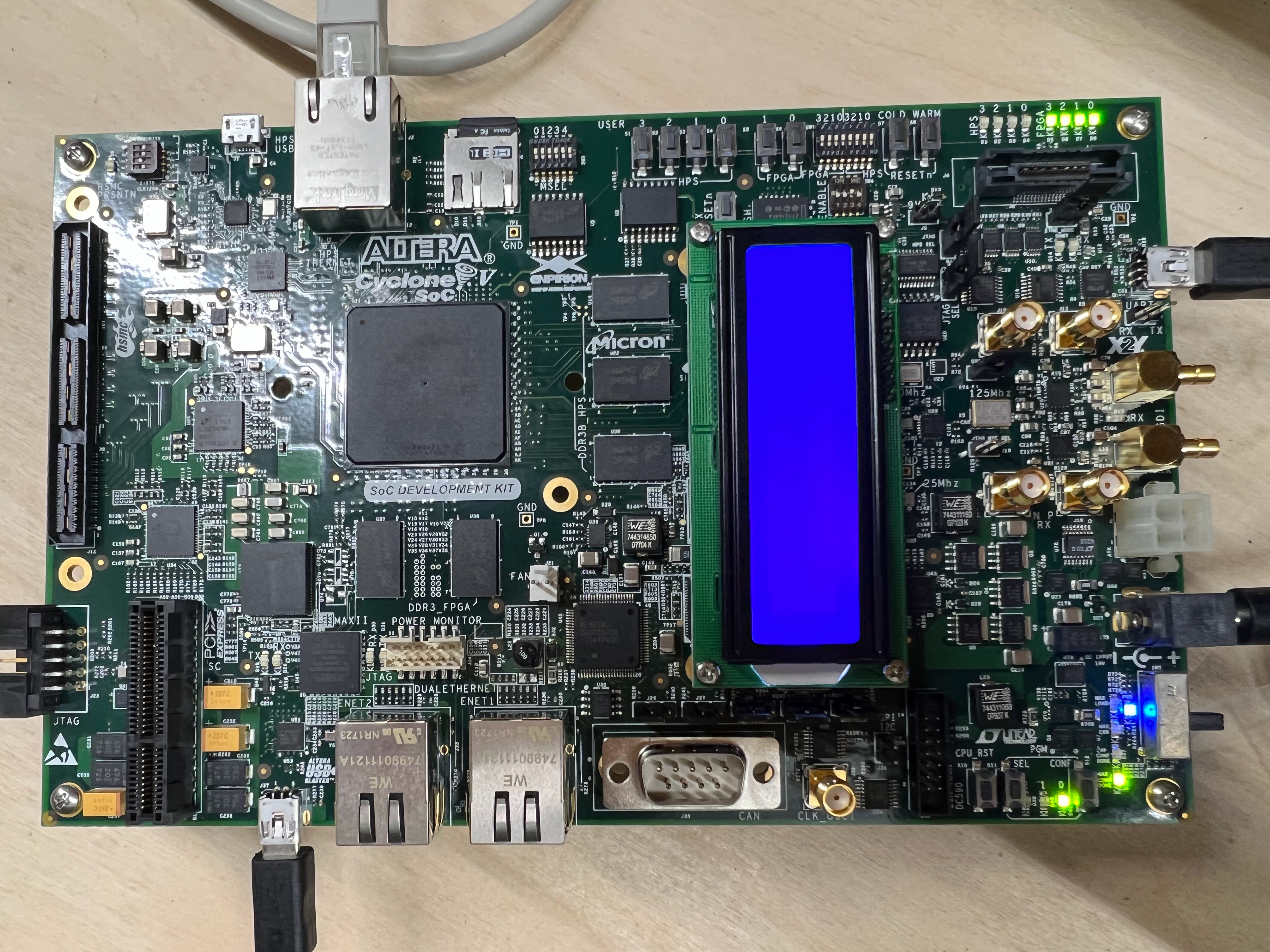
My latest photo attached shows the config as per the words reading left to right
SW1: All OFF
SW2: All OFF
SW3: ON-OFF-ON-OFF-ON-ON
SW4: OFF-OFF-ON-ON
I am on Linux so I use dd to program the SD card.
Again:
No output on the serial port.
I have been around this loop many times.
I need some kind of additional diagnostic.
Is there any programming of the FPGA or the CPLD needed? Or that should be verified?
Can I verify the SD card programming?
Compare a HEX dump maybe?
Somehow trace the ARM boot?
Again I need a way to move forward without simply repeating the steps including the various with differences shown on the Internet and included with the board front Intel,
The setup recommended by Intel and delivered in the unopened box is not the same as described on Roceketboards.org
Any assistance is much appreciated.
As I said a simple video of the booting of a board that works showing the light sequence and TX/RF toggling would help.
Martin
ps. The Intel site says this board comes with a year of Quartus Pro licenses. How do I get that?
pps. Which is the latest version of Quartus I can run to program the FPGA? I am unable to install device support for this device up front with Quartus 23.2
- aikeu
Hi Martin,
I check from your attached picture and it loosk like there is no problem with your physical board configuration.
I do not know any method to verify the sd card content and I was using windows to write the download files into the sd card.
The sdimage.img is the only file required to boot up the system with logs and is the most direct method to show the board in operation.
Another method is to configure the pyhsical board to boot the system with qspi instead of sdcard, this will requires some program tools to flash the necessary files into the qspi flash.
writing the below file related to Uboot(u-boot-with-spl.sfp) into the qspi flash will be enough to observe any logs.
The example cmd below is from the document I shared below and you can get the particular prebuilt file from the other link.
quartus_hps -c 1 -o pv -a 0x000000 u-boot-with-spl.sfp
Further information for reference as below:
The document for cyclone v building bootloader:
https://www.rocketboards.org/foswiki/Documentation/BuildingBootloaderCycloneVAndArria10
The prebuilt images for cyclone v:
https://releases.rocketboards.org/2022.11/gsrd/c5_gsrd/
There is a board test system under (Kit Installation (ZIP) (22.1 std)) for Cyclone V to check some basic functionality example like turning on some LEDs of the board from this link:
https://www.intel.com/content/www/us/en/products/details/fpga/development-kits/cyclone/v-sx.html
Regarding the quartus license, can try to check back with the sales contact of the purchased board.
Thanks.
Regards,
Aik Eu
- martinonorcas
Hi Aik Eu,
Thank you for all your help.
Your quick responses helped me focis on my issue.
So in working to validate the SD card I wrote, I found my problem.
I had been writing to the wrong device with my dd commands.
I was writing to a sub-partition of the device rather than the primary device:
/dev/disk7s1 instead of the correct device: /dev/disk7
I can now boot Linux and move on!
Thanks again Martin
- aikeu
Hi Martin,
Great to hear that the issue has been resolved! I will proceed to close this thread.
p/s: If any answer from the community or Intel Support are helpful, please feel free to give best answer or rate 4/5 survey.
Thanks.
Regards,
Aik Eu