Forum Discussion

 New Contributor
I am getting nowhere fast booting reference Linux on Cyclone V SOC dev board
 3 years ago
Hi Aik Eu,
Thank you for all your help.
Your quick responses helped me focis on my issue.
So in working to validate the SD card I wrote, I found my problem.
I had been writing to the wrong device with my dd commands.
I was writing to a sub-partition of the device rather than the primary device:
/dev/disk7s1 instead of the correct device: /dev/disk7
I can now boot Linux and move on!
Thanks again Martin

 Regular Contributor
Hi Martin,
Are you following this document for booting?
https://www.rocketboards.org/foswiki/Documentation/CycloneVSoCGSRD
I am trying to summarize on what I know from the document, do refer back to the document if require further details.
Get the sd card image referring to the section(Creating SD Card on Windows) from the above document.
Remember to rename the downloaded file gsrd-console-image-cyclone5.wic to sdimage.img then only use win32diskmanager to write into the sdcard
The necessary file to boot up the system is only referring to sdimage.img
Do check the physical connection on the board as below so that the board can boot up from SD card:
First, the board jumpers need to be configured as follows:
J5: Open
J6: Short
J7: Short
J9: Open
J13: Short
J16: Open
J26: Short pins 1-2
J27: Short pins 2-3
J28: Short pins 1-2
J29: Short pins 2-3
J30: Short pins 1-2
J31: Open
Then, the board switches need to be configured as follows:
SW1: All OFF
SW2: All OFF
SW3: ON-OFF-ON-OFF-ON-ON
SW4: OFF-OFF-ON-ON
Once the board is properly configured, power on the board and there should be UART booting logs showing in the terminal.
You will be using 115200 as your terminal baudrate. Do check the USB serial port for UART is selected correctly for your terminal.
Thanks.
Regards,
Aik Eu
- martinonorcas3 years ago
I repeated that process for the nth time including the new DD of SD card and still nothing.
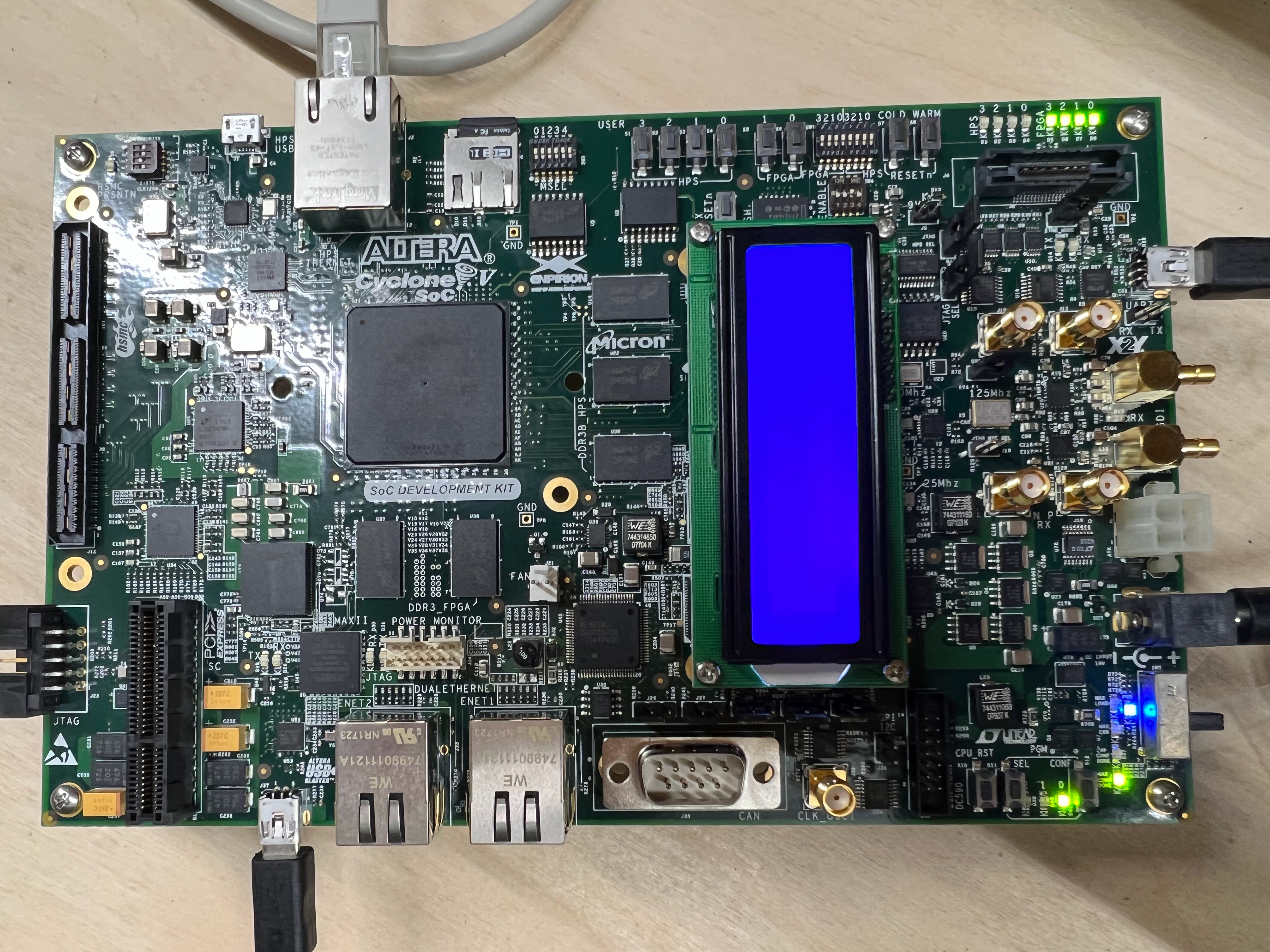
Using exactly those parameters in your response. Note your parameters and the image in the diagram are not easily understood to correspond.
SW3 and SW4 dffer in the photo from the words.
But I have tried all combos.
My latest photo attached shows the config as per the words reading left to right
SW1: All OFF
SW2: All OFF
SW3: ON-OFF-ON-OFF-ON-ON
SW4: OFF-OFF-ON-ON
I am on Linux so I use dd to program the SD card.
Again:
No output on the serial port.
I have been around this loop many times.
I need some kind of additional diagnostic.
Is there any programming of the FPGA or the CPLD needed? Or that should be verified?
Can I verify the SD card programming?
Compare a HEX dump maybe?
Somehow trace the ARM boot?
Again I need a way to move forward without simply repeating the steps including the various with differences shown on the Internet and included with the board front Intel,
The setup recommended by Intel and delivered in the unopened box is not the same as described on Roceketboards.org
Any assistance is much appreciated.
As I said a simple video of the booting of a board that works showing the light sequence and TX/RF toggling would help.
Martin
ps. The Intel site says this board comes with a year of Quartus Pro licenses. How do I get that?
pps. Which is the latest version of Quartus I can run to program the FPGA? I am unable to install device support for this device up front with Quartus 23.2