Forum Discussion

 Occasional Contributor
OFS : Data Path of QSFP from HE_HSSI

 Regular Contributor
Hi,
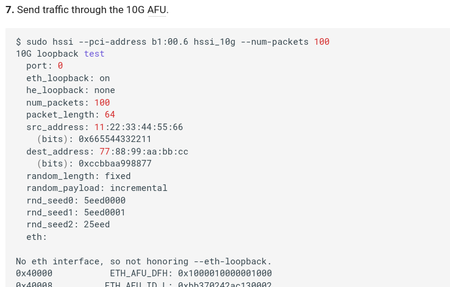
Do you know the other host Ethernet address? If you look at the screenshot provided, it is not honoring the ethernet loopback off due to not able to find the ethernet destination. You might need to specify the receiver address.
Can you print out the receiver FPGA ethernet information as well?
 Occasional Contributor
Hi @JohnT_Intel ,
Thanks for your response.
I had even tried adding destination address using --dst-addr in hssi applicaition. Still I was not able to detect the packet increment count in ifconfig.
Host1:
$ sudo hssi hssi_10g --eth-loopback off --num-packets 50 --src-addr 11:22:33:44:55:66 --dest-addr 04:3f:72:a4:11:bc --src-port 0
10G loopback test
Tx/Rx port: 99
Tx port: 0
Rx port: 0
eth_loopback: off
he_loopback: none
num_packets: 50
packet_length: 64
src_address: 11:22:33:44:55:66
(bits): 0x665544332211
dest_address: 04:3f:72:a4:11:bc
(bits): 0xbc11a4723f04
random_length: fixed
random_payload: incremental
rnd_seed0: 5eed0000
rnd_seed1: 5eed0001
rnd_seed2: 25eed
eth:
No eth interface, so not honoring --eth-loopback. Try using the hssiloopback command instead.
0x40000 ETH_AFU_DFH: 0x1000010000001000
0x40008 ETH_AFU_ID_L: 0xbb370242ac130002
0x40010 ETH_AFU_ID_H: 0x823c334c98bf11ea
0x40030 TRAFFIC_CTRL_CMD: 0x0000000000000000
0x40038 TRAFFIC_CTRL_DATA: 0x0000000100000000
0x40040 TRAFFIC_CTRL_PORT_SEL: 0x0000000000000000
0x40048 AFU_SCRATCHPAD: 0x0000000045324511
0x3c00 number_packets: 0x00000032
0x3c01 random_length: 0x00000000
0x3c02 random_payload: 0x00000000
0x3c03 start: 0x00000000
0x3c04 stop: 0x00000000
0x3c05 source_addr0: 0x44332211
0x3c06 source_addr1: 0x00006655
0x3c07 dest_addr0: 0xa4723f04
0x3c08 dest_addr1: 0x0000bc11
0x3c09 packet_tx_count: 0x00000032
0x3c0a rnd_seed0: 0x5eed0000
0x3c0b rnd_seed1: 0x5eed0001
0x3c0c rnd_seed2: 0x00025eed
0x3c0d pkt_length: 0x00000040
0x3cf4 tx_sta_tstamp: 0x029238c8
0x3cf5 tx_end_tstamp: 0x02923a90
0x3d00 num_pkt: 0xffffffff
0x3d01 pkt_good: 0x00000000
0x3d02 pkt_bad: 0x00000000
0x3d07 avst_rx_err: 0x00000000
0x3d0b rx_sta_tstamp: 0x029427da
0x3d0c rx_end_tstamp: 0xaa91bc27
0x3e00 mac_loop: 0x00000000
HSSI performance:
Selected clock frequency : 402.832 MHz
Latency minimum : 529638 ns
Latency maximum : 6.99681e+09 ns
Achieved Tx throughput : 19.7882 GB/s
No eth interface, so not showing stats. Try using the hssistats command instead.
In Host2,
user@user-OptiPlex-7080:~$ sudo ifconfig enp1s0f0np0
enp1s0f0np0: flags=4163<UP,BROADCAST,RUNNING,MULTICAST> mtu 1500
inet6 fe80::694b:f9a2:b595:f22b prefixlen 64 scopeid 0x20<link>
ether 04:3f:72:a4:11:bc txqueuelen 1000 (Ethernet)
RX packets 0 bytes 0 (0.0 B)
RX errors 0 dropped 0 overruns 0 frame 0
TX packets 0 bytes 0 (0 KB)
TX errors 0 dropped 0 overruns 0 carrier 0 collisions 0

