Forum Discussion

 Occasional Contributor
HLS Compiler 24.1 error - aocl-clang.exe - dll entry point not found
 2 years ago
Thanks Noah. Please install Quartus 23.1lite, then add HLS as an 'upgrade', paying attention to step 3 of the Getting Started Guide. Make sure you remove/rename any version of HLS that exists in 23.1lite; I spoke with some people in engineering and the error you're seeing might appear if HLS 24.1 pro happens to pick up the libraries from HLS 23.1std.
 Contributor
I wonder if there are some permission limitations with building in the 'examples' directory.
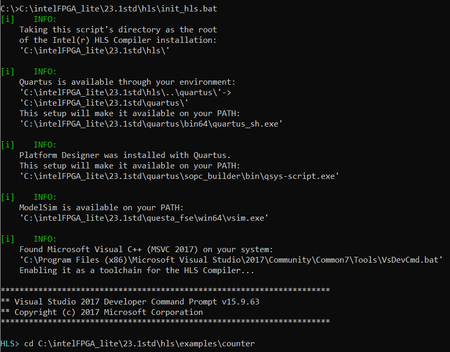
When I try to compile the counter design on my machine, it runs fine if I first copy the 'counter' directory out of C:\intelFPGA_lite\23.1std\hls\examples, and somewhere else (e.g. C:\hls_customers\forum\counter).
I've also heard of issues with mixing versions of visual studio, e.g. if you already have 2022 installed, and then try to install 2017. The recommended solution there was to remove all visual studio installations, and install the oldest one first. (e.g. first 2017, then 2022).
https://learn.microsoft.com/en-gb/previous-versions/visualstudio/visual-studio-2015/install/install-visual-studio-versions-side-by-side?view=vs-2015&redirectedfrom=MSDN
Why are you installing the visual C++ redistributables? The necessary libraries should be included with visual studio:
https://www.intel.com/content/www/us/en/docs/programmable/683680/24-1/pro-edition-prerequisites.html

