User Profile

Abe
 Frequent Contributor
Joined 8 years ago


User Widgets
Contributions
Re: Error synthesizing Nios II design in Quartus 19.1
After you create the NIOS design in Platform Designer, did you save and generate the system? If not, generate the system and then close Platform designer , compile the design and check. It should work. Also make sure that the location where you have saved and generated the system is in the Quartus main project folder and not in another location.3.3KViews0likes2CommentsRe: Solution To Fatal Error
This looks like some other program or software is blocking Quartus execution. Check if another instance of Quartus or its tools are running in the background and also make sure you have sufficient read+write privileges in the directory and files (project).2.5KViews0likes0CommentsRe: When I'm in the programming window and trying to pass the pof file to MAX I get the following error "Cannot add target device EPCQL1024 to device chain when in current programming mode" how should I proceed? What would be the other way to programming MAX?
When trying to program the Max device have you tried changing the Programming mode. If its in the JTAG mode, set it to Active Serial and then try.1.6KViews0likes1CommentRe: I have a problem using the JTAG to program stratix 10 1SG 085 HN3 F43 E1VG. I have the follow error -> Error (18950) : Device has stopped receiving configuration data Error (18948) : Error message received from device: Device is in configura
Hi, Try the following steps mentioned in the S10 user guide : https://www.intel.com/content/dam/www/programmable/us/en/pdfs/literature/hb/stratix-10/ug-s10-pwr.pdf , under the following section: 3.1.1. Specifying Parameters and Options Follow these steps to specify the Power Management and VID parameters and options. 1. Create an Intel Quartus Prime project using the New Project Wizard available from the File menu. 2. On the Assignments menu, click Device. 3. On the Device dialog box, click Device and Pin Options. 4. On the Device and Pin Options dialog box, click Configuration. 5. On the Configuration page, specify the VID Operation mode. There are two modes available—PMBus Master and PMBus Slave. 6. Both the PMBus Master and PMBus Slave modes require the PWMGT_SDA and PWMGT_SCL pins. For the PMBus Slave mode, additional PWRMGT_ALERT pin is required. To configure these pins, on the Configuration page, click Configuration Pin Options. For the configuration pin parameters, refer to Table 7 on page 24. 7. On the Configuration Pin dialog box, assign the appropriate SDM_IO pin to the power management pins. Click OK. 8. On the Device and Pin Options dialog box, click Power Management and VID to specify the device settings if your device is in the PMBus Master mode. Click OK. For the power management and VID parameters, refer to Table 8 on page 24. This completes the SmartVID setup for the Intel Stratix 10 device.1.4KViews0likes0CommentsRe: blackbox file
The issue here is you've used the VHDL black box module without declaring it. Before you use the BB module in your VHDL Architecture block via a Port Map, you have to declare the BB module as a Component. All you need to do is to add a component declaration for the black box module under the Architecture block and then use it in the Port Map. Architecture RTL of XXX Is Component my_file Is Port ( ..... ..... ); end component; Begin Port Map ( ); It should resolve the issue. Else post back with your code and we'll help you resolve it.2.3KViews0likes0CommentsRe: "CONF_DONE pin failed to go high in device 1" - MAX 10 FPGA Dev
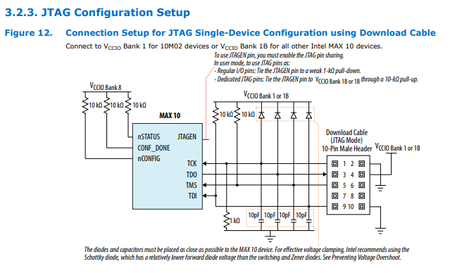
Have you connected the JTAG pins with correct Pull-up/PD resistor values.. 10K .. Check the Max10 confguration guide here : https://www.intel.com/content/dam/www/programmable/us/en/pdfs/literature/hb/max-10/ug_m10_config.pdf Please make sure you follow the pin connection guidelines mentioned here: https://www.intel.com/content/dam/www/programmable/us/en/pdfs/literature/dp/max-10/pcg-01018.pdf The DEV_OE pin needs to be pulled low as well as the DEV_CLRn pin.2.8KViews0likes0CommentsRe: set_clock_group constraints question!! plz help..
You could use something like this: set_time_format -unit ns -decimal_places 3 # Create the first input clock to the mux create_clock -period 10 -name clockA [get_ports a_clock] # Create the second input clock to the mux create_clock -period 10 -name clockB [get_ports b_clock] #Cut transfers between FirstClock and SecondClock set_clock_groups -exclusive -group {clockA} -group {clockB} or the following for externally switched clocks set_time_format -unit ns -decimal_places 3 # Create the first input clock on the clock port create_clock -period 10 -name clockA [get_ports a_clock] # Create the second input clock on the same clock port create_clock -period 10 -name clockB [get_ports b_clock] -add # Cut transfers between FirstClock and SecondClock set_clock_groups -exclusive -group { clockA } -group { clockB }1.3KViews0likes0Comments