User Profile

CPaul10
 New Contributor
Joined 7 years ago


User Widgets
Contributions
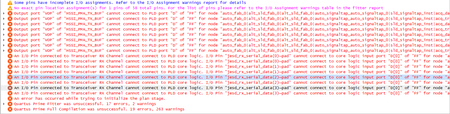
Add the serial ports of JESD204B to SignalTap, but compile failed.
Hi, Software:Quartus Pro Edition 20.4 Hardware:Intel A10 GX PCIE Kit I would like to catch the serial ports of JESD204B by SignalTap. But compile failed. If I remove the serial ports(tx/rx) of JESD204B, it compiles successfully. Failed Messages: Pin assignment: SignalTap:836Views0likes2CommentsRe: [Issue] Quartus Standard Edition on Ubuntu Desktop 18.04.05 (VMware)
I fixed this problem. Install steps: 1. apt install -y libc6:i386 libncurses5:i386 libxtst6:i386 libxft2:i386 libstdc++6:i386 libc6-dev-i386 lib32z1 lib32ncurses5 libqt5xml5 liblzma-dev make build-essential 2. wget https://mirrors.edge.kernel.org/ubuntu/pool/main/libp/libpng/libpng12-0_1.2.54-1ubuntu1.1_amd64.deb dpkg -i libpng12-0_1.2.54-1ubuntu1.1_amd64.deb wget http://security.ubuntu.com/ubuntu/pool/main/b/bzip2/lib32bz2-1.0_1.0.6-5_amd64.deb dpkg -i lib32bz2-1.0_1.0.6-5_amd64.deb 3. Instal Quartus Standard Edition1.2KViews0likes1Comment[Issue] Quartus Standard Edition on Ubuntu Desktop 18.04.05 (VMware)
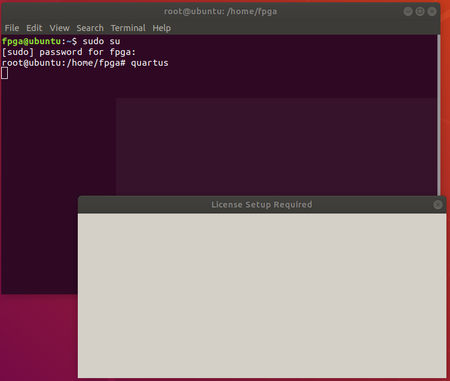
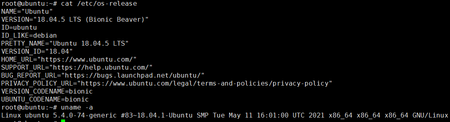
Hi Quartus Version:Standard Edition 20.1.1 OS:Ubuntu Desktop 18.04.05 My company bought the Arria 10 SOC Development kit recently. I try to install Quartus Standard Edition 20.1.1 on Ubuntu Desktop 18.04.05(VMware). After I execute quartus, the License Setup Required Window shows "nothing". I try to install Lite Edition, it shows nothing too. I follow the Youtuber's steps to install quartus, the license window shows "nothing" too... https://www.youtube.com/watch?v=WHI5Xz7jycA&t=318s Is there anyone met the issue like this? My Building Procedure. 1. Create Ubuntu Desktop 18.04.05 on VMware 2. Install nessesary librarys apt install -y lib32ncurses5 lib32z1 libx11-6:i386 libxext6:i386 libxft2:i386 apt install -y liblzma-dev libqt5xml5 libstdc++6:i386 libncurses5:i386 libxtst6:i386 libc6-dev-i386 3. Install libpng12 wget http://mirrors.kernel.org/ubuntu/pool/main/libp/libpng/libpng12-0_1.2.54-1ubuntu1.1_amd64.deb dpkg -i libpng12-0_1.2.54-1ubuntu1.1_amd64.deb 4. Execute Quartus (the window shows nothing and no any error message)1.3KViews0likes3Comments[ DE0-Nano ] Question about JTAG Uart & RS232 Uart
Hi I would like to control DE0-Nano on PC by JTAG UART, also I can command DE0-Nano do something by rs232 UART. But it seems can't output string through rs232 UART, when JTAG UART is exist in Nios II system. If I remove JTAG UART IP, the rs232 UART can output string normally. Is it possible use JTAG UART and rs232 UART at same time?2KViews0likes4Comments