User Profile

Njoroge
 Occasional Contributor
Joined 2 years ago


User Widgets
Contributions
Re: Could not link 'vsim_auto_compile.dll' error troubleshooting.
Hi ZiYingE_Altera, The solution is actually much easier than that. What I had was the 32-bit Mingw installed. All I did was remove it and install the 64-bit version using msys tools and then set the environment variable to point to the bin folder. It worked right away. I am on Quartus Pro 25.3 and there is no gcc compiler bundled with Questasim on my system. I believe the problem has been solved so I appreciate the help. Thank you.8Views0likes1CommentRe: Could not link 'vsim_auto_compile.dll' error troubleshooting.
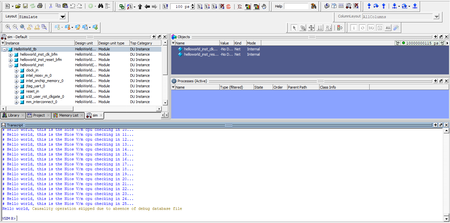
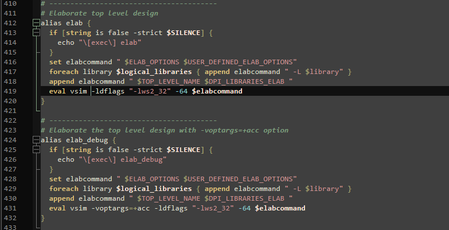
Hi ZiYingE, I received your solution and applied it but the error persists. I did reply to you in the inbox discussion we were having. Here's the changes I made: Here's the transcript window of Questa after ld/ld_debug: Regards.5Views0likes0CommentsRe: Simulation Examples
I checked it out, thank you. Still, I'd implore the community, I myself included, to include simulations and their detailed explanations in our example projects as much as we can. Deploying designs physically is still the end goal but the simulation/verification skills are increasingly crucial and the software provided to do this would best be trained for and used. I also think that this would continue to lessen the complexities facing beginners getting into FPGA design. Thank you.229Views0likes0CommentsReported Disk Usage
I have Quartus Pro 25.1.0.129 on my Windows 10 Pro 64-bit. I have installed, uninstalled and reinstalled some of the modules over time. These include the Agilex range and the huge EDA simlib file. When I track the disk usage in the Control Panel, Quartus doesn't update to reflect a lower disk usage when a module has been uninstalled. For example, I installed the EDA simlib to compile the libraries for a third party simulator then removed the file because it took up about 40GB of space. However, on the reported disk usage, the total amount still includes this 40GB. I have also observed that if you install the devices, remove them then reinstall them, the reported disk usage will be equivalent to double the correct usage. Is there a file that you can modify to change this to reflect the correct storage space used?244Views0likes3CommentsSimulation Examples
Are there any project examples that actually incorporate and show simulation? Take the "hello world" example, is there any walkthrough of a simulation using the available simulation resources like the eda simlib and the simulation softwares from Altera and other vendors? It's all nice that I can use platform designer to put together a project but verification begins with simulation and there is little to no examples of that. Obviously there's manuals to read but I argue that relatively simple pure-rtl and IP-based designs should have simulations to accompany them because those are usually the projects to on-board beginners. It would really encapsulate nearly all of the design process for a beginner having an example project video/document showing design from platform designer to the RISC-free IDE to simulation/verification and then to programming. I am sorry if there's already some out there which I haven't come across due to not doing a thorough search. If anyone could point me to such simulation-specific resources, I would be grateful. I would also have this as a suggestion for a video/series on the training platform.459Views0likes2CommentsRe: Software Development Tools
From what I gathered, Ashling RiscFree IDE can be used for all hard and sofcore processors software development of the 10 series and Agilex devices since it supports both Risc-V and ARM ISAs while Arm-DS can only be used for Arm HPS processors but supports all Altera FPSoCs. Hence, for example, if I plan to use the Agilex 5 or Arria 10 SoC devices, all I need is the RiscFree IDE for all software development for both the Nios-V and HPS processor cores. If I was using the Cyclone-V SoC devices, I would need RiscFree for the Nios soft processor then Arm-DS for the HPS. Correct me if wrong. Thank you955Views0likes1Comment