User Profile

Ran-GUO
 New Contributor
Joined 4 years ago


User Widgets
Contributions
Re: OpenCL starter guide for Intel Cyclong10 GX FPGA development kit
Hello @BoonBengT_Altera , I created a BSP, compiled and generated an .aocx file, I am looking for information on how to implement it. I don't have the driver to run it. How do I get or create a driver, or is there another way to run it? Thanks. (The Host PC running Ubuntu 20.04) Best wishes, Ran1.1KViews0likes0CommentsRe: OpenCL starter guide for Intel Cyclong10 GX FPGA development kit
Hi @BoonBengT_Altera , Thank you for your assistance. I am currently working on creating the BSP and updating the driver. I look forward to continuing this discussion on the forum and may have some additional questions as I proceed. Thanks again for your help. Best Wishes, Ran1.2KViews0likes0CommentsOpenCL starter guide for Intel Cyclong10 GX FPGA development kit
We are beginners with the Intel Cyclone 10 GX FPGA development kit, aiming to implement an OpenCL project on this board. Our plan involves connecting the board to a PC running Ubuntu 20.04, with the PC acting as the host and the board as the device. Unfortunately, we have been unable to find any examples online, and we can't find the BSP and OpenCL driver for the Cyclone 10 GX. Is there a tutorial or getting started guide available, preferably with an example? Thanks for your help. P.S. The preferred software version is 18.0 pro.1.4KViews0likes5CommentsRe: OpenCL environment : Couldn't open /dev/aocl0
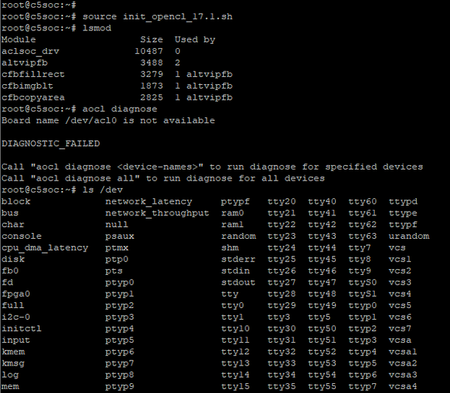
Hi Aikeu, The custom BSP means I have modified the platform interconnect, I use the AXI bus H2F connect hps and fpga rather than lwH2F. I am following the step 6 and 7 correctly, and we can find the module aclsoc_drv has been well installed. Invoking the aocl diagnose utility command, the logs shows : Board name /dev/acl0 is not available DIAGNOSTIC_FAILED Call "aocl diagnose <device-names>" to run diagnose for specified devices Call "aocl diagnose all" to run diagnose for all devices Then I run "ls /dev", no acl0 listed there. Theoretically, it should be added when we run "source init_opencl.sh", right? Thanks, Ran1.7KViews0likes0CommentsOpenCL environment : Couldn't open /dev/aocl0
Hello, There is something wrong with the OpenCL environment of my custom BSP. I created a custom BSP with only bridge hps2fpga (disable lwhps2fpga) by qsys (quartus standard 18.0) and compiled an OpenCL kernel, generated the binary file opencl.rbf by OpenCL SDK 18.0. Following the GSRD, I created the preloader, device tree, Linux kernel image (Linux 3.18) and so on. To set the OpenCL environment, I follow the instructions on this site: https://www.intel.com/content/www/us/en/docs/programmable/683435/17-1/compiling-and-installing-the-opencl.html cross compile the aocl runtime driver with right kernel version and regenerate the aclsoc_drv.ko file. I run the init_opencl.sh file, including insmod aclsoc_drv.ko, it works well, I can find it by lsmod. But when I execute "aocl program /dev/acl0 helloworld.aocx", it says: Couldn't open /dev/acl0 device! Did you load the driver? aocl program: Program failed. And when I run "ls /dev", no acl0 listed there! How can I resolve this problem? Thanks a lot.1.8KViews0likes9CommentsCan the DPC++ program run on intel Arria10 SoC Development Kit?
Hello, I want to use the Arria 10 SoC Development Kit as both the host and device for the DPC++ SyCL, the host program runs on the Hard processor system (HPS, Linux ARMv7, 32-bit) part of the SoC board, and the device runs on the FPGA part of the board. I don't know if this idea is feasible. I used DevCLoud oneApi to run the simplest example fpga_compile, build for FPGA hardware and generate the executable file "fpga_compile.fpga". I copied it to the Linux system of the Arria 10 SoC board and ran it with this error: ". /fpga_compile.fpga: cannot execute binary file: Exec format error." Is it because the Linux system is 32-bit that causes this problem? Do you have any solution? Thank you very much!1.7KViews0likes6CommentsRe: Quartus prime pro 18.0 license for Arria 10 SoC Development Kit
Thanks. But I still don't get it. I was using OpenCL (Quartus 18.0 standard) for cycloneV before and it was working fine, I have the float license. Then I want to change the FPGA board to Arria 10, and I install the Quartus 18.0 pro, this error occurs. I can not even create a new project without OpenCL for Arria 10 in Quartus pro. License for Quartus pro works and I can verify it in Tools-> License setup. Thanks a lot.2.3KViews0likes0CommentsQuartus prime pro 18.0 license for Arria 10 SoC Development Kit
Hello, I have installed Quartus prime pro 18.0 and device support Arria 10, I used float license and it works (I can verify it in Tools-> License setup). The board is Arria 10 SoC Development Kit. But the error occurs when I create a new project or open an existing Arria 10 example project : A license file is required to enable compilation of your design for the family of devices. Visit the Licensing Center section of the Intel FPGA website to request a license. I want to use opencl SDK for Arria 10, when I compile, I saw this error: error (19286): No license for family Arria 10 Do Arria 10 devices need an extra license or My License Quartus pro doesn't work? Thanks a lot.2.4KViews0likes5Comments