User Profile

bob_rf
 New Contributor
Joined 4 years ago


User Widgets
Contributions
Re: Trying to simulate FFT IP via Quartus Prime Lite Edition and ModelSim-Altera :(
Hi Sheng, This is a reply to your two most-previous posts to me. Regarding your earlier post about removing db and increment db folders, while ensuring settings -> simulation tool -> set to none: This looks to have worked and allowed the project to be compiled. Regarding your second/later post to me about using ModelSim, I followed your steps and was able to run the .tcl file and generate the FFT ports which can be added to the waveform window. As you can see from the picture, this is definitely progress from the vsim 3033 error I was stuck on. I have a couple of questions: *Is it possible to simulate my overall design, in Evaluation Mode, which uses the FFT IP? Or am I only able to simulate 1 instance of the FFT IP at a time, and only this 1 instance (not other design elements of a project)? *I have used search engines and searched through directories on my work computer, but I am not sure where the "example test bench" you mentioned (for FFT IP) is included or available for download. I was able to run the .tcl script you mentioned because I found one by the same name in my instantiation of the FFT IP, but I could never find the folder to unzip which you mentioned. Can you tell me where I can find this example test bench file? Also, I need to make sure when I call the .tcl file that the testbench will supply the simulation inputs. Is there an extra step or edit I need to make to the .tcl file to supply the input simulation data? Regards, Robert2.9KViews0likes1CommentRe: Trying to simulate FFT IP via Quartus Prime Lite Edition and ModelSim-Altera :(
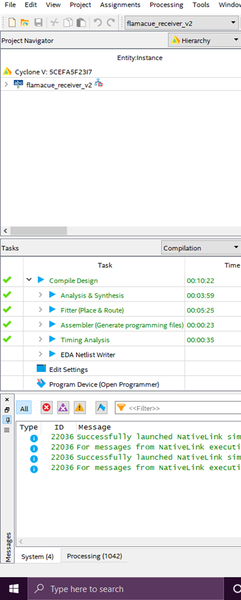
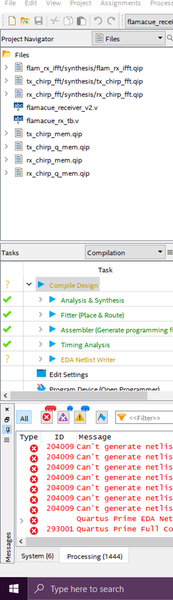
Sheng, Thank you for reaching out to me here and for your suggestion. I checked if I had made sure to add the .qip file(s) for using the FFT IP in my design. I am not sure if the snapshots I included will be easy to read on your side - the purpose of attaching these is to show the .qip files look present under the Files section of Project Navigator, as well as the Hierarchy section. Simultaneously it can be seen that the EDA Netlist Writer step of compilation is incomplete, and an error such as 204009 can be seen in the terminal window. For the record, "Intel FPGA IP Evaluation Mode" is set to Enabled. Let me know what other problem you think it could be for me. Again, thanks for your suggestion. Regards, Robert2.9KViews0likes4CommentsRe: Trying to simulate FFT IP via Quartus Prime Lite Edition and ModelSim-Altera :(
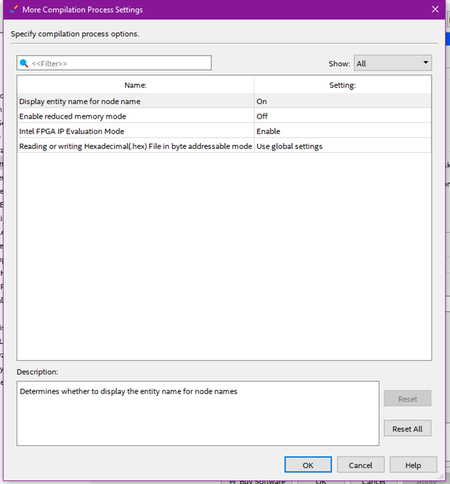
RichardTanSY_Intel, Thank you for replying here. Regarding the first link you included with your message.. I had found this link during my troubleshooting. Advice from the link: "To avoid this error, disable the EDA simulation tool in your project by opening the Settings dialog box from the Quartus II Assignments menu. Select the category EDA Tool Settings and the subcategory Simulation. On the Simulation page of the Settings dialog box, change the Tool name option to <None>." It sounds like the suggestion here is to totally disable the simulation, you know, to get the error to go away. The error that comes up when I am trying to simulate... What am I missing here? I tried this method before and it did not work. I follow these instructions again and I still get the same error code (vsim-3033) I listed above when trying to run a simulation in ModelSim. Also the second link included here is busted/broken. "Oops" (from the page). Might have to do with it being a .cn link (Intel China?). I do have the .pdf for this downloaded and I have referenced it. Is there a specific section you would have me see and follow instructions on? I did make sure the Quartus tool was set Enabled for Evaluation Mode. This appears to be the default setting. (see above picture from my Quartus Prime Lite tool) It does not seem to make a difference in allowing the design to compile, i.e. it still cannot compile. The failure occurs at EDA Netlist Writer step (with the previously mentioned errors). Let me know if you can think of any other advice for getting a simulation to run in evaluation mode. Regards, Robert2.9KViews0likes6CommentsHelp Re-Access Quartus Prime seat held by previous employee of company
Hello, The company I work for has previously purchased a license for a Quartus Prime seat. This seat was registered under an employee who has since left the company. We are still trying to access our purchased seat for the Quartus Prime software, but it was registered under his email. Can you help us regain our purchased remaining access to this license for Quartus Prime? RegardsSolved1.4KViews0likes4CommentsRe: Trying to simulate FFT IP via Quartus Prime Lite Edition and ModelSim-Altera :(
Additionally, I have examined the following links (in my effort to simulate the FFT IP): Unable to simulate designs comprising FFT (ModelSim Intel FPGA Starter Edition 10.5b and 10.6d) - Intel Communities AN 320: Using Intel® FPGA IP Evaluation Mode (d2pgu9s4sfmw1s.cloudfront.net) The first link, from the forum, has an explanation about 'compilation order' of certain FFT IP files, but it is not clear how to accomplish changing the file order. I tried it a couple of different ways, such as in Project Navigator (in Quartus IDE) but I was not able to change the file order, let alone know if this is even an overall valid solution. As for the second link, regarding IP Evaluation Mode, I checked in Quartus under Assignments -> Settings -> Compilation Process Settings -> More Settings Under More Settings, for Intel FPGA IP Evaluation Mode, I made sure the Setting: was 'Enable'. This was the default setting, as well. I am still looking for a way to simulate this FFT IP before purchasing a license.3KViews0likes0CommentsTrying to simulate FFT IP via Quartus Prime Lite Edition and ModelSim-Altera :(
Hello Friends, It appears that the FFT IP 'available' in Quartus Prime Lite (18.1) actually costs ~$8k. I discovered that it is available from ARROW, Mouser, et al. for this price, after my simulation attempts with ModelSim-Altera returned Error: (vsim-3033). ** Error: (vsim-3033) ...... Instantiation of 'auk_dspip_r22sdf_top' failed. The design unit was not found. This error was seen for each instantiation of the FFT IP(s) in my firmware design. Looking back over in the Quartus Prime Lite tool, I see my design almost fully compiles, passing Synthesis, Place & Route, Assembler, Timing Analysis, but then fails at the EDA Netlist Writer causing the compilation to fail. The following errors are reported: 204012 Can't generate netlist output files because the file "C:..................." is an OpenCore Plus time-limited file. Remove the unlicensed cores... 204009 Can't generate netlist output files because the license for encrypted file "C:................" is not available. Obviously I need to have a license to use the FFT IP/core, but here is my question. I have seen in some other forums and links where it is stated that the core can be evaluated so long as the USB programmer cable is continually inserted to the platform board (inconvenient - pay money to remove). If I can program the encrypted core to a platform before paying $$$$, is it possible for me to obtain simulation results as well (before paying $$$$)? ***If it is possible to simulate this FFT (altera_fft_ii) IP from the IP catalog seen in Quartus Prime Lite, before buying it or paying any money, please let me know some good detailed instructions on how I can accomplish this simulation. *** Regards, bob_rf3.1KViews0likes9Comments