User Profile

Gerhard56
 Occasional Contributor
Joined 5 years ago


User Widgets
Contributions
Re: Problems with ModelSIM 2020.1 Starter Edition
Hi Sheng, THAAANKS. Worked as described. Only one little bump in my road left. This don't restore the settings for my clock signal. I have still to right click at my clock signal and set the periode, because my periode didn't default to 100ns .. I need 83.33ns setting. But it is much better now. With best regards Gerhard1.4KViews0likes0CommentsProblems with ModelSIM 2020.1 Starter Edition
Hi, I finished the first version of my design and tried to simulate it. Works, but some changes requiered as usual. Now I have to setup simulation every time from scratch. Defining the clock signal, clock periode and which signals should be in the wave panel. As my design generate signals using a pwm, it is helpful to use the 'Analog View'. But it is boring to enter the same info over and over. I searched the documentation how to save this settings, but no success. I only found something to save the results ... pretty fine but not helpful in my situation. Please help me. With best regards Gerhard1.5KViews0likes4CommentsRe: NIOS 2 First steps
Hi, so, I have implemented the first version of my hardware, I also implemented a NIOS MCU to control everything and I get FreeRTOS running. I wrote a little program to have a command line interface which I use to set parameters for my hardware (PWM generator, special one). I have to fire up the power stage now, which I can do with the first implementation of the FPGA stuff, when this is donw I will fine tune the software and extend the hardware (inside the FPGA). With best regards Gerhard PS: Happy to be able to post again after a nasty malfunction of my Intel account.2KViews0likes0CommentsRe: I2C master with NIOS 2
Hi, sorry for the delay, but the Intel website didn't let me log in, I always get an error, with the text 'Contact your admin ..', but to contact the admin I have to log in .... But now they fixed it. I am well, the project is going on, but I have some hardware problems to solve, not related to the FPGA, so I didn't do anything with I2C for now. With best regards Gerhard4.9KViews0likes0CommentsRe: NIOS 2 First steps
Hi BB, yes I am well. Get my vaxins first round, hope I win. I get the problems solved, I have now a running logic on my FPGA and currently try to control it with the help of an NIOS 2. The NIOS 2 hardware part is done, I had recently troubles to get it running, but this was my mistake. Now I try to get FreeRTOS running on the soft core, and this isn't that easy. The Eclipse tool and the other tools involved are totally new for me (normally using Visual Studio or Atmel Studio) and than the WSL (Windows subsystem for Linux) ... It is no fun. With best regards Gerhard2.1KViews0likes2CommentsFreeRTOS and Quartus 20.1
Hi, did sombody use FreeRTOS together with Quartus Prime Lite 20.1? I found a description to install the files for FreeRTOS in V10.0, but the current version of Quartus and the Eclipse tools looking quite different. Any idea? Thanks a lot for helping. With best regards Gerhard640Views0likes1CommentRe: Error during loading new program for NIOS 2
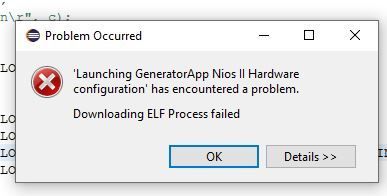
Sorry, solved. Oh my god. After altering the NIOSII by adding a PIO the symbol for the block symbol file was altered too, and gets two grid ticks broader. This breaks the connection to the pin defines for the SDTam clock signal. No error during compilation, maybe a warning? Without clock, the SDRam do not work properly and so the download fails.... Sorry about this message. With best regards Gerhard849Views0likes0CommentsRe: Block design file v. Verilog
Hi, I used the LPM_COUNTER out of the IP catalog I get together with Quartus Premium lite. Here I can't look into with the TCL viewer tool. This IP works fine at 400MHz. But I need some arithmetic, so I started with Verilog. It is also easier to change the design editing some lines of code than drawing boxes and lines (block design). Now it fails with 400MHz and I have to go down to 100Mhz. After verification of the design, I split it into a counter/comparer part and an arithmetic part. Arithmetic is still Verilog, but for the counter and comparer I use the LPM_XXX IP blocks out of the library. Now it works at 400MHz again. I want to ask the community before I started this amount of work, to draw the schematic. It also could be, that it isn't faster than the Verilog design. But now I can say and I know, that a simple counter, which is an adder and a register after the Verilog compiler is slower than the LPM_COUNTER library block. And if you take a look at the old logic chips (74xxx) you will see, that a binary counter didn't use an adder to simply increment by one each clock cycle ... With best regards Gerhard1.2KViews0likes0Comments