User Profile

Arthur_Davidov
 New Contributor
Joined 6 years ago


User Widgets
Contributions
NIOS II Command Shell 20.1-20.3 WIN10 - not recognize Quartus commands
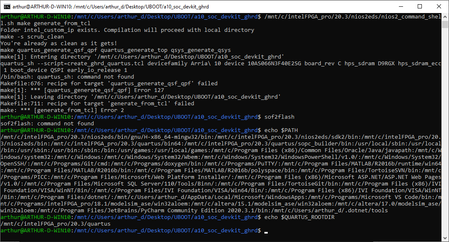
Hi, I am using Win10 WSL1 and run "Nios II Command Shell.bat" from my 'C:\intelfpga_pro\20.3\nios2eds' and when I prompt commands from Quartus I receive "command not found": 'sof2flash' - command not found ' make generate_fro_tcl' - /bin/bash: quartus_sh: command not found The $PATH is ok, $QUARTUS_ROOTDIR ok. Please see the screen capture: BUT if I do the same with From my Linux machine - it works: How can I fix this issue?1.3KViews0likes2CommentsARRIA 10 U-Boot boot from QSPI - spi probe failed
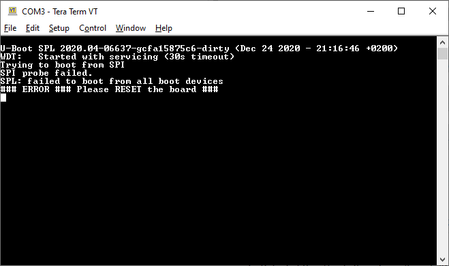
Hi, I use with arria 10 dev kit and followed the tutorial Arria_10_SoC_45_Boot_from_QSPI I prepared system for baremetal and skipped the sections to prepare: kernel.itb - Linux kerned and device tree core-image-minimal-arria10-rootfs.jffs2 -Linux rootfs Than I programed: cd $TOP_FOLDER/qspi_bin ~/intelFPGA_pro/20.4/nios2eds/nios2_command_shell.sh \ quartus_hps -c 1 -o e ~/intelFPGA_pro/20.4/nios2eds/nios2_command_shell.sh \ quartus_hps -c 1 -o pv -a 0x0000000 u-boot-splx4.sfp ~/intelFPGA_pro/20.4/nios2eds/nios2_command_shell.sh \ quartus_hps -c 1 -o pv -a 0x0100000 fit_uboot.itb ~/intelFPGA_pro/20.4/nios2eds/nios2_command_shell.sh \ quartus_hps -c 1 -o pv -a 0x0300000 fit_spl_fpga.itb As the result I get a "spi probe filed": What is the problem? What it does mean? BTW, I followed boot from SD card instructions (also for baremetal - without kernel and rootfs files) and success to boot.Solved2.6KViews0likes2CommentsNIOSII altera_epcq_controller v15.1 - Stuck in ALTERA_EPCQ_CONTROLLER_INIT with debug
Hi, I face with a problem that during running debugger (blaster) the processor is stuck in where try to " read EPCQ_RD_RDID for the silicon ID": silicon_id = IORD_ALTERA_EPCQ_CONTROLLER_RDID(flash->csr_base); The address is valid, but when suspending the debugger right before this line execution and try to read from 'Memory Monitor', I receive an error that address isn't valid. This situation doesn't occur if I program the ".jic" file of the same solution. Thanks, Arthur D.1.3KViews0likes4CommentsBSP build - Configuring BSP search path
Hi, I have a problem same as described here and the suggested solution is to edit configuration path. In " Nios II Software Developer’s Handbook " NII5V2-13.1 p.42 there is an explanation for 'Configuring Component Search Paths'. The problem is that I cant locate the objects that are supposed to be. My tools--> options view: "The BSP component search paths:" isn't a link/button. What I am missing?Solved2.1KViews0likes5CommentsQuartos Prime Pro 20.2 on Ububtu 18.04 LTS - No Java virtual machine was found
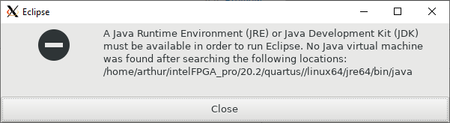
Hi, I met a problem with editing the following path: I tried follow the instructions: edit '-vm' parameter in eclipse.ini , but this parameter isn't exists in this file. So, where can I edit this path? Thanks!Solved1.3KViews0likes2Comments