troubleshooting
10383 Topics
Why do I unexpectedly observe intermittent DDM Errors?
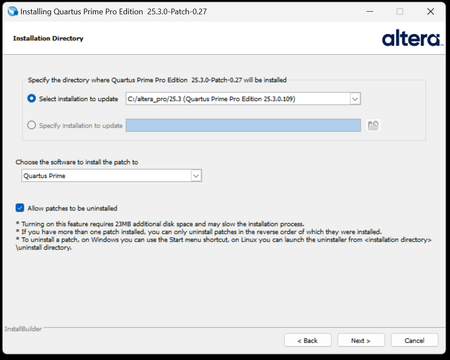
Description Beginning January 10, 2026, executing commands in the terminal or GUI of Quartus® Prime Pro Edition software, Quartus Embedded Edition software or select standalone tools may cause the software or tool to crash with an error similar to the crash signature shown below. This error affects: Quartus Prime Pro Software versions v23.3 through v25.3.1 Standalone Quartus Prime Pro Programmer v23.3 through v25.3.1 Standalone Quartus Prime Pro Embedded Edition v25.3 and v25.3.1 Standalone Quartus Prime Pro Power Thermal Analyzer v25.3 through v25.3.1 This issue is not observed in Quartus Prime Pro Edition versions 23.2 or prior or Quartus Prime Standard Edition. Crash Signature: Error (22912): Unhandled exception: Fatal Error: Assertion failed tools/cpp/ddm/ddm_assessor.cpp:53: DDM_T::verify_token(token) : Cannot identify the client from function assertion_error in tools/cpp/ddm_report/ddm_report_msg.cpp@465 *** Fatal Error: Program termination requested *** *** Below is the stack trace at the time the error occurred. *** The lines beginning "Err Handler" represent frames relating *** to generating this report. *** The point at which the error occurred is somewhere after these lines. *** There may be a few frames representing standard/library code *** before the Quartus frames begin. *** The search for the error should begin with the Quartus frames. *** Unwinder: libunwind *** Stack depth: 15 Quartus 0x24e67: err_terminator() + 0x1bc (ccl_err) Quartus 0xb036a: __cxxabiv1::__terminate(void (*)()) + 0xa (stdc++) Quartus 0xb03d5: (stdc++) Quartus 0xb0628: (stdc++) Quartus 0x1680d: void ddm_throw<DDM_RUNTIME_ERROR>(std::__cxx11::basic_string<char, std::char_traits<char>, std::allocator<char> > const&) + 0x26d (ddm_report) Quartus 0x13fae: DDM_REPORT::DDM_ASSERTION_HANDLER::assertion_error(std::__cxx11::basic_string<char, std::char_traits<char>, std::allocator<char> >) const + 0xde (ddm_report) Quartus 0x12a52: DDM_REPORT::ASSERTION_HANDLER::error(std::__cxx11::basic_string<char, std::char_traits<char>, std::allocator<char> >) + 0x72 (ddm_report) Quartus 0x13e64: DDM_REPORT::detail::assert_at_line(char const*, char const*, int, char const*, ...) + 0x1b4 (ddm_report) Quartus 0x205fb0: ddm_set_lassessor(DDM_T_ASSESSOR*, std::__cxx11::basic_string<char, std::char_traits<char>, std::allocator<char> > const&) + 0x60 (ddm) Quartus 0xf4445: DMS_MANAGER::DMS_MANAGER() + 0x5c5 (dni_dms) Quartus 0xf45b2: DMS_MANAGER::get() + 0x7a (dni_dms) Quartus 0xf6db4: _GLOBAL__sub_I_dms_manager.cpp + 0x58 (dni_dms) Quartus 0x647e: (ld-linux-x86-64) Quartus 0x6568: (ld-linux-x86-64) Quartus 0x202ca: (ld-linux-x86-64) Resolution To work around this problem: For Windows machines Download and unzip the Quartus Prime Pro version zip file that matches your Quartus Prime Pro version from this KDB. Double click on the executable ending in “windows.exe”. When the GUI pops up, press Next. Note that the GUI may look slightly different depending on the version of Quartus you are using. Accept the license agreement Specify the directory where the patch needs to be applied which may be a different location than Quartus install if you have standalone tools in a different directory from your Quartus Prime Pro software installation. Keep “Allow Patch to be uninstalled” selected. Select the software in which to install the patch: The patch will install in the directory of the software or tool you have selected. You will see an uninstall directory for the patch in your software or tool folder where patch is installed; it will contain an executable to uninstall the patch if required for any reason. To confirm patch is installed, you can run quartus_sh -v or corresponding version command for your tool via command line. Alternatively, you can Open Quartus in the GUI and select Help → About Quartus Prime in the main menu. If you are opening up a standalone tool you will navigate to Help-> About <tool_name>. For the Command Line Implementation of the patch in Windows, use the following command: <patch_filename.exe> --mode unattended --installdir <your_install_directory> --accept_eula 1 --patch_to [quartus|qprogrammer|qemb|pta] # An example to patch Quartus Prime Pro Edition Software v25.3: quartus-25.3-0.27-windows.exe --mode unattended --installdir /tmp/altera_pro/25.3 --accept_eula 1 # An example to patch the Standalone Programmer for Quartus Prime Pro Software v25.3: quartus-25.3-0.27-windows.exe --mode unattended --installdir /tmp/altera_pro/25.3 --accept_eula 1 --patch_to qprogrammer For Linux machines: Download and unzip the Quartus Prime Pro version zip file that matches your Quartus Prime Pro version from this KDB. Ensure you run chmod +x on the file ending with linux.run. Run in the command line: ./<installation_patch_run_file>. When GUI pops up, press Next. Note that the GUI may look slightly different depending on the version of Quartus you are using. Accept the license agreement Specify the directory where the patch needs to be applied which may be a different location than Quartus install if you have standalone tools in a different directory from your Quartus Prime Pro software installation. Keep “Allow Patch to be uninstalled” selected. Select the software in which to install the patch: The patch will install in the directory of the software or tool you have selected. You will see an uninstall directory for the patch in your software or tool folder where patch installed; it will contain an executable to uninstall the patch if required for any reason. To confirm patch is installed, you can run ./quartus_sh -v or corresponding version command for your tool via command line. Alternatively, you can Open Quartus in the GUI and select Help → About Quartus Prime in the main menu. If you are opening up a standalone tool you will navigate to Help-> About <tool_name>. For the Command Line Implementation of the patch in Linux, use the following command: ./<patch_filename.run> --mode unattended --installdir <your_install_directory> --accept_eula 1 --patch_to [quartus|qprogrammer|qemb|pta] # An example to patch Quartus Prime Pro Edition v25.3: ./quartus-25.3-0.27-linux.run --mode unattended --installdir /tmp/altera_pro/25.3 --accept_eula 1 # An example to patch the Standalone Programmer for Quartus Prime Pro Software v25.3: ./quartus-25.3-0.27-linux.run --mode unattended --installdir /tmp/altera_pro/25.3 --accept_eula 1 --patch_to qprogrammer This problem has been fixed in Quartus® Prime Pro Edition Software version 26.1. The below table lists the patches that are available and the associated patch number. The patch zip files are attached to the KDB below: Quartus Prime Pro Edition Version Patch Number 23.3 0.52 23.4 0.70 23.4.1 1.01 24.1 0.52 24.2 0.64 24.3 0.35 24.3.1 1.29 25.1 0.36 25.1.1 1.31 25.3 0.27 25.3.1 1.0213KViews5likes0CommentsWhy I can't change the device family in Power and Thermal Analyzer?
Description Due to a problem in the Quartus® Prime Pro Edition Software version 26.1, you may not be able to change to a different device family in Power and Thermal Analyzer (PTA) after you create or open a design. For example, if you open a design targeting a Stratix® 10 device, you may not be able to change to an Agilex® FPGA device. In version 26.1, if you select File > New File to create a new PTA design, the new file wizard does not appear. Without the wizard, you cannot select a different device family when creating a new file. Resolution PTA locks a design to the device family selected when the file is created. To explore power consumption across different device families, create a new PTA file in the target family and import your existing design. To import an existing PTA design into a different device family: Create a new PTA file targeting the desired device family. Use the Import function to bring your existing PTA design into the new file. If you chose the wrong device family when creating a file, close the existing file and create a new one. In the File menu, select New File, and select the correct device family in the new file wizard. In version 26.1 of Power and Thermal Analyzer, the new file wizard does not appear when you select New File. To work around this issue, exit and restart PTA. After restarting, select File > New File to open the new file wizard and select the correct device family.487Views2likes0Comments
Why are there minimum pulse width timing violations in the High Bandwidth Memory (HBM2E) Interface Agilex® 7 FPGA M-Series IP Design Example?
Description High Bandwidth Memory (HBM2E) Interface Agilexs® 7 FPGA M-Series IP design examples, generated with Quartus® Prime Pro Edition 25.3 or prior, with the configuration settings described in tables 1 and 2, may present minimum pulse width timing violations. Parameter Value Choose the initiator to target the NoC mapping 16-to-16 crossbar connection Use Fabric NoC to return read responses via M20Ks Any Core clock frequency '> 500 MHz' for configurations with 'Use Fabric NoC to return read responses via M20Ks' set to 'Fabric NoC will not be used by the example design' '350 MHz' for all other 'Use Fabric NoC to return read responses via M20Ks' values NoC bridge hardware frequency '> 620 MHz' for configurations with 'Use Fabric NoC to return read responses via M20Ks' set to any value different from 'Fabric NoC will not be used by the example design' Table 1. High Bandwidth Memory (HBM2E) Interface Agilex® 7 FPGA M-Series IP Design Example parametrization Reference Clock Signal Pin Assignment core_pll_refclk_clk Top HBM2E - PIN_AT41 (PLL: UIB_FBR_LEFT) - PIN_AP33 (PLL: UIB_FBR_RIGHT) Bottom HBM2E - PIN_EF29 (PLL: UIB_FBR_LEFT) - PIN_EH37 (PLL: UIB_FBR_RIGHT) Table 2. High Bandwidth Memory (HBM2E) Interface Agilex™ 7 M-Series FPGA IP Design Example pin assignment. The minimum pulse width timing violations are due to a combination of an oversized core_pll|core_pll|tennm_ph2_iopll-O_OUT_CLK2 (OUT_CLK) clock tree, the clock uncertainty from UIB PLLs, and the target frequency to drive core logic. An example minimum pulse width timing report showing the violations can be downloaded here. Resolution Resolution: To workaround the issue, select a different PLL to drive the example design core logic. Table 3 shows reference pins that connect to IOPLL not affected by this issue Reference Clock Pin IO Bank HBM2E Location PIN_N64 Bank 3A Top PIN_N52 Bank 3B Top PIN_G30 Bank 3C Top PIN_G18 Bank 3D Top PIN_FJ58 Bank 2A Bottom PIN_FH43 Bank 2B Bottom PIN_FR24 Bank 2C Bottom PIN_FJ6 Bank 2D Bottom As an alternative, you can adjust the core_pll|core_pll|tennm_ph2_iopll-O_OUT_CLK2 clock tree region to utilize only the clock sectors required to cover all the placed core logic in the chip. Refer to 6.6. Creating Clock Region Assignments in the Chip Planner section from the Quartus® Prime Pro Edition User Guide: Design Optimization for guidance on how to adjust the clock region. After adjusting the clock tree, your project QSF file will have a CLOCK_REGION assignment as follows: set_instance_assignment -name CLOCK_REGION "SX0 SY3 SX7 SY9" -to core_pll|core_pll|tennm_ph2_iopll~O_OUT_CLK2 -entity ed_synth This problem is scheduled to be fixed in a future release of the Quartus® Prime Pro Edition software.240Views2likes0CommentsWhich Protocols Support Spread Spectrum Clocking (SSC) on Agilex® 5 and Agilex® 3 FPGA Devices?
Description In the Agilex® 5 and Agilex® 3 FPGA device families, the Spread Spectrum Clocking (SSC) feature is supported only for specific protocol-based applications and can be optionally enabled for the following protocols: PCI Express (PCIe*) DisplayPort Hard Processor System (HPS) USB 3.1 Gen1 SATA/SAS (configured through the PMA/FEC Direct PHY IP) When using GTS transceivers, SSC is enabled by setting the "Spread Spectrum" option to "ENABLE", while keeping the “Enable TX FGT PLL fractional mode” option disabled in the GTS PMA/FEC Direct PHY IP. Resolution N/A113Views1like0CommentsWhy does boundary scan fail or report length mismatches when including F-Tile FHT transceivers in the scan chain of Agilex® 7 FPGA devices when using Quartus® Prime Pro software version 26.1 or earlier?
Description Boundary scan of F-Tile FHT transceiver channels is not supported in Agilex® 7 FPGA devices when using the Quartus® Prime Pro software version 26.1 or earlier. Resolution To work around this problem, you can bypass the F-Tile FHT transceiver channels in your boundary scan chain. This problem will be fixed in a future version of the Quartus Prime Pro software.72Views1like0CommentsWhy does Agilex® 5 FPGA fail to boot Linux* from eMMC when using the ATF-to-Linux direct boot flow in the 26.1 release?
Description Due to an issue with the SDRAM memory configuration in the Linux device tree, the Agilex® 5 FPGA HPS fails to boot Linux* from eMMC when using the ATF-to-Linux direct boot flow in the 26.1 release (Linux branch socfpga-6.18.2-lts). This issue is not observed in the U-Boot–to-Linux boot flow, as U-Boot patches the Linux device tree with the correct memory configuration. In the ATF-to-Linux direct boot flow, ATF does not perform this patching; therefore, the memory configuration must be correctly defined in the device tree. Resolution To work around this issue, the Linux device tree used for booting from eMMC in the ATF-to-Linux direct boot flow must be updated with the correct memory configuration. For the Premium Development Kit (ES and production), this requires updating the file arch/arm64/boot/dts/intel/socfpga_agilex5_socdk_emmc_atfboot.dts with the following fix: memory { device_type = "memory"; reg = <0 0x80000000 0 0x80000000>; }; Refer to the following build instructions for the workaround implementation: PDK 065B ES PDK 065B PDK 065A This problem is scheduled to be fixed in a future release of the Quartus® Prime Pro Edition Software.118Views1like0CommentsWhy do I see configuration failure "Error(18948): Error while sending VOUT_MODE command" if the PMBus Slave device type is set as XDPE12284C or PXE1410CDM_G005 for Agilex® 7 FPGA in Quartus® Prime Pro Edition Software version prior to 26.1?
Description Due to a problem in Quartus® Prime Pro Edition Software version prior to 26.1, when you select the "Slave device type" as XDPE12284C or PXE1410CDM_G005 in the Power Management & VID settings page in your design, you may see the following error while programming SOF file with Quartus® Prime Pro Edition Programmer: Error(18948): Error message received from device: Error while sending VOUT_MODE command Resolution In Quartus® Prime Pro Edition Software version prior to 26.1, if you are using XDPE12284C or PXE1410CDM_G005 as the PMBus Slave device for Agilex® 7 FPGA, select the "Slave device type" as "others" in the Power Management & VID settings page as shown in the table below. Voltage Regulator Slave device type Voltage output format Coefficient Voltage value unit XDPE 12284C (IMVP9 mode) Others Direct m=1, b=-200, r=-1 millivolt PXE1410CDM_G005 Others Direct m=2, b=-490, r=-1 millivolt This problem has been fixed in Quartus® Prime Pro Edition Software version 26.1.82Views1like0CommentsError(22650): File <filename>.jic is corrupted. DCIO/Main section data information is not found
Description Due to a bug in Quartus® Prime Pro Edition Software version 25.3.1 or earlier, when using Agilex® 5 FPGA or Agilex® 7 FPGA series devices, you may see this error when examining a JIC file (using quartus_pfg --info or the Configuration Debugger tool) that has been generated where the Direct Factory Image Fallback flag has been enabled on a signed BOOT_INFO .rbf image. This error occurs because this setting needs to be applied before the image is signed.. Resolution A future update of the quartus_pfg flow in the Quartus® Prime Pro Edition Software will include a method to generate .rbf files with the Direct Factory Image Fallback flag set to a user-desired value before encryption and signing.84Views1like0CommentsWhy does my Quartus® Prime Installation fail with certificate error: SSL certificate problem: unable to get local issuer certificate (curlcode 60)?
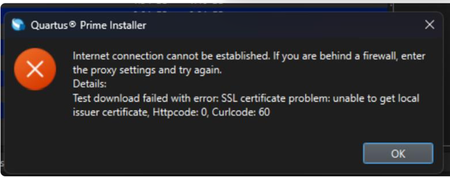
Description Due to a problem in the Quartus® Prime Installer Software, you might see the error message shown below when you click Download & Install. This happens because the certificate bundled with the Quartus® Prime Installer Software is no longer accepted by the Altera® Content Delivery Network (CDN). As a result, secure downloads initiated during the installation process cannot be verified using the outdated certificate. The issue impacts the Installer for the following versions of Quartus software: Operating System Quartus Prime Pro Installer Version(s) Quartus Std/Lite Installer Version(s) Microsoft Windows* 23.3 to 25.3.1 23.1std to 25.1std Linux* 23.3 to 23.4 23.1std The KDB workaround provided below applies to the following versions of Quartus software: Quartus Prime Pro Installer Version(s) Quartus Std/Lite Installer Version(s) KDB workaround applies to 24.3 to 25.3.1 24.1std to 25.1std Note that for all other affected versions not covered by the KDB, you cannot use the installer workaround and must download Quartus software package files individually without using the installer. Separate packages can be found in the Individual Files tab of the Quartus Software Download pages. Resolution To work around this problem, follow these steps: 1. Download and unzip the cacert.zip, which contains the cacert.pem certificate file. 2. Specify the new certificate using one of the following methods: i) Command Line Interface (CLI): Open a command prompt or terminal and run the installer with the--cacert option, pointing to the new certificate file. Windows*: qinst_<version>.exe -sp"--cacert <full path to cacert.pem>" Linux*: qinst_<version>.run -- --cacert <full path to cacert.pem> ii) Graphical User Interface (GUI): - Open the Quartus® Prime Installer, navigate to Settings, locate the CA Certificate Path, and specify the full path to the cacert.pem certificate file. - Then, click Apply > OK. This problem is scheduled to be resolved in a future release of the Quartus® Prime Installer Software.12KViews1like0CommentsWhy does FPGA configuration (Phase 2) fail in HPS first boot mode on Agilex® 5 and Agilex® 3 SoC FPGAs when using Quartus® Prime Pro Edition Software version 25.3.1?
Description Due to a problem in Quartus® Prime Pro Edition Software version 25.3.1, Phase 2 configuration (FPGA fabric configuration from HPS) may fail on Agilex® 5 and Agilex® 3 FPGA devices when Phase 1 and Phase 2 bitstreams originate from different designs or design revisions. This is caused by HPS IO hash mismatches between compilations. Resolution To work around this problem, download and install the patch below. You must recompile both the design generating the Phase 1 bitstream and the design generating the Phase 2 bitstream using the patched version of Quartus® Prime Pro Edition Software version 25.3.1. The problem has been fixed starting with Quartus® Prime Pro Edition software version 26.1. Additional Information HPS IO hash mismatches can also occur for other reasons independent of this Quartus® Prime Pro Edition Software problem. For more information about other potential causes and how to avoid them, refer to the HPS IO Hash Compatibility section in the Hard Processor System Booting User Guide: Agilex™ 3 and Agilex™ 5 SoCs145Views1like0Comments