simulation
277 Topics
Serial Lite IV - Rx Simulation Issues
Hello, I'm having trouble with the RX in side when simulating the F-Tile Serial Lite IV example design. Enviroment: - Quartus Prime Pro Edition 26.1, Windows - Questa Altera FPGA Edition-64 2025.3, installed with Quartus 26.1, with its precompiled device libraries - Device AGMF039R47A1E1VC (Agilex 7 M-Series) - F-Tile Serial Lite IV IP: FGT, NRZ, 8 lanes, 18.0048 Gbps, RS-FEC enabled, FULL streaming mode, PMA reference clock 180.048 MHz, System PLL 562.65 MHz - Example design generated from the IP parameter editor (Generate Example Design). Problem 1 : the generated run_mentor.tcl cannot compile the device libraries. run_mentor.tcl sets QUARTUS_SIM_LIB_DIR to $QUARTUS_ROOTDIR/eda/sim_lib2, DEVICES_SIM_LIB_DIR to $QUARTUS_ROOTDIR/../devices/sim_lib2 and ENABLE_QE_LIBRARY_COMPILATION to true. Both folders exist, but dev_com fails with vlog-7 (Failed to open design unit file) on the first file of every device library : quartus/eda/sim_lib2 : 220model.v, sgate.v, altera_primitives.v, altera_mf.v, altera_lnsim.sv, tennm_atoms.sv, tennm_hssi_atoms.sv, ctfb_hssi_atoms.sv, ctr_hssi_atoms.sv devices/sim_lib2 : tennm_fm_hps.sv, tennm_fp8_noc.sv, tennm_revb_io96.sv, tennm_revb_io96_iopll.sv ,ctfb_hssi_atoms_ncrypt.sv and ctfb_hssi_atoms2_ncrypt.sv, which the script also compiles, are not present anywhere in the installation. The only ctfb_hssi_atoms file installed is questa_fe/intel/verilog/src/ctfb_hssi_atoms.sv. Problem 2 : with the precompiled libraries the rx never comes up To get past problem 1, the two sim_lib2 lines were removed from run_mentor.tcl and ENABLE_QE_LIBRARY_COMPILATION was set to false, so the design binds to the precompiled Questa Altera FPGA Edition libraries. The macros in USER_DEFINED_VERILOG_COMPILE_OPTIONS were left as generated. Compilation and elaboration then succeed, and : - Phy TX Lanes Stable and Phy EHIP ready assert at 58,215 ns, TX link_up at 58,223 ns. - rx_pcs_fec_phy_reset_n is released at about 200 ns together with the TX, and rx_reset_ack asserts during the reset and clears after the release. - rx_cdr_lock stays 0 on all 8 lanes and rx_link_up never asserts : the testbench stays at "Waiting for RX Link Up". The run was stopped at 126.5 us, 68 us after TX link up. The reference logs in UG-20325 show RX link up 20 to 28 us after TX link up. - The F-tile model reports a single lane state change per lane, "State change from S0, R0, W0 TO S2, R0, W0", finished at 3,625 ns, and nothing after that. - The simulation runs at about 5 hours of wall-clock time for 126.5 us. Our own design, which uses the same IP, behaves identically on this installation. Questions 1. Where should the files that run_mentor.tcl expects in quartus/eda/sim_lib2 and devices/sim_lib2 come from ? Is an installation component missing ? 2. Is the example design supported with the precompiled Questa Altera FPGA Edition libraries ? If so, what does the FGT RX need to reach rx_cdr_lock ? 3. Is this a known issue in 26.1, and is there a patch or a workaround ?Solved148Views0likes8Comments
Introducing the Altera Community AI Responder — Beta
Altera is introducing the AI Responder, an assistant built into the Altera Community to help provide faster, context-aware guidance for Altera product questions. It uses relevant public Altera documentation and Knowledge Database content, with coverage continuing to expand. The AI Responder may provide source references and can hand off complex or out-of-scope questions to an Altera subject-matter expert. As a beta feature, responses may contain errors or omissions, so please review the sources and verify technical guidance against official Altera documentation before implementation. If the response does not fully address your question, add more context and tag ai_responder to continue the discussion. We welcome your feedback as we improve the Community experience.74Views0likes1Comment
ModelSim Intel FPGA Ed. 2020.1 not updating changes to HDL File
I have ModelSim open and Quartus Prime Lite v. 22.1, while I'm simulating, I often make changes back to the Quartus, but when I reload the design into ModelSim, it cold-archives the initial HDL file and references that file instead of the changes I make in Quartus. No matter how many times I recompile the code for both the wrapper function and main entity, it always goes back to the original? How is this possible? Does ModelSim copy the file into it's own directory and simply references it? I've spent days trying to figure this out, wihtout creating a new project and adding the changed code to it, how can I force it to use the updated files?Solved334Views0likes8CommentsQuesta warning vsim-3473 Component instance is not bound.
I am using Quartus Prime Pro 25.3 and Questa Altera Starter FPGA Edition-64 2025.2. I am trying to simulate a design with numerous Altera IP. I get the "not bound" warning for the many, possibly all, of the Altera IP. I have searched online and this forum. I see the same problem identified with ModelSim. I could not find anything specifically Questa. I have tried various posted solutions but have had no success. I generated simulation models for all IP in Quartus. For one of the IP, I tried creating the simulation model in VHDL and Verilog and tried Traditional and Qrun QuestSim flow selection. I checked the QuestaSim box for which simulator script will be generated. I found some solutions talking about using the command line in Questa. I very much prefer to remain in in the GUI for all commands.180Views0likes4Comments
MAX10 ADC - getting it to simulate in Modelsim
Hi, I'm setting up a new project - actually a rework of a 7 year old project were we had massive tools problems with the ADC, some of which I think were specific to Quartus 17. I have regenerated the ADC IP in Quartus 18.1. I have manually created the simulation in Modelsim 10.5b. I have added all the ADC files I can find to the Modelsim project, as shown in the attached screenshot. When I run the simulation, all the ADC outputs are floating. Any clues as to what I am going wrong, please? I tried running the msim_setup.tcl from the Modelsim command line, but this made no difference. Searching this forum, I wonder if it has something to do with fiftyfivenm_adcblock_primitive_wrapper.v, but the solution eludes me, since I have compiled this. Attached: screenshot of my modelsim project, the generated IP code, and my vhdl which instantiates the ADC. Thanks, Rob332Views0likes13Comments
QPP 26.1.0 Tools->Generate Simulator Setup Script produces no output
Hello, I have a relatively simple Agilex 3 QPP 26.1.0 project with four IPs on Win 11. Today after adding the latest IP block, running Tools->Generate Simulator Setup Script produces no output when executing the command. I can see from the Quartus log that "--spd" is not passed, and I believe this is the problem. If I run ip-sim-script in the Quartus command line and include the "--spd" option, the correct sim folders and files are produced. I do not see this same problem when working with the same project on Ubuntu Linux. What would cause "--spd" not to be passed? Note that the *.spd files do exist. Thank you.524Views0likes20Comments
Xcelium Simulation using XRUN with Verilog Configurations defining Library Search Order
I have an AgileX based design using Quartus 26.1.0.110 and Simulating with Xcelium 24.09.005. If I simulate the FPGA entirely standalone using this combination and embracing the xcelium/xcelium_setup.sh approach I can have some success. So I know that everything within the FPGA is resolving. If I attempt to develop a Verilog Configuration for the design by integrating the xmelab run for the resolved libraries found in order to develop my "default liblist" within the Verilog configuration and then migrate the flow to Cadence XRUN it fails. My XRUN environment does NOT have a cds.lib or hdl.var files as they are empty. Everything in this flow is to be governed by the XRUN environment. I need the XRUN flow to run to further integrate this FPGA into a larger multiple Mixed Signal ASICs. Can someone tell me the correct order that should be present in the "default liblist" for a Verilog Configuration? The errors I get are unresolved cells in library where everything inside the rest of the error is inside the encrypted Altera libraries. So it is impossible to debug exactly which cell it is referencing. Something like: xmelab: *E, BILCNF: Cell '{Name Protected*}' not found for instance '{*Name Protected*}' through configuration '{*Name Protected*}' The cell listed was: ip7521serdes_uxs2t1r1gpd_pipe_msvmodelknobmod Has anyone tried this? Could Altera Engineering provided a defined expected library order for the lowest level encrypted libraries? Thanks, Thomas D. Tessier127Views1like3CommentsQuesta Starter Edition: Nothing can be added to Wave window
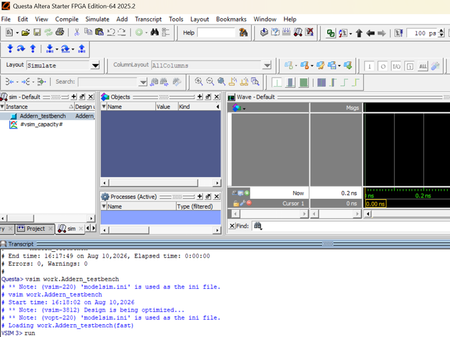
Hello, I cannot add any objects to the Wave window, by right-clicking nodes in the Sim window and selecting the Add Wave command. Even the objects in my Sim.v that I am using to stimulate the DUT cannot be added to the Wave Window. This method worked in the ModelSim. What am I doing wrong? Please see attached screen shots. Regards, MarkSolved70Views0likes2Comments