cyclone® v fpgas and socs
1057 Topics
Error: (vlog-7) Failed to open design unit file
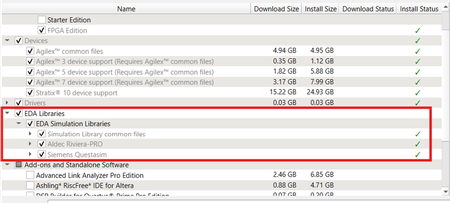
Description Due to simulation models not being installed along with the Quartus ® Prime Pro Edition Software, an error such as: Error: (vlog-7) Failed to open design unit file "C:/altera_pro/26.1.1/quartus/eda/sim_lib/220model.v" in read mode may occur during simulation. The root cause of missing files is that “EDA libraries” are not installed properly during installation of the Quartus ® Prime Pro Edition Software. Resolution To fix this problem, make sure “EDA Libraries” has been checked and installed properly during installation of the Quartus ® Prime Pro Edition Software, as shown in the screenshot below.9Views0likes0CommentsWhy does Nios® V/g experience data corruption when using DTCM?
Description Due to a problem in Quartus® Prime software, data corruption may occur when running a Nios® V/g processor application that interacts with a Tightly-Coupled Memory (TCM). This happens because of a RTL bug in the load-store unit. This problem is affecting Nios® V/g processor in, Quartus® Prime Pro Edition release 25.3.1 and earlier Quartus® Prime Standard Edition release 25.1 and earlier When Nios® V/g processor executes a non-TCM load (i.e. Load from On-Chip Memory or memory-mapped CSR) followed by a Data TCM load, the latter corrupts the former. This causes the non-TCM load to receive incorrect load data. For example, lw rd1,0(non-TCM) lw rd2,0(TCM) Expectation Actual Failure rd1 = load data from address “non-TCM” rd1 = load data from address “TCM” rd2 = load data from address “TCM“ rd2 = load data from address “TCM“ Resolution This problem is fixed in Quartus® Prime Pro Edition 26.1 and is scheduled to be resolved in a future Quartus® Prime Standard Edition release. Additional Information A patch is available to fix this problem. Quartus® Prime Standard Edition Software v25.1 Patch 0.01 Please contact Altera Support for additional support.150Views0likes0CommentsWhy do I get "Fatal Error: Access Violation at" when running quartus_syn or quartus_fit?
Description Due to a problem in the Quartus® Prime Pro Edition Software versions 26.1 and earlier, and Quartus Prime Standard Edition Software versions 25.1 and earlier, compilation may terminate with a "Fatal Error: Access Violation" message during synthesis or fitting. This failure can occur intermittently, and the reported memory address may change between compilation runs. You may observe one or more of the following behaviors: Quartus® compilation fails during synthesis or fitting The failure may occur in either of the following modules: quartus_syn (during synthesis) quartus_fit (during fitting) The error message is similar to: *** Fatal Error: Access Violation at <<ADDRESS>> The reported memory address may change between runs. The fatal error is followed by a stack trace that includes one of the failure signatures listed below. CDB_SGATE_OTERM::adopt_fanouts HDB_ASGN_CONTAINER::remove_assignment LUTIL_DEVICE::get_fragment_from_subloc STA_NODE::reset_tag_heads DESIGN_HDB_ASSIGNMENT_CONVERTER::cleanup_after_conversion BSYN_RTM_FLOP::IsExpired RTM_ATOM_MGR::rip_out_simple_ff_for_bypass IRTM_FF_QUEUE::remove_ff PTI_BCM_TIMING_GRAPH::push_back_carry_hipi_clock_iterm FTM_TREE_NODE::num_sgates Stack traces may differ, even when compiling the same design. Specific Failure Signatures: Synthesis failure (quartus_syn): The crash report includes the following function call: RTL_ADDER::aggressive_adder_balancing Fitter failure (quartus_fit): The error occurs very early after the fitter starts, and the crash report includes the following function call: qhd_reread_global_assign_from_qsf Error Log Examples Stack Trace example for crashes in quartus_syn *** Fatal Error: Access Violation at 00007FFB92E2C63E Module: quartus_syn.exe Stack Trace: Quartus 0xc63d: CDB_SGATE_OTERM::adopt_fanouts + 0x2d (db_cdb_sgate) Quartus 0x117e7: RTL_ADDER::shrink_iports + 0x1f7 (SYNTH_OPT) Quartus 0x14a75: RTL_ADDER::create_binary_adder + 0x49e9 (SYNTH_OPT) Quartus 0x45910: RTL_ADDER::restrict_adder_network + 0x84a (SYNTH_OPT) Quartus 0x4f5d6: RTL_ADDER::aggressive_adder_balancing + 0x9d (SYNTH_OPT) Quartus 0x11533: RTL_SCRIPT::call_common_rtl_fns + 0x1043 (SYNTH_OPT) Quartus 0x115b5: RTL_SCRIPT::call_named_function + 0x8a2 (SYNTH_OPT) Quartus 0x3a87a: RTL_SCRIPT::process_script + 0x62c (SYNTH_OPT) Quartus 0x3a8e4: run_parallel_rtl + 0x1db4 (SYNTH_OPT) Quartus 0x8509d: SYNTH_QIS::SYNTHESIS_FLOW::run_parallel_rtl_in_helper_processes + 0x285 (synth_qis) Quartus 0x850d5: SYNTH_QIS::SYNTHESIS_FLOW::high_level_synthesis + 0x47d (synth_qis) Quartus 0x8546d: SYNTH_QIS::SYNTHESIS_FLOW::run_current_phase + 0x286 (synth_qis) Quartus 0x854d4: SYNTH_QIS::SYNTHESIS_FLOW::run_full_flow + 0x30d (synth_qis) Quartus 0x859b7: QIS_RTL_STAGE_IMPL::synthesize + 0x467 (synth_qis) Quartus 0x15b55: qis_synthesize + 0x245 (synth_qis) Quartus 0x16442: TclNRRunCallbacks + 0x62 (tcl86) Quartus 0x16f4d: TclEvalEx + 0x9ed (tcl86) Quartus 0xa6ab8: Tcl_FSEvalFileEx + 0x22b (tcl86) Quartus 0xa5136: Tcl_EvalFile + 0x36 (tcl86) Quartus 0x15246: qexe_evaluate_tcl_script + 0x4e6 (comp_qexe) Quartus 0x1143b: qexe_do_tcl + 0x46b (comp_qexe) Quartus 0x1a70e: qexe_run_tcl_option + 0x5ee (comp_qexe) Quartus 0x16451: QCU::DETAIL::initialize_qhd_and_run_qexe + 0xa1 (comp_qcu) Quartus 0x1f8e2: qcu_run_tcl_option + 0x2f2 (comp_qcu) Quartus 0x1b1ba: qexe_standard main + 0x26a (comp_qexe) Quartus 0x29eb: qexe_run + 0x3eb (comp_qexe) Quartus 0x1192p: qsyn2_main + 0x1a9p (quartus_syn) Quartus 0x1e808: msg_main_thread + 0x18 (CCL_MSG) Quartus 0x17021: msg_thread_wrapper + 0x71 (CCL_MSG) Quartus 0x1c89d: mem_thread_wrapper + 0x70 (CCL_MEM) Quartus 0x1b49d: msg_exe_main + 0x20d (CCL_MSG) Quartus 0x2b6c: __scrt_common_main_seh + 0x11c (quartus_syn) Quartus 0x2e8d6: BaseThreadInitThunk + 0x16 (KERNEL32) Quartus 0x5b3b: RtlUserThreadStart + 0x2b (ntdll) End-trace Stack Trace example for crashes in quartus_fit *** Fatal Error: Access Violation at 00007FFB8F79CFF7 Module: quartus_fit.exe Stack Trace: Quartus 0x1cff6: HDB_ASGN_CONTAINER::remove_assignment + 0x52 (DB_HDB) Quartus 0x1cf71: HDB_ASGN_CONTAINER::destroy_assignment + 0x31 (DB_HDB) Quartus 0xca69c: anonymous namespace::delete_all_global_assignments + 0x25c (comp_qhd) Quartus 0xcc344: qhd_reread_global_assign_from_qsf + 0x384 (comp_qhd) Quartus 0x51679: QHD_DATABASE_UTILS::load_design + 0x449 (comp_qhd) Quartus 0x1e1e0: FIT2_DATABASE_EXPERT_QDB::load + 0x5b0 (comp_fit2) Quartus 0x3xee: fit2_create_fitter_netlist + 0x3xee (comp_fit2) Quartus 0x16442: TclNRRunCallbacks + 0x62 (tcl86) Quartus 0x16f4d: TclEvalEx + 0x9ed (tcl86) Quartus 0xa6ab8: Tcl_FSEvalFileEx + 0x22b (tcl86) Quartus 0xa5136: Tcl_EvalFile + 0x36 (tcl86) Quartus 0x15246: qexe_evaluate_tcl_script + 0x4e6 (comp_qexe) Quartus 0x1143b: qexe_do_tcl + 0x46b (comp_qexe) Quartus 0x1a70e: qexe_run_tcl_option + 0x5ee (comp_qexe) Quartus 0x16451: QCU::DETAIL::initialize_qhd_and_run_qexe + 0xa1 (comp_qcu) Quartus 0x1f8e2: qcu_run_tcl_option + 0x2f2 (comp_qcu) Quartus 0x29eb: qexe_run + 0x3eb (comp_qexe) Quartus 0x16f2d: qfit2_main + 0x82d (quartus_fit) Quartus 0x1e808: msg_main_thread + 0x18 (CCL_MSG) Quartus 0x17021: msg_thread_wrapper + 0x71 (CCL_MSG) Quartus 0x1c89d: mem_thread_wrapper + 0x70 (CCL_MEM) Quartus 0x1b49d: msg_exe_main + 0x20d (CCL_MSG) Quartus 0x2b6c: __scrt_common_main_seh + 0x11c (quartus_fit) Quartus 0x2e8d6: BaseThreadInitThunk + 0x16 (KERNEL32) Quartus 0x5b3b: RtlUserThreadStart + 0x2b (ntdll) End-trace Resolution This problem is currently scheduled to be resolved in a future release of the Quartus Prime Pro Edition Software and the Quartus Prime Standard Edition Software. If you are using Quartus Prime Pro Edition Software version 26.1, apply the attached patch for your operating system: Download the Linux or Windows patch package for your platform. On Linux, install the patch package from the console. On Windows, run the patch executable file. Confirm the installation by opening the Quartus Prime GUI and checking the About window, or by running: quartus_sh -v If applying the patch is not possible, or if you need assistance with other Quartus Prime software versions, contact your local Altera support representative. Additional Information Affected software: Quartus Prime Pro Edition Software version 26.1 and earlier Quartus Prime Standard Edition Software version 25.1 and earlier187Views0likes0CommentsWhy is the Avalon MM interface optimized away when using the SDI Audio Embed or SDI Audio Extract IP?
Description Due to a problem in the Quartus® Prime Pro Edition Software version 25.3 and earlier, the SDI Audio Embed IP and SDI Audio Extract IP might show incorrect behaviour when the generated IP name is audio_embed or audio_extract. In this condition, the affected output ports are left undriven and connected to the default value gnd, you will see messages similar to those shown below: Output port "reg_waitrequest" in instance "u0" of entity "audio_extract" does not have a driver. Connecting to the default value "gnd". Output port "reg_readdatavalid" in instance "u0" of entity "audio_extract" does not have a driver. Connecting to the default value "gnd". Output port "reg_readdata[0..7]" in instance "u0" of entity "audio_extract" does not have a driver. Connecting to the default value "gnd". Output port "reg_waitrequest" in instance "u1" of entity "audio_embed" does not have a driver. Connecting to the default value "gnd". Output port "reg_readdatavalid" in instance "u1" of entity "audio_embed" does not have a driver. Connecting to the default value "gnd". Output port "reg_readdata[0..7]" in instance "u1" of entity "audio_embed" does not have a driver. Connecting to the default value "gnd". Resolution To work around this problem, use a different IP name to avoid a naming that conflicts with the generated HDL module naming used by the Quartus® Prime Pro Software for the SDI Audio Embed or SDI Audio Extract IP. For example: Do not name the SDI Audio Embed IP as audio_embed. Do not name the SDI Audio Extract IP as audio_extract. Regenerate the IP after renaming it to a non-conflicting name. This problem is currently scheduled to be resolved in a future release of the Quartus ® Prime Pro Edition Software.83Views0likes0CommentsWhy does Board Support Package Editor fail to generate embedded peripheral IP drivers when generating BSP FreeRTOS project for Nios® V processor?
Description Due to a problem in the Quartus ® Prime Standard Edition Software version 24.1 and 25.1, the BSP Editor fails to generate embedded peripheral IP drivers, when it is generating BSP FreeRTOS project for Nios ® V processor. This is because the BSP Editor is not enabled to generate those drivers in FreeRTOS. Refer to Embedded Peripherals IP User Guide - Driver Support for the list of embedded peripherals with driver support. Resolution Patches are available to fix this problem for the Quartus ® Prime Standard Edition Software version 24.1 and 25.1 Linux and Windows versions. Download and install patch below. Quartus® Prime Standard Edition Software v24.1 Patch 0.01 Quartus® Prime Standard Edition Software v25.1 Patch 0.01 This problem is currently scheduled to be resolved in a future release of the Quartus ® Prime Standard Edition Software.88Views0likes0CommentsWhy are some simulation library files missing when compiling for Questasim*?
Description Due to a problem in Simulation Library Compiler in the Quartus® Prime Standard Edition Software 23.1 and later, you may see some Quartus® Simulation Library source files not included for compilation for Siemens* Questasim* Tool selection. This problem persists on both EDA Simulation Library Compiler GUI and command line versions. This problem only exists in Quartus® Prime Standard Edition and does not affect Quartus® Prime Pro Edition versions. Resolution To work around this problem, follow these steps: 1. Edit file: <QUARTUS INSTALLATION DIRECTORY>/quartus/common/tcl/internal/simlib_comp.tcl 2. Replace: set gl(primary_tool,questasim) questasim With: set gl(primary_tool,questasim) modelsim This problem is scheduled to be fixed in a future release of the Quartus® Prime Standard Edition Software.113Views0likes0CommentsWhy does the outclk of the ALTCLKCTRL IP remain enabled when using the ENA input in External Path mode?
Description Due to a problem in the Quartus® Prime Standard Edition Software version 22.1 or earlier, you might see that the output clock of the ALTCLKCTRL IP remains enabled regardless of whether the ENA input is asserted or de‑asserted when using the “External path” mode. This problem occurs because the ENA input port is not used in “External path” mode even if the “Create ‘ena’ port to enable or disable the clock network driven by this buffer” option is selected. Beginning with the Quartus® Prime Standard Edition Software version 23.1, the software will generate an error message indicating that the “Create ‘ena’ port” option is unavailable when the “External path” type is selected. Resolution To work around this problem using the ALTCLKCTRL IP with the “External path” mode: Disable the “Create ‘ena’ port to enable or disable the clock network driven by this buffer” option in the Parameter Editor. If you require clock gating, implement the gating logic external to ALTCLKCTRL (for example, gate the source clock or use an alternate supported clock‑control scheme) rather than relying on the ALTCLKCTRL ENA port in “External path” mode.58Views0likes0CommentsWhy does niosv-download return “Invalid reset option” when executing reset from debug module?
Description Due to a problem in the Ashling RiscFree IDE for Altera® software, the niosv-download returns “Invalid reset option” when executing reset from debug module for designs targeting Nios ® V processor. The affected versions are: Software version 25.2.1 (version dated 9 th May 2025, paired with Quartus® Prime Pro software version 25.1.1 and Quartus® Prime Standard software version 25.1) Software version 25.3.1 (version dated 1 st Aug 2025, paired with Quartus® Prime Pro software version 25.3.1) Software version 25.4.1 (version dated 31 st Oct 2025, paired with Quartus® Prime Pro software version 26.1) The problem is caused by Ashling GDBServer failing to execute software reset (swreset), and niosv-download is using Ashling GDBServer to communicate with the processor. Thus, this failure prompts the “Invalid reset option” message when executing “niosv-download –r". Resolution To work around this problem, use the argument “-o” to change from Ashling GDBserver to OpenOCD. $ niosv-download –r -o This problem is fixed beginning with the Ashling RiscFree IDE for Altera® Quartus® software version 26.1.1-C, which is paired with Quartus® Prime Pro software version 26.1.1. Related Articles NIOS V/m dbg_reset_out signal (Q25.1 Std, MAX10) | Altera Community - 35238784Views0likes0CommentsWhy does Quartus® Prime Standard Edition Software v24.1 hang and fail to close after using the Programmer?
Description Due to a problem in the Quartus® Prime Standard Edition Software version 24.1 and later, the Quartus® Prime Standard Edition Software might become unresponsive and fail to close after running the Quartus® Prime Programmer on Windows* 10 environments. The typical sequence that triggers the hang is: Launch the Quartus® Prime Standard Edition Software. Launch the Quartus® Prime Programmer from within the Quartus® Prime Standard Edition Software and complete programming. Close the Quartus® Prime Programmer. Attempt to close the Quartus® Prime Standard Edition Software. Result: Windows shows “Not Responding” and the application must be forcibly terminated. Resolution To work around this problem in the Quartus® Prime Standard Edition Software version 24.1, download and install the patch below: This problem is scheduled to be fixed in a future release of the Quartus® Prime Standard Edition Software.110Views0likes0CommentsWhy does my Quartus® Prime Installation fail with certificate error: SSL certificate problem: unable to get local issuer certificate (curlcode 60)?
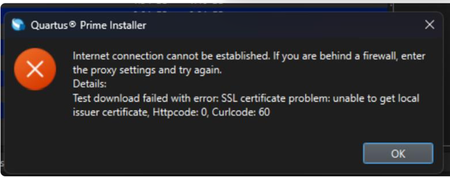
Description Due to a problem in the Quartus® Prime Installer Software, you might see the error message shown below when you click Download & Install. This happens because the certificate bundled with the Quartus® Prime Installer Software is no longer accepted by the Altera® Content Delivery Network (CDN). As a result, secure downloads initiated during the installation process cannot be verified using the outdated certificate. The issue impacts the Installer for the following versions of Quartus software: Operating System Quartus Prime Pro Installer Version(s) Quartus Std/Lite Installer Version(s) Microsoft Windows* 23.3 to 25.3.1 23.1std to 25.1std Linux* 23.3 to 23.4 23.1std The KDB workaround provided below applies to the following versions of Quartus software: Quartus Prime Pro Installer Version(s) Quartus Std/Lite Installer Version(s) KDB workaround applies to 24.3 to 25.3.1 24.1std to 25.1std Note that for all other affected versions not covered by the KDB, you cannot use the installer workaround and must download Quartus software package files individually without using the installer. Separate packages can be found in the Individual Files tab of the Quartus Software Download pages. Resolution To work around this problem, follow these steps: 1. Download and unzip the cacert.zip, which contains the cacert.pem certificate file. 2. Specify the new certificate using one of the following methods: i) Command Line Interface (CLI): Open a command prompt or terminal and run the installer with the--cacert option, pointing to the new certificate file. Windows*: qinst_<version>.exe -sp"--cacert <full path to cacert.pem>" Linux*: qinst_<version>.run -- --cacert <full path to cacert.pem> ii) Graphical User Interface (GUI): - Open the Quartus® Prime Installer, navigate to Settings, locate the CA Certificate Path, and specify the full path to the cacert.pem certificate file. - Then, click Apply > OK. This problem is scheduled to be resolved in a future release of the Quartus® Prime Installer Software.11KViews1like0Comments