cyclone® 10 lp fpga
79 Topics
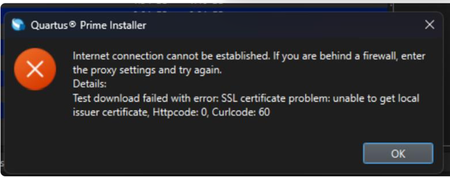
Why does my Quartus® Prime Installation fail with certificate error: SSL certificate problem: unable to get local issuer certificate (curlcode 60)?
Description Due to a problem in the Quartus® Prime Installer Software, you might see the error message shown below when you click Download & Install. This happens because the certificate bundled with the Quartus® Prime Installer Software is no longer accepted by the Altera® Content Delivery Network (CDN). As a result, secure downloads initiated during the installation process cannot be verified using the outdated certificate. The issue impacts the Installer for the following versions of Quartus software: Operating System Quartus Prime Pro Installer Version(s) Quartus Std/Lite Installer Version(s) Microsoft Windows* 23.3 to 25.3.1 23.1std to 25.1std Linux* 23.3 to 23.4 23.1std The KDB workaround provided below applies to the following versions of Quartus software: Quartus Prime Pro Installer Version(s) Quartus Std/Lite Installer Version(s) KDB workaround applies to 24.3 to 25.3.1 24.1std to 25.1std Note that for all other affected versions not covered by the KDB, you cannot use the installer workaround and must download Quartus software package files individually without using the installer. Separate packages can be found in the Individual Files tab of the Quartus Software Download pages. Resolution To work around this problem, follow these steps: 1. Download and unzip the cacert.zip, which contains the cacert.pem certificate file. 2. Specify the new certificate using one of the following methods: i) Command Line Interface (CLI): Open a command prompt or terminal and run the installer with the--cacert option, pointing to the new certificate file. Windows*: qinst_<version>.exe -sp"--cacert <full path to cacert.pem>" Linux*: qinst_<version>.run -- --cacert <full path to cacert.pem> ii) Graphical User Interface (GUI): - Open the Quartus® Prime Installer, navigate to Settings, locate the CA Certificate Path, and specify the full path to the cacert.pem certificate file. - Then, click Apply > OK. This problem is scheduled to be resolved in a future release of the Quartus® Prime Installer Software.12KViews1like0CommentsWhy does the text overlap in the ALTPLL IP Parameter Editor?
Description Due to a problem in the Quartus® Prime Standard Edition Software version 25.1, you might see that the text overlaps in the ALTPLL IP Parameter Editor on the Windows* Operating System. This prevents the ALTPLL IP from being instantiated. This problem does not occur in the Quartus® Prime Standard Edition Software version 24.1 and earlier. Resolution To work around this problem in the Quartus® Prime Standard Edition Software version 25.1, download and install the patch below: This problem is scheduled to be resolved in a future release of the Quartus® Prime Standard Edition Software.1.5KViews1like0Comments
Error: TBBmalloc: skip allocation functions replacement in ucrtbase.dll: unknown prologue for function _msize
Description Due to a problem in the Quartus® Prime Standard Edition Software version 25.1 or earlier, you might see this error message when generating PLL IP on Windows* 11 Operating System. The IP generation might complete successfully even though this error message is reported. Resolution To work around this problem, follow these steps: Go to This PC, right-click, and select Properties. Click Advanced System Setting. In the Advanced tab, select Environment Variable. Under System variables, create a new variable with the name TBB_MALLOC_DISABLE_REPLACEMENT and value as 1. Click OK and restart the Quartus® Prime Software. The workaround above does not work for the Quartus® Prime Standard Edition Software version 22.1std.2 or earlier. A patch is available to fix this problem for the Quartus® Prime Standard Edition Software version 22.1std.2. The environment variable is still required to prevent the TBBmalloc message from appearing. Download and install patch 2.02 below: Patch 2.02 for Windows (.exe) Readme for patch 2.02 (.txt) This problem is not scheduled to be fixed in the Quartus® Prime Standard Edition Software.1.1KViews1like0CommentsWhich voltage should I use for MSEL pins to drive a logic high in Intel® Cyclone® 10 LP devices?
Description To select the configuration scheme, the MSEL pins should be pulled High or Low. Resolution In the Intel® Cyclone® 10 LP devices, you must hardwire MSEL pins to VCCA (for logic high) or GND (for logic low) as section 6.3.1 MSEL Pin Settings from the Intel Cyclone 10 LP Core Fabric and General Purpose I/Os Handbook states. The intention of table 46. Configuration Pins Summary for Intel Cyclone 10 LP devices is just to describe the power voltage used by the internal logic used by the MSEL pins, which is VCCINT.600Views0likes0CommentsWhy does the Nios® V processor that applies fast JTAG UART driver stop (stuck in a loop) when the JTAG UART terminal is not active?
Description Due to a problem in the Board Support Package Editor of Quartus ® Prime software, the JTAG UART driver for fast implementation might get stuck in a loop for any Nios ® V processor designs, when JTAG UART terminal is not active. This problem has been present since: Quartus ® Prime Pro Edition software version 21.3 Quartus ® Prime Standard Edition software version 22.1 It is because the JTAG UART IP is initialized before the Nios ® V processor initialization in alt_sys_init.c. For example: void alt_sys_init( void ) { ALTERA_AVALON_JTAG_UART_INIT (JTAG_UART, jtag_uart); INTEL_NIOSV_M_INIT (NIOS, nios); } Resolution To work around this problem, update the alt_sys_init.c to initialize the Nios ® V processor first. void alt_sys_init( void ) { INTEL_NIOSV_M_INIT (NIOS, nios); ALTERA_AVALON_JTAG_UART_INIT (JTAG_UART, jtag_uart); } This problem is currently scheduled to be resolved in a future release of the Quartus ® Prime software. Additional Information Refer to Embedded Peripherals IP User Guide [titled as JTAG UART Core - Driver Options: Fast vs. Small Implementations] for more information about the JTAG UART driver for fast (non-blocking) and slow (blocking) implementation. Related Article NIOSV firmware stuck when juart-terminal is not open for the print messages.400Views0likes0CommentsHow do I instantiate a differential input or output buffer in my design?
Description You can instantiate a differential input or output buffer in your design using the ALTIOBUF Intel® FPGA IP core available in the Intel® Quartus® Prime Software. Resolution The ALTIOBUF Intel® FPGA IP core allows you to specify your input or output pin as a differential receiver or transmitter and then you need to port both the positive and negative signals to I/O pins. This Intel FPGA IP core is supported beginning with the Stratix® III and Cyclone® III device families. For Stratix® II, Cyclone® II, Arria® GX, and previous device families, you cannot instantiate a differential buffer in your design. Instead, use the positive leg of the differential pair in your design, and locate that pin in the Assignment Editor. Give that pin an I/O standard assignment with a value of "LVDS" or the differential I/O standard you wish to use. Refer to the device handbook for a complete listing of the supported I/O standards. The negative leg will automatically be assigned to the corresponding complimentary pin by the fitter when you compile your design. This method is supported for all device families that support differential I/O standards such as LVDS. For more information on the ALTIOBUF Intel FPGA IP core, refer to the ALTIOBUF IP Core User Guide (PDF). Related Articles Internal Error: Sub-system: FIOMGR, File: /quartus/fitter/fiomgr/fiomgr_io_power_region.cpp, Line: 2460400Views0likes0CommentsHow to mitigate the security vulnerability in the Nios® II Command Shell utility?
Description Due to a problem in the Quartus ® Prime Standard and Lite Edition Software version 19.1 through 24.1, the Nios® II Command Shell utility included in the Quartus ® Prime Software for Windows* is vulnerable to a Current Working Directory (CWD) planting attack. The Linux* versions are not affected. Resolution To work around this problem, replace the “Nios II Command Shell.bat” Windows Batch File located in the <drive>:\<edition>\<version number>\nios2eds\, with the attached file below. This problem is fixed beginning with the Quartus® Prime Standard and Lite Edition Software version 25.1.300Views0likes0CommentsIs there any problem if a floating voltage exists on VCCIO and VCCPT before it is ramped up and after it is ramped down in Arria® 10 FPGA devices and Cyclone® 10 FPGA devices?
Description No, there is no problem if a floating voltage exists on VCCIO and VCCPT before it is ramped up and after it is ramped down in Arria® 10 FPGA devices and Cyclone® 10 FPGA devices. Leakage can occur between VCC and VCCIO as well as between VCC and VCCPT, which can cause both VCCIO and VCCPT to float up to a maximum approximation of 0.8V before the power supply is ramped up and after the power supply is ramped down. This is expected behavior, and if the power-up and power-down sequences are followed, it will neither cause any functional failure nor concern the device's reliability. This behavior can only be observed if the regulators were designed to leave the power supplies to float before they ramp up and after they ramp down. Resolution This is an expected behavior and will neither cause any functional failure nor reliability concern to the device if the power-up sequence and power-down sequence are followed. This behavior can only be observed if the regulators were designed to leave the power supplies to float before they ramp up and after they ramp down.300Views0likes0CommentsWhy can’t I open the Early Power Estimator (EPE) tool in the latest version of Microsoft* Excel?
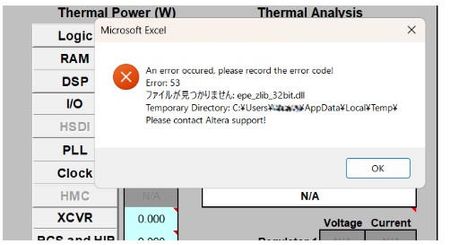
Description Due to the legacy design of the Early Power Estimator (EPE) worksheets, which include VBA macros, ActiveX components, and embedded DLL files, errors may occur when opening the Excel file on newer Windows platforms or when using Microsoft* Office 365, in both 32-bit and 64-bit versions. When the spreadsheet is opened, several actions occur in the background. Excel extracts the embedded DLLc files to the user's %TEMP% directory. A script then decompresses the DLLc files into standard DLL files. The script subsequently loads and executes the DLL files, which is used by the Excel macros. Why does this issue occur? To extract and execute the required DLL files, the Excel macros rely on a set of commands provided by Microsoft .NET and Microsoft Visual C++ runtime libraries, depending on the specific version of the Excel worksheet. In newer versions of Microsoft Windows and Microsoft Office 365, these runtime components are no longer bundled together by default, and some legacy functions used by older scripts have been deprecated or replaced with newer implementations. As a result, scripts designed for earlier environments may fail when attempting to call these functions. Note: In some systems, some of these are already installed automatically by other 3rd party software tools during installation. Additionally, the legacy script design does not support symbolic linking or modern handling of the user's %TEMP% directory, which can cause issues when extracting and accessing temporary files. Modern systems also enforce stricter security controls, including: ActiveX restrictions in newer versions of Microsoft Excel Trust Center policies that block code execution from untrusted locations Operating system security policies in Microsoft Windows that may prevent DLL execution from the %TEMP% directory if such restrictions are enabled As a result, if any of these conditions are triggered, users may encounter errors such as “Unable to find or load DLL files.” For example, errors may appear related to the zlib.dll file (the 32-bit or 64-bit version used depends on the installed Excel architecture). Resolution To workaround this issue PART A: Unblocking the Excel and Enable Macros/ActiveX 1. Unblock the Excel File • Right-click the EPE Excel file → Properties → Check Unblock under Security. • Click Apply → OK. 2. Enable Macros and ActiveX • Open Excel → File → Options → Trust Center → Trust Center Settings: Enable Macros. Enable ActiveX controls. Leave other settings as default (Safe Mode can remain enabled or disabled). 3. Check whether you can now open the EPE excel sheet. Else proceed to PART B. PART B: Installing the necessary Microsoft .NET and Visual C++ runtime libraries. Microsoft .NET installation Go to your Installed apps settings and find for .NET. It is recommended to have both .NET Runtime and ASP .NET installed in your system. If you already have a version installed on your machine then proceed to the next step( you only require 1 version each), otherwise refer to this location to download Download .NET 8.0 (Linux, macOS, and Windows) | .NET Example: Microsoft Visual C++ Installation As different EPE Excel sheet relies on specific Visual C++ version, you will need to install multiple versions of Visual C++ for both 32bit and 64bit. This is because even though Excel is running on 64bit, existing scripting might have dependency on 32bit functions as well. Recommendation to install C++ version for both 32 bit and 64 bit as below Latest Supported Visual C++ Redistributable Downloads Visual Studio 2017-2026 Visual Studio 2015 (in older Microsoft release, it might show as C++ V14 or 2015-2022 version) Visual Studio 2013 Visual Studio 2012 Example After installing both 32 bit and 64 bit, do restart the system and then try launching the EPE excel sheet again. In some rare occurrences, you might need to install Visual Studio C++ 2010 , Visual Studio C++ 2008 and Visual Studio C++ 2005. Do refer to PART C first as the issue might not be due to Visual C++ but symbolic link. PART C: Symbolic Link issue workaround (optional) If installing the .NET and Visual C++ runtime libraries still does not help in resolving the error opening EPE Excel, you should check whether your %TEMP% file folder is the same as what reported in the error when opening the EPE excel sheet. If the folder path are different between %TEMP% and the path reported by Excel sheet, it means that they are using symbolic link folder. In this case user should copy the .dll files generated out from the %TEMP% when they opened the excel sheet and copy it over to the Windows SySWoW folder (%windir%\SysWOW64). To access your %TEMP% folder , just type %TEMP% into your explorer and it will open your folder location (%TEMP% is set in windows environment variables) From the %TEMP% folder, there are multiple *epe* DLL files if you open different EPE excel sheets. Copy all of these .DLL files into your Windows SysWOW64 folder and try launching the EPE excel sheet again. Example, if using Cyclone® V EPE excel sheet, these are the 4 files required in red box in %TEMP% to be copied over NOTE 1: The SysWOW64 folder is selected because it is part of Windows’ default search locations when required DLL files cannot be found. Alternatively, you can add a custom directory to the Windows Environment Variables (PATH) so that Windows will also search that folder when looking for the DLL files. NOTE 2: Adding the %TEMP% folder into the system environment variables will not have any effect as latest Microsoft Windows have blocked the DLL searching mechanism to prevent search %TEMP% folder as part of the security to prevent remote execution from DLL. Additional Information If all fails, alternatively install Process Monitor from Microsoft to analyze the DLL failure/error 1. Download Process Monitor from this location Process Monitor - Sysinternals 2. Close all excel sheets that is open in Windows. 3. Launch the Process Monitor , then select Filter. Set to Process Name and EXCEL.exe and click Add. 4. After adding the filter, ensure that capturing is started 5. Then open any of the EPE excel file,and wait till you get the DLL (eg. epe_zlib_32bit.dll) error then press pause on the Process Monitor. 6. Then use Find and search for the dll error stated in the excel(eg. epe_zlib_32bit.dll) It will give you a list of things, but important is to check the details on createfile, open, close , query, those are the functions that are in the zlib dll file. Example Good case scenario where no error occurred. Fail case scenario where Windows unable to locate the DLL (due to symbolic link issue)299Views0likes0CommentsWhy does Nios® V processor design fail to compile during Analysis & Synthesis when the QSYS file is added into the Quartus® Prime project instead of the QIP file?
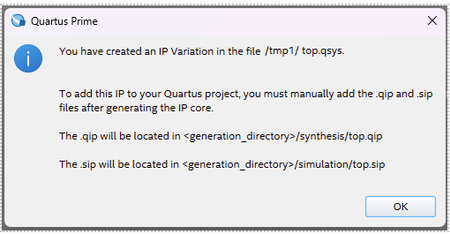
Description In the Quartus ® Prime Standard Edition software version 25.1, any Nios ® V processor designs might fail to compile during Analysis & Synthesis when the QSYS file is added into the Quartus ® Prime project. Here are the possible error messages that you might receive: Error (10170): Verilog HDL syntax error at niosv_cpp_fsm.sv(1418) near text: "'"; expecting ":", or "?", or binary operator. Error (10355): SystemVerilog Enumeration Type Declaration error at riscv.pkg.sv(1163): encoded value for element "MXL32" has width 32, which does not match the width of the enumeration's base type (2) Error (10835): SystemVerilog error at riscv.pkg.sv(149): no support for unions Error (16950): Verilog HDL error at : decimal constant 00000000000000010000000000000000 is too large, using 1874919424 instead Error (16814): Verilog HDL error at ... : unknown literal value 00000000000000010000000000000000 for parameter ... ignored This is because the Quartus ® Prime Standard Edition software version 25.1 has been updated to adhere to the software requirements below. This requirement is not mandatory in prior versions of the Quartus ® Prime Standard Edition software. Resolution To work around this problem in the Quartus ® Prime Standard Edition Software version 25.1, Remove the QSYS file from the project using the Remove Files in Project function. Add the QIP file to the project using the Add Files in Project function. Related Articles ERROR building simple NIOS® V Compact project Nios® V Synthesis Fails with Quartus® Prime 25.1 Lite299Views0likes0Comments