cyclone® 10 gx fpga
326 Topics
Why do I unexpectedly observe intermittent DDM Errors?
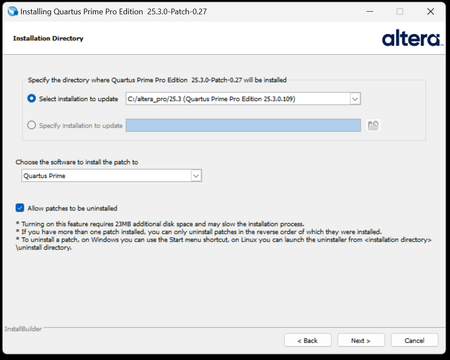
Description Beginning January 10, 2026, executing commands in the terminal or GUI of Quartus® Prime Pro Edition software, Quartus Embedded Edition software or select standalone tools may cause the software or tool to crash with an error similar to the crash signature shown below. This error affects: Quartus Prime Pro Software versions v23.3 through v25.3.1 Standalone Quartus Prime Pro Programmer v23.3 through v25.3.1 Standalone Quartus Prime Pro Embedded Edition v25.3 and v25.3.1 Standalone Quartus Prime Pro Power Thermal Analyzer v25.3 through v25.3.1 This issue is not observed in Quartus Prime Pro Edition versions 23.2 or prior or Quartus Prime Standard Edition. Crash Signature: Error (22912): Unhandled exception: Fatal Error: Assertion failed tools/cpp/ddm/ddm_assessor.cpp:53: DDM_T::verify_token(token) : Cannot identify the client from function assertion_error in tools/cpp/ddm_report/ddm_report_msg.cpp@465 *** Fatal Error: Program termination requested *** *** Below is the stack trace at the time the error occurred. *** The lines beginning "Err Handler" represent frames relating *** to generating this report. *** The point at which the error occurred is somewhere after these lines. *** There may be a few frames representing standard/library code *** before the Quartus frames begin. *** The search for the error should begin with the Quartus frames. *** Unwinder: libunwind *** Stack depth: 15 Quartus 0x24e67: err_terminator() + 0x1bc (ccl_err) Quartus 0xb036a: __cxxabiv1::__terminate(void (*)()) + 0xa (stdc++) Quartus 0xb03d5: (stdc++) Quartus 0xb0628: (stdc++) Quartus 0x1680d: void ddm_throw<DDM_RUNTIME_ERROR>(std::__cxx11::basic_string<char, std::char_traits<char>, std::allocator<char> > const&) + 0x26d (ddm_report) Quartus 0x13fae: DDM_REPORT::DDM_ASSERTION_HANDLER::assertion_error(std::__cxx11::basic_string<char, std::char_traits<char>, std::allocator<char> >) const + 0xde (ddm_report) Quartus 0x12a52: DDM_REPORT::ASSERTION_HANDLER::error(std::__cxx11::basic_string<char, std::char_traits<char>, std::allocator<char> >) + 0x72 (ddm_report) Quartus 0x13e64: DDM_REPORT::detail::assert_at_line(char const*, char const*, int, char const*, ...) + 0x1b4 (ddm_report) Quartus 0x205fb0: ddm_set_lassessor(DDM_T_ASSESSOR*, std::__cxx11::basic_string<char, std::char_traits<char>, std::allocator<char> > const&) + 0x60 (ddm) Quartus 0xf4445: DMS_MANAGER::DMS_MANAGER() + 0x5c5 (dni_dms) Quartus 0xf45b2: DMS_MANAGER::get() + 0x7a (dni_dms) Quartus 0xf6db4: _GLOBAL__sub_I_dms_manager.cpp + 0x58 (dni_dms) Quartus 0x647e: (ld-linux-x86-64) Quartus 0x6568: (ld-linux-x86-64) Quartus 0x202ca: (ld-linux-x86-64) Resolution To work around this problem: For Windows machines Download and unzip the Quartus Prime Pro version zip file that matches your Quartus Prime Pro version from this KDB. Double click on the executable ending in “windows.exe”. When the GUI pops up, press Next. Note that the GUI may look slightly different depending on the version of Quartus you are using. Accept the license agreement Specify the directory where the patch needs to be applied which may be a different location than Quartus install if you have standalone tools in a different directory from your Quartus Prime Pro software installation. Keep “Allow Patch to be uninstalled” selected. Select the software in which to install the patch: The patch will install in the directory of the software or tool you have selected. You will see an uninstall directory for the patch in your software or tool folder where patch is installed; it will contain an executable to uninstall the patch if required for any reason. To confirm patch is installed, you can run quartus_sh -v or corresponding version command for your tool via command line. Alternatively, you can Open Quartus in the GUI and select Help → About Quartus Prime in the main menu. If you are opening up a standalone tool you will navigate to Help-> About <tool_name>. For the Command Line Implementation of the patch in Windows, use the following command: <patch_filename.exe> --mode unattended --installdir <your_install_directory> --accept_eula 1 --patch_to [quartus|qprogrammer|qemb|pta] # An example to patch Quartus Prime Pro Edition Software v25.3: quartus-25.3-0.27-windows.exe --mode unattended --installdir /tmp/altera_pro/25.3 --accept_eula 1 # An example to patch the Standalone Programmer for Quartus Prime Pro Software v25.3: quartus-25.3-0.27-windows.exe --mode unattended --installdir /tmp/altera_pro/25.3 --accept_eula 1 --patch_to qprogrammer For Linux machines: Download and unzip the Quartus Prime Pro version zip file that matches your Quartus Prime Pro version from this KDB. Ensure you run chmod +x on the file ending with linux.run. Run in the command line: ./<installation_patch_run_file>. When GUI pops up, press Next. Note that the GUI may look slightly different depending on the version of Quartus you are using. Accept the license agreement Specify the directory where the patch needs to be applied which may be a different location than Quartus install if you have standalone tools in a different directory from your Quartus Prime Pro software installation. Keep “Allow Patch to be uninstalled” selected. Select the software in which to install the patch: The patch will install in the directory of the software or tool you have selected. You will see an uninstall directory for the patch in your software or tool folder where patch installed; it will contain an executable to uninstall the patch if required for any reason. To confirm patch is installed, you can run ./quartus_sh -v or corresponding version command for your tool via command line. Alternatively, you can Open Quartus in the GUI and select Help → About Quartus Prime in the main menu. If you are opening up a standalone tool you will navigate to Help-> About <tool_name>. For the Command Line Implementation of the patch in Linux, use the following command: ./<patch_filename.run> --mode unattended --installdir <your_install_directory> --accept_eula 1 --patch_to [quartus|qprogrammer|qemb|pta] # An example to patch Quartus Prime Pro Edition v25.3: ./quartus-25.3-0.27-linux.run --mode unattended --installdir /tmp/altera_pro/25.3 --accept_eula 1 # An example to patch the Standalone Programmer for Quartus Prime Pro Software v25.3: ./quartus-25.3-0.27-linux.run --mode unattended --installdir /tmp/altera_pro/25.3 --accept_eula 1 --patch_to qprogrammer This problem has been fixed in Quartus® Prime Pro Edition Software version 26.1. The below table lists the patches that are available and the associated patch number. The patch zip files are attached to the KDB below: Quartus Prime Pro Edition Version Patch Number 23.3 0.52 23.4 0.70 23.4.1 1.01 24.1 0.52 24.2 0.64 24.3 0.35 24.3.1 1.29 25.1 0.36 25.1.1 1.31 25.3 0.27 25.3.1 1.0213KViews5likes0CommentsWhy does my Quartus® Prime Installation fail with certificate error: SSL certificate problem: unable to get local issuer certificate (curlcode 60)?
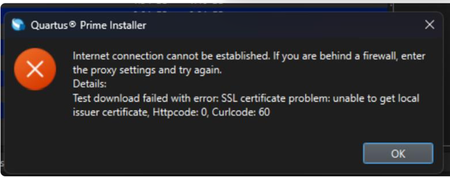
Description Due to a problem in the Quartus® Prime Installer Software, you might see the error message shown below when you click Download & Install. This happens because the certificate bundled with the Quartus® Prime Installer Software is no longer accepted by the Altera® Content Delivery Network (CDN). As a result, secure downloads initiated during the installation process cannot be verified using the outdated certificate. The issue impacts the Installer for the following versions of Quartus software: Operating System Quartus Prime Pro Installer Version(s) Quartus Std/Lite Installer Version(s) Microsoft Windows* 23.3 to 25.3.1 23.1std to 25.1std Linux* 23.3 to 23.4 23.1std The KDB workaround provided below applies to the following versions of Quartus software: Quartus Prime Pro Installer Version(s) Quartus Std/Lite Installer Version(s) KDB workaround applies to 24.3 to 25.3.1 24.1std to 25.1std Note that for all other affected versions not covered by the KDB, you cannot use the installer workaround and must download Quartus software package files individually without using the installer. Separate packages can be found in the Individual Files tab of the Quartus Software Download pages. Resolution To work around this problem, follow these steps: 1. Download and unzip the cacert.zip, which contains the cacert.pem certificate file. 2. Specify the new certificate using one of the following methods: i) Command Line Interface (CLI): Open a command prompt or terminal and run the installer with the--cacert option, pointing to the new certificate file. Windows*: qinst_<version>.exe -sp"--cacert <full path to cacert.pem>" Linux*: qinst_<version>.run -- --cacert <full path to cacert.pem> ii) Graphical User Interface (GUI): - Open the Quartus® Prime Installer, navigate to Settings, locate the CA Certificate Path, and specify the full path to the cacert.pem certificate file. - Then, click Apply > OK. This problem is scheduled to be resolved in a future release of the Quartus® Prime Installer Software.12KViews1like0Comments
Why don’t I get a programming file when I compile with the Quartus® Prime Pro Edition software version 25.1.1?
Description Beginning with version 25.1.1 of the Quartus® Prime Pro Edition software, pin location assignments and I/O standard assignments are required for a programming file to be generated. If these required assignments are missing, no programming file is generated. You must add the required assignments and recompile your design to generate a programming file. If you do not want to generate a programming file, you may ignore this behavior change. To determine whether your design is missing pin location or I/O standard assignments, review your compilation messages. If either of the following messages was generated during your compile, your design is missing pin location or I/O standard assignments that are required to generate a programming file: Critical Warning: Some pins have incomplete I/O assignments. Refer to the I/O Assignment Warnings report for details Critical Warning: No exact pin location assignment(s) for <number> pins of <number> total pins. For the list of pins, please refer to the I/O Assignment Warnings table in the fitter report Resolution Review the I/O Assignment Warnings report, found in the Place sub-section of the Fitter section of the compilation report. Alternately, review the <revision>.fit.plan.rpt report file. For any pins in the I/O Assignment Warnings report that are reported as “Missing location assignment” or “Missing I/O standard,” add the appropriate location or I/O standard assignment. For help making these assignments, refer to Assigning I/O Pins After adding any required assignments, recompile the design to generate a programming file. This change applies to all device families supported by the Quartus® Prime Pro Edition software, beginning in version 25.1.1. Missing pin location or I/O standard assignments are reported as a critical warning, not an error. If you script the compilation of projects, the exit code of the compilation process still indicates success even if pin location or I/O standard assignments are missing, because missing pin location or I/O assignments are reported as a critical warning, not an error.699Views0likes0CommentsWhy Can't I Program Using Active Serial Programming with my USB Blaster III?
Description Due to a firmware issue the USB Blaster III Development cable may not have the correct product ID and may inadvertently disabled FLASH programming using the active serial x1/x2 interface in the Quartus Programmer. It does not impact just using ASx4 to program your FPGA or using JTAG to program your flash device. Is my Development Cable affected by this? If your USB Blaster III Development cable has a serial number ranging from UB3000000 - UB3006090, then you will need to update the PID. Resolution To resolve this issue the Product ID of the cable should be updated to (6023). Perform the following steps on Windows to update the ID. Download and Install the FT_PROG.exe the EEPROM Programming Utility from FTDI https://ftdichip.com/utilities/ Plug-in your USB Blaster III development cable into your computer. Uninstall the USB Blaster III device driver from the device manager. Open the Windows Device Manager. Find the group called JTAG cables, under this group there should be a USB Blaster III device. Right Click on the USB Blaster III device and Click Uninstall. Tick "Attempt to delete the driver for this device" or "Delete the driver software for this device" during uninstallation. This prevents the UB3 driver from being automatically reinstalled. Install the FTDI Device driver. Open the Windows Device Manager. Find the group called Other Devices. In the group Other Devices there may be several USB Blaster III devices. To Identify the correct USB Blaster III device Right click on each USB Blaster III device and click Properties. Find USB Blaster III device that contains values that end with MI_00 Once Identified, Right click on correct USB Blaster III device and click Update driver To Update driver click Browse my computer for drivers Search and select the USB Blaster III driver directory under your Quartus installation. <Quartus Path>\qdrivers\quartus\drivers\usb-blaster-iii Click Let me pick from a list of available drivers on my computer. If, Select your device’s type from the list below, choose Universal Serial Bus controllers. When selecting a driver click the FTDI manufacturer then select USB Serial Converter A Version: 2.12.36.4 and click the Next button. Program your USB Blaster III Development Cable with FT_PROG.exe to update your product ID. Open the FT_PROG.exe from FTDI installed in step 1. From the DEVICES menu click Scan and Parse to bring up your USB Blaster III Device Under the Device Tree select the section called USB Device Descriptor This should contain a property called Product ID and should have a value of 6023, change this to 6023 if it is not set to this value. Once changed, under the DEVICES menu click Program to flash the EEPROM Uninstall the FTDI driver installed in step 4. Open the Windows Device Manager. Find the group Universal Serial Sub controllers In the Universal Serial Bus controllers right click on the USB Serial Converter A and Click Uninstall. Do not tick "Attempt to delete the driver for this device" or "Delete the driver software for this device". Re-Install the USB Blaster III device driver. Open the Windows Device Manager. Find the group called Other Devices. In the group Other Devices there may be several USB Serial Port devices or USB Blaster III devices. To Identify the correct USB Serial Port device Right click on each USB Serial Port device and click Properties. Find USB Serial Port device that contains values that end with MI_00 Once Identified, Right click on correct USB Blaster III device and click Update driver To Update driver click Browse my computer for drivers Search and select the USB Blaster III driver directory under your Quartus installation. <Quartus Path>\qdrivers\quartus\drivers\usb-blaster-iii Click the Next button. Windows should show USB Blaster III driver installed. Verify USB Blaster III device has the correct Product ID. Open the Windows Device Manager. Find the group called JTAG cables, under this group there should be a USB Blaster III device. Right click on each USB Blaster III device and click Properties. Values should contain PID_6023 in the string, if not unplug and re-plugin the device. Open Quartus Programmer and Validate that the Active Serial programing is now available.500Views0likes0CommentsHow can I simulate the ASMI Intel FPGA IP with internal and external memory models when using the Intel® Arria® 10 and Intel Cyclone® 10 GX devices?
Description For internal memory model use case, we currently only support simulation of the ASMI Intel FPGA IP in Intel® Arria® 10 and Intel Cyclone® 10 GX devices with the flash model for the EPCQL1024 serial configuration device. Follow the steps in the Resolution section to perform the simulation with the internal EPCQL model (Note: This simulation was tested with Mentor Graphics* ModelSim* SE simulation software). Resolution Create a simulation model for ASMI block and set the enable_sim parameter to true in file: <project directory>/<ASMIIP name>/<altera_asmi_parallel_<quartus_version>>/<sim>/<ip_name>altera_asmi_parallel_<quartus_version>_<unique_ip_id>.v Create a testbench file with initialization of ASMI block as shown in the following example: <ip_name>_altera_asmi_parallel_<quartus_version>_<unique_ip_id> dut( .clkin (clkin), // clkin.clk .fast_read (fast_read), // fast_read.fast_read .rden (rden), // rden.rden .addr (addr), // addr.addr .read_status (read_status), // read_status.read_status .write (write), // write.write .datain (datain), // datain.datain .sector_protect (sector_protect), // sector_protect.sector_protect .sector_erase (sector_erase), // sector_erase.sector_erase .die_erase (die_erase), // die_erase.die_erase .wren (wren), // wren.wren .read_rdid (read_rdid), // read_rdid.read_rdid .en4b_addr (en4b_addr), // en4b_addr.en4b_addr .ex4b_addr (ex4b_addr), // ex4b_addr.ex4b_addr .reset (reset), // reset.reset .sce (sce), // sce.sce .dataout (dataout), // dataout.dataout .busy (busy), // busy.busy .data_valid (data_valid), // data_valid.data_valid .status_out (status_out), // status_out.status_out .illegal_write (illegal_write), // illegal_write.illegal_write .illegal_erase (illegal_erase), // illegal_erase.illegal_erase .read_address (read_address), // read_address.read_address .rdid_out (rdid_out) // rdid_out.rdid_out ); Run simulation. To simulate with an external memory model, follow these steps: Create a simulation model for ASMI block and set the enable_sim parameter to false in file: <project directory>/<ASMI IP name>/<altera_asmi_parallel_<quartus_version>>/<sim>/<ip_name>altera_asmi_parallel_<quartus_version>_<unique_ip_id>.v Create a testbench file with initialization of ASMI block (as shown in the previous code example): Create a wrapper for external memory In a simulation project, compile the following files for your working folder: flash simulation model asmi_sim_model design wrapper testbench file(s) Run simulation.499Views0likes0CommentsWhy does the Nios® V processor that applies fast JTAG UART driver stop (stuck in a loop) when the JTAG UART terminal is not active?
Description Due to a problem in the Board Support Package Editor of Quartus ® Prime software, the JTAG UART driver for fast implementation might get stuck in a loop for any Nios ® V processor designs, when JTAG UART terminal is not active. This problem has been present since: Quartus ® Prime Pro Edition software version 21.3 Quartus ® Prime Standard Edition software version 22.1 It is because the JTAG UART IP is initialized before the Nios ® V processor initialization in alt_sys_init.c. For example: void alt_sys_init( void ) { ALTERA_AVALON_JTAG_UART_INIT (JTAG_UART, jtag_uart); INTEL_NIOSV_M_INIT (NIOS, nios); } Resolution To work around this problem, update the alt_sys_init.c to initialize the Nios ® V processor first. void alt_sys_init( void ) { INTEL_NIOSV_M_INIT (NIOS, nios); ALTERA_AVALON_JTAG_UART_INIT (JTAG_UART, jtag_uart); } This problem is currently scheduled to be resolved in a future release of the Quartus ® Prime software. Additional Information Refer to Embedded Peripherals IP User Guide [titled as JTAG UART Core - Driver Options: Fast vs. Small Implementations] for more information about the JTAG UART driver for fast (non-blocking) and slow (blocking) implementation. Related Article NIOSV firmware stuck when juart-terminal is not open for the print messages.400Views0likes0CommentsHow do I constrain my clock domain crossing?
Description It is essential to apply timing constraints to your multibit clock domain crossing. If this bus has a set_false_path constraint, then the skew across the bus can be more than 1 clock period, which can cause functional errors. The first requirement is that you do not have a set_false_path constraint between the two clock domains. If you don't want paths between them to be analyzed for setup and hold, then you can use set_clock_groups, which has a lower precedence. Next, constrain the paths with set_net_delay to make them as short as possible and with set_max_skew. set_max_skew does not constrain the fitter, but you can analyse against this constraint in the Timing Analyzer. Resolution The constraints for a clock domain crossing between data_a in clock domain clk_a and data_b in clock domain clk_b might look like this. create_clock -name clk_a -period 4.000 [get_ports {clk_a}] create_clock -name clk_b -period 4.500 [get_ports {clk_b}] set_clock_groups -asynchronous -group [get_clocks {clk_a}] -group [get_clocks {clk_b}] set_net_delay -from [get_registers {data_a[*]}] -to [get_registers {data_b[*]}] -max -get_value_from_clock_period dst_clock_period -value_multiplier 0.8 set_max_skew -from [get_keepers {data_a[*]}] -to [get_keepers {data_b[*]}] -get_skew_value_from_clock_period min_clock_period -skew_value_multiplier 0.8 The skew requirements will depend on your design and how you handled the clock domain crossing. Finally, check the timing of your clock domain crossing by running Report Max Skew Summary and Report Net Delay Summary in the Timing Analyzer.400Views0likes0CommentsError (209012): Operation failed
Description You might encounter this error message during the .jic file programming into the EPCQ-L flash device in the Intel® Cyclone® 10 GX FPGA Development Kit when using the Intel® Quartus® Prime Software programmer version 17.1 and older. Resolution This problem is fixed starting with the Intel® Quartus® Prime Pro Edition Software version 17.1.1.399Views0likes0CommentsError(22595): Quartus® Prime software does not support entity "entity_path/entity_name" of type "BDF". Convert BDF files to Verilog or VHDL for continued support
Description Beginning with the Quartus® Prime Pro Edition Software version 23.3, the Block Design Format (.BDF) has been deprecated. Any existing BDF design files must be converted to Verilog HDL or VHDL. Resolution Convert your BDF files to Verilog HDL or VHDL using the Quartus® Prime Standard Edition command line with one of the following commands: quartus_map <project_name> --convert_bdf_to_verilog=<bdf_file_name> quartus_map <project_name> --convert_bdf_to_vhdl=<bdf_file_name> This will generate a Verilog HDL or VHDL file in the same folder where the BDF file is located. Some of the generated registers or instances may require renaming to work properly. Notes: The Quartus® Prime Standard Edition Software does not support devices newer than Arria® 10 FPGAs. For projects targeting newer device families, change the device to a supported one or create a dummy project targeting a supported device. The Quartus® Prime Standard Edition Software does not support all the assignments that the Quartus® Prime Pro Edition Software supports. Comment out any unsupported assignments when converting your BDF to Verilog HDL or VHDL.399Views0likes0CommentsWhat is the latest device firmware for the Agilex® FPGA and Stratix®10 FPGAs?
Description Altera® recommends using the latest version of the Quartus® Prime Pro Edition Software and the latest available device firmware. Please also see the following user guides: Updating the SDM Firmware in the Agilex® 7 FPGA Configuration User Guide Updating the SDM Firmware in the Stratix® 10 FPGA Configuration User Guide Resolution The latest device firmware available for the Quartus® Prime Pro Edition Software can be downloaded from the following links: Quartus Prime Pro Edition Software version 25.3 What is the latest device firmware for the Quartus® Prime Pro Edition Software version 25.3? Quartus Prime Pro Edition Software version 25.1 What is the latest device firmware for the Quartus® Prime Pro Edition Software version 25.1? Quartus Prime Pro Edition Software version 24.3.1 What is the latest device firmware for the Quartus® Prime Pro Edition Software version 24.3.1? Quartus Prime Pro Edition Software version 24.3 What is the latest device firmware for the Quartus® Prime Pro Edition Software version 24.3? Quartus Prime Pro Edition Software version 24.2 What is the latest device firmware for the Quartus® Prime Pro Edition Software version 24.2? Quartus Prime Pro Edition Software version 24.1 What is the latest device firmware for the Quartus® Prime Pro Edition Software version 24.1? Quartus Prime Pro Edition Software version 23.4 What is the latest device firmware available for the Quartus® Prime Pro Edition Software version 23.4? Quartus Prime Pro Edition Software version 23.3 What is the latest device firmware available for the Quartus® Prime Pro Edition Software version 23.3? Quartus Prime Pro Edition Software version 23.2 What is the latest device firmware available for the Quartus® Prime Pro Edition Software version 23.2? Quartus Prime Pro Edition Software version 23.1 What is the latest device firmware available for the Quartus® Prime Pro Edition Software version 23.1? Quartus Prime Pro Edition Software version 22.4 What is the latest device firmware available for the Quartus® Prime Pro Edition Software version 22.4? Quartus Prime Pro Edition Software version 22.3 What is the latest device firmware available for the Quartus® Prime Pro Edition Software version 22.3? Quartus Prime Pro Edition Software version 22.2 What is the latest device firmware available for the Quartus® Prime Pro Edition Software version 22.2? Quartus Prime Pro Edition Software version 22.1 What is the latest device firmware available for the Quartus® Prime Pro Edition Software version 22.1? Quartus Prime Pro Edition Software version 21.4 What is the latest device firmware available for the Quartus® Prime Pro Edition Software version 21.4? Quartus Prime Pro Edition Software version 21.3 What is the latest device firmware available for the Quartus® Prime Pro Edition Software version 21.3? Quartus Prime Pro Edition Software version 21.2 What is the latest device firmware available for the Quartus® Prime Pro Edition Software version 21.2? Quartus Prime Pro Edition Software version 21.1 What is the latest device firmware available for the Quartus® Prime Pro Edition Software version 21.1? Quartus Prime Pro Edition Software version 20.3 What is the latest device firmware available for the Quartus® Prime Pro Edition Software version 20.3?399Views0likes0Comments