cxl
38 Topics
Introducing the Altera Community AI Responder — Beta
Altera is introducing the AI Responder, an assistant built into the Altera Community to help provide faster, context-aware guidance for Altera product questions. It uses relevant public Altera documentation and Knowledge Database content, with coverage continuing to expand. The AI Responder may provide source references and can hand off complex or out-of-scope questions to an Altera subject-matter expert. As a beta feature, responses may contain errors or omissions, so please review the sources and verify technical guidance against official Altera documentation before implementation. If the response does not fully address your question, add more context and tag ai_responder to continue the discussion. We welcome your feedback as we improve the Community experience.22Views0likes0Comments
Agilex 7 R-Tile CXL Type-2 IP Hang with Incomplete CXL.cache Operations
Device: DK-DEV-AGI027RBES (Power Solution 2) Software Version: Quartus Prime Pro 24.3 IP Core: CXL Type 2 Hard IP Issue Description: We observed that the CXL Type-2 IP can hang when CXL.cache transactions remain incomplete under heavy workloads. Our design is based on the CXL Type-2 design example, with a delay unit inserted between the CXL IP and the DDR controller. We ran Intel MLC bandwidth tests on the CXL device while monitoring host reachability using continuous ping. In the first experiment (Figure 1), the delay unit inserted a 10,000-cycle delay for each CXL.mem request, with no CXL.cache operations involved. In this case, ping latency increased from approximately 0.2 ms to 45 ms, but the system remained stable. In the second experiment (Figure 2), we replaced the 10,000-cycle delay with a CXL.cache operation, which typically completes in around 300 cycles. Under this configuration, the system hung and ping indicated that the host became unreachable. We observed that the CXL.cache request was issued but never received a response, leading to the hang. We would like to know if there is a known issue or recommended solution for handling incomplete CXL.cache operations in this scenario.152Views0likes3Comments
CXL IP type2 ED failed at the final assembler stage due to unlicensed IP in Ver 25.1
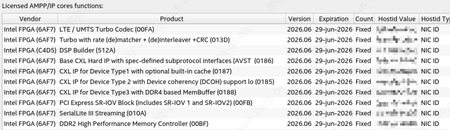
Hi supprot teams, I installed Quartus Prime Pro V25.1 and generate tool lic & CXL type1/2/3 lic in SSLC. And I create a project of CXL type2 ed. After click compile button, everything goes fine until the assembler state, the report tells: Error (23714): Can not generate programming files for your current project because you do not have a valid license. Visit the Intel FPGA Self-Service Licensing Center at https://licensing.intel.com Warning (115005): Unlicensed IP: "CXL IP for Device Type 2 with Device coherency (6AF7 0185)" Warning (115004): Unlicensed encrypted design file: "/xxx/demo/intel_rtile_cxl_top_0_ed/hardware_test_design/qdb/_compiler/cxltyp2_ed/root_partition/25.1.0/final/1/netlist.model" Warning (115004): Unlicensed encrypted design file: "/xxx/demo/intel_rtile_cxl_top_0_ed/hardware_test_design/qdb/_compiler/cxltyp2_ed/root_partition/25.1.0/final/1/names.model" Warning (115004): Unlicensed encrypted design file: "/xxx/demo/intel_rtile_cxl_top_0_ed/hardware_test_design/qdb/_compiler/cxltyp2_ed/auto_fab_0/25.1.0/final/1/netlist.model" Warning (115004): Unlicensed encrypted design file: "/xxx/demo/intel_rtile_cxl_top_0_ed/hardware_test_design/qdb/_compiler/cxltyp2_ed/auto_fab_0/25.1.0/final/1/names.model" Error: Quartus Prime Assembler was unsuccessful. 1 error, 6 warnings And I check the license status in output_files/cxltyp2_ed.asm.rpt : +----------------------------------------------------------------------------------------+ ; Assembler Encrypted IP Cores Summary ; +------------+------------------------------------------------------------+--------------+ ; Vendor ; IP Core Name ; License Type ; +------------+------------------------------------------------------------+--------------+ ; Intel FPGA ; CXL IP for Device Type 2 with Device coherency (6AF7 0185) ; Unlicensed ; ; Intel FPGA ; Signal Tap (6AF7 BCE1) ; Licensed ; ; Intel FPGA ; Signal Tap (6AF7 BCEC) ; Licensed ; ; Intel FPGA ; Unknown (6AF7 FFFF) ; Licensed ; +------------+------------------------------------------------------------+--------------+ But in Tools -> License Setup,I can see feature "6AF7 0185" is valid. So how can I solve this problem. Regards Joseph84Views0likes1CommentAgilex 7 R-Tile CXL IP Support for QoS DevLoad and PCIe ATS
Device: DK-DEV-AGI027RBES (Power Solution 2) Software Version: Quartus Prime Pro 24.3 IP Core: CXL Type-2 Hard IP Issue Description We have two questions regarding feature support in the Agilex 7 R-Tile CXL IP. 1. CXL QoS Device Load (DevLoad) According to the CXL 2.0 Specification, Section 3.3.2 (QoS Telemetry for Memory), CXL.mem supports reporting QoS Device Load (DevLoad). In the CXL IP example design, we observe that the DevLoad-related signal exists, but it is not actively used and appears to be statically tied to 0. • Is CXL.mem QoS Device Load reporting supported in the current CXL Type-2 Hard IP? • What is the expected host CPU behavior when DevLoad is asserted (e.g., bandwidth throttling, scheduling changes, or telemetry only)? 2. PCIe ATS (Address Translation Service) Requests We would like to issue PCIe ATS requests to the host using the CXL.io interface. • Does the Agilex 7 R-Tile CXL Type-2 Hard IP support generating PCIe ATS request packets? • If supported, are there any specific configuration requirements or interface signals needed to enable ATS transactions through CXL.io?70Views0likes1Comment
Agilex 7 R-Tile CXL IP: D2H write bandwidth does not scale with dual CAFU AXI-MM ports
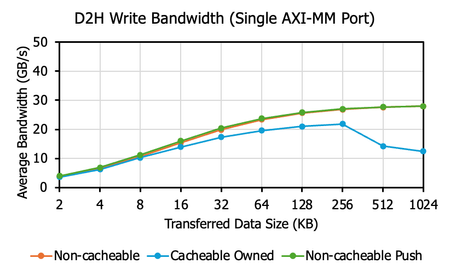
Device: Agilex 7 I-Series AGI027 Software: Quartus Prime Pro 24.3 IP Core: CXL Type 2 IP Issue Description: We are attempting to increase CXL Device-to-Host (D2H) write bandwidth by utilizing both CAFU AXI-MM ports (port 0 and port 1) provided in the CXL Type 2 IP design example. However, our measurements show that enabling both AXI ports does not improve bandwidth as expected. For Non-cacheable writes, bandwidth remains unchanged when moving from one port to two ports. For Cacheable Owned writes, bandwidth decreases when using two ports. Please refer to the figures blow for detailed results. We are using the design example configured with two DCOH slices. To avoid potential DCOH contention, we've implemented address interleaving such that: - AXI port 0 only accesses addresses corresponding to "even number × 64B" - AXI port 1 only accesses addresses corresponding to "odd number × 64B" Despite this, no bandwidth improvement is observed for either Non-cacheable or Cacheable Owned traffic. Additionally, the non-cacheable bandwidth curve remains almost identical regardless of whether one or both AXI ports are used. This suggests that the exercised hardware path may contain a bottleneck or contention point within (either soft or hard part of) the CXL Type-2 IP. We would like to understand how to resolve this bandwidth limitation. If it cannot be improved, we would appreciate clarification on the underlying cause of this behavior. Thank you for your time and support.Solved113Views0likes1CommentCXL IP User Guide redirect to intel.com and access denied.
Hey, guys, I am interested in CXL IP inside Agilex7 device. Before I purchase the DK-DEV-AGI027-RA-B board, I want to read the User Guide and the Example Design User Guide to try the CXL demo. But the documents link listed on the webpage below: Compute Express Link (CXL) IP | Altera https://www.intel.com/content/www/us/en/secure/content-details/862292/agilex-7-r-tile-compute-express-link-cxl-1-1-2-0-fpga-ip-user-guide.html?wapkw=cxl%20ip%20user%20guide https://www.intel.com/content/www/us/en/secure/content-details/862293/agilex-7-r-tile-compute-express-link-cxl-fpga-ip-design-example-user-guide.html?wapkw=cxl%20ip%20user%20guide redirect me to intel.com and after I registered and login in, I can only see access denied. So how can I get access to these 2 documents. Thanks. Joseph114Views0likes1Comment
PCIe Enumeration Failure for CXL IP
When attempting to validate the Agilex 7 R-Tile Compute Express Link (CXL) 1.1/2.0 IP (Type 2 and Type 3) using a CXL compatible host server, the host server is unable to complete PCIe bus enumeration. The host server stalls while attempting to complete PCIe bus enumeration. The stall never resolves after boot, and access to to the host is never granted. Depiction of the stall and its status code from the host server's perspective is provided as an attached PNG file titled: "pcie_enumeration_stall". Debugging Information: A PCIe Gen 5.0 reference design using the Altera R-Tile Avalon Streaming IP For PCI Express was used to validate that PCIe enumeration could complete fully without failure, and that the host server could exchange data with the FPGA. While running the CXL example design, the Quartus System Console's Link Logger indicates that the LTSSM state is in the "UP_L0" before the PCIe bus enumeration stall. The state may sometimes change when attempting to "Refresh" the status during the PCIe bus enumeration stall. The state may briefly enter recovery (UP_L0 -> REC_IDLE -> REC_RCVRCFG -> REC_RCSVLOCK -> REC_COMPLETE -> UP_L0). Depiction of the Quartus System Console's Link Logger when this occurs is provided as an attached PNG file titled: "ltssm_link_logger". While running the CXL example design, the Quartus System Console's Link Logger indicates that the advertised and negotiated link speeds and widths are both 32.0 GT and x16. Depiction of a CXL Type 3 Quartus System Console's Overview is provided as an attached PNG file titled: "cxl_ip_systemconsole_overview". Instead of generating the example design, the pre-compiled binary offered by Altera for Type 2 and Type 3 CXL IP designs was used and resulted in the exact same failures as shown above. CXL.mem transaction registers (M2S and S2M) are 0x00, indicating that the host server never progresses far enough to begin sending/receiving transactions/requests. Between the PCIe build that functions and the CXL build that does not function (stalls at enumeration), no server UEFI settings were changed. A CXL enable function was enabled for all tests. Several PCIe UEFI settings were changed in an attempt to resolve the enumeration stall, but none changed the outcome. Attempting to disable the CXL Compliance 2.0 and the HDM decoder registers both did not resolve the issue. The FPGA was powered and programmed before the server was launched. Two different CXL servers were tested and both resulted in the same behavior. The relevant PCIe and CXL settings from BIOS is provided as an attached PNG file titled: "cxl_server_settings". The CXL REFCLK was tested as both COMMON and SRIS/SRNS. Each test changed SW3 to use relevant onboard and connected based clocks. IP Settings: CXL IP settings are uploaded as PNG files titled: "cxl_ip_settings_N". The settings tested are the default provided settings as well as a version with a 300 MHz PLD clock (SRIS). Hardware Details: FPGA is connected to host server via PCIe Gen 5.0 x16 slot on Tile 14C. FPGA device is the Altera Agilex 7 FPGA I-Series Development Kit (Production 2x R-Tile & 1x F-Tile) (AGIB027R29A1E1VB) The DIMM provided with the development kit is slotted into DIMM Slot A. SW1 is set to 1000 (PCIe PRSNT x16). SW3 is set to 0110 for designs using the CXL/PCIe common clock and 0000 for designs using the CXL/PCIe onboard REFCLK (SRIS). Software Details: Quartus Prime Pro Edition v25.1 was used to generate the designs. R-Tile Altera FPGA IP for Compute Express Link (CXL) was generated with version 1.17.0. FPGA Design: The FPGA design is generated using the example design with the IP settings given above. A pre-compiled binary provided by Altera was also used to test instead of a generated design. Server details: SMC AS-1126HS-TN (CXL 2.0 via 4x PCIe gen5 x16 slots) CPU: 2x AMD EPYC 9135 (CXL 2.0) RAM: 4x Micron 64GB @ 6000 MT/s UEFI: AMI 1.7a 10/30/2025 Attachments: The system console debug register outputs are saved to CSV files attached to this post. These CSV files are taken from a CXL Type 3 reference design with PLD REFCLK at 300 MHz (SRIS). Questions: Can you provide guidance on how to obtain more information on the enumeration status other than the LTSSM register? Can you provide the UEFI/BIOS settings for PCIe/CXL that was used to test this IP as reference? Could the configuration space registers (DVSEC/HDM) or the TLP handling implemented in the CXL example design RTL create this PCIe enumeration failure? Can you provide guidance on what debug/status registers the CXL IP provides that could be relevant to this issue?523Views0likes4CommentsAgilex 7 R-Tile PIPE Direct Mode: Raw Rx Data Misalignment - Is Soft Word Alignment Needed?
Hello, I am designing a custom PCIe Logical PHY using Agilex 7 R-Tile in PIPE Direct Mode. My goal is to implement the PCS/MAC layer in soft logic (FPGA fabric). I have established a link with the Host, but I am unable to detect the COM symbol (K28.5). Instead, I observe the following two repeating patterns on the 10-bit RxData bus via Signal Tap: Observed Raw Data (Repeating 10-bit Hex values): Pattern A (RD-): 0x3E5, 0x142, 0x147, 0x267, 0x30E, 0x236, 0x156, 0x155, 0x155, ... Pattern B (RD+): 0x01D, 0x2BD, 0x2B8, 0x198, 0x0F1, 0x1C9, 0x151, 0x155, 0x155, ... My Analysis: The trailing 0x155 matches D10.2 (TS1 Link/Lane ID), which is symmetric (0101010101), so it looks correct even if bit-reversed. The header 0x3E5 (Pattern A) and 0x01D (Pattern B) do not match K28.5 directly. However, if I apply Bit Reversal and a 3-bit Shift to 0x3E5, it perfectly matches the K28.5 comma pattern. This strongly suggests the data is valid but is coming in as Raw, Bit-Reversed, and Misaligned bits. My Questions: In PIPE Direct Mode, is it standard behavior for the R-Tile Hard IP to bypass Word Alignment and output raw, unaligned data? Does this mean the user is strictly responsible for implementing Bit Reversal and a Soft Word Aligner (Bit Slip / Barrel Shifter) in the FPGA fabric to achieve Symbol Lock? Is there any IP parameter or configuration to enable Hard Word Alignment while keeping the PIPE Direct interface? I would appreciate any confirmation or advice from those experienced with R-Tile PIPE Direct mode. Thank you.97Views0likes1Comment
CXL ARB/MUX initialization debug
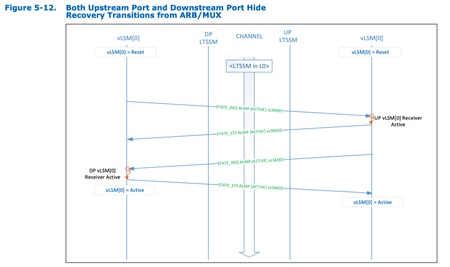
Hi, I am currently implementing the CXL controller using the FPGA. (connected to Intel Xeon Sapphire Rapids Server) (I am not sure I am writing to the appropriate board. If I need to move this post, please let me know ) Actually, I am not using the Intel CXL IP and implementing myself based on PCIE IP. and I am on the road to implement the FPGA that want to be connected to CPU as CXL.io & CXL.cache enabled(CXL type 1 device). But the problem is I am stuck at ARB/MUX layer initialization flow. (I already successfully done connecting CPU and FPGA as CXL.io only enabled . As CXL.io only enabled, ARB/MUX layer is set to bypassed so that ARB/MUX layer initialization flow is not required at this situation. ) In this above picture(Fig. 5-12) from the CXL specification, CPU(Left side) and Endpoint device(Right side) exchange the ALMPs(ARB/MUX link management packets) and finishes the state transition to active state. but the problem is that CPU is not responding the State_Status_Active_ALMP that notifies the CPU's ARB/MUX layer initialization is done even if previous ALMPs sent well from the endpoint device and received well to CPU. Can anybody help me with these problems ? Any similar circumstances or advices would be welcome Best,753Views0likes2Comments
altera_avalon_new_sdram_controller
I have a project with Dev board max1000 and altera_avalon_new_sdram_controller and in the last version of quartus prime lite give an error that I can't found this module in Qsys. Today I'm writing to you via mobile so I can't make to you a screenshot to show what connections we need to do but since this is a github project, I can show you the link that is https://github.com/dimag0g/nios_duino/blob/476950fa22f31b23a70c71ec2137ad0d9a84ab21/contrib/max1000/NIOSDuino.qar . If anyone can say me how to easily replace this IP I will thanks.Solved3.1KViews0likes8Comments