ai suite
20 Topics
Introducing the Altera Community AI Responder — Beta
Altera is introducing the AI Responder, an assistant built into the Altera Community to help provide faster, context-aware guidance for Altera product questions. It uses relevant public Altera documentation and Knowledge Database content, with coverage continuing to expand. The AI Responder may provide source references and can hand off complex or out-of-scope questions to an Altera subject-matter expert. As a beta feature, responses may contain errors or omissions, so please review the sources and verify technical guidance against official Altera documentation before implementation. If the response does not fully address your question, add more context and tag ai_responder to continue the discussion. We welcome your feedback as we improve the Community experience.35Views0likes1CommentDoes anyone actually use the FPGA AI Suite?
Hello Altera Community My question today is: does anyone actually use the ai suite, and is able to profit from it? I am thinking of vibe coding a micro service with the docker image, such that one can try the compiler and have the output presented nicely. That way they dont have to read the entire manual to try it out. However it does not make sense for me to make it, if nobody will use it. I only know 3 people who have used it, myself, fpga zealot, and one guy on linkedin. Thanks in advance.Solved156Views0likes4CommentsAI Suite - How to interpret these graphs in Model Analyzer GUI
Hello Altera Community What can I learn from these subgraphs? I'm not sure how to connect it to the dla layer device file. The compiler told me: [ INFO ] The input graph is split into 9 subgraph(s), FPGA:3 CPU:6. (unsupported_layer_chains.dot) There are 9 nodes with "Transpose does not precede an FC layer." and 2 nodes with "Interpolation input not in NCDHW layout" (hetero_subgraphs_TensorFlow_Frontend_IR_3.dot) Why is there a node for device subgraph? Thanks in advance.Solved239Views0likes3CommentsAI Suite - Custom model in the FPGA building process
Hello Altera Community. My question is: Where in the FPGA building process do I incorporate my costum neural network into the design? This is my current understanding of the FPGA building process: The IP block is generated with the dla create ip script, which takes arch file as input. The IP block is placed in platform designer, and then is connected to memory and signals. After compiling, the data is send to the design using runtime, (JTAG being the slowest) Where does the NN Model I made with PyTorch gets incorporated into all this?Solved186Views0likes1CommentAI Suite - Spatial IP outputs wrong value
Hello Altera Community When looking at my Spatial IP in Signal Tap, I can see that it outputs a wrong value. Please help me identify where this mistakes happen. Below is the Signal Tap result of my test: 3D903C90 - 3D9C3D87 -BD983E38 However from my golden_output_sink_port_0.txt I'm expecting this value: 3D12BC8D - 3DA43E1E - 3DABBE18 Below is the Singal Tap of my input I'm inserting the values I got from input_vlogkw.txt from the DLA_COMPILER. Here is a list of warnings I got from Quartus, but they are from proteced sv files that I can't acess: Warning(16761): VHDL warning at spatial_first.vhd(146): actual for formal port "reset_reset" is neither a static name nor a globally static expression Warning(13469): Verilog HDL assignment warning at dot_core_controller.sv(381): truncated value with size 6 to match size of target (5) Warning(16788): Net "out[0][31]" does not have a driver at dsp_sum_of_2n_bf16xbf16.sv(118) Warning(13469): Verilog HDL assignment warning at dot_core_controller.sv(381): truncated value with size 6 to match size of target (5) Warning(21620): Design Assistant Results: 1 of 1 High severity rules issued violations in snapshot 'partitioned'. Please refer to DRC report 'C:/Users/mads/Desktop/test/quartus/output_files/spatial_first.drc.partitioned.rpt' for more information Warning(25315): Some pins are missing drive strength (current strength), termination and/or slew rate assignments. Refer to the I/O Assignment Warnings report for details. Warning(332158): Clock uncertainty characteristics of the A5EB013BB23BE4SR1 device are preliminary Warning(18291): Timing characteristics of device A5EB013BB23BE4SR1 are preliminary Warning(332060): Node: altera_reserved_tck was determined to be a clock but was found without an associated clock assignment. Warning(332158): Clock uncertainty characteristics of the A5EB013BB23BE4SR1 device are preliminary Warning(21620): Design Assistant Results: 3 of 34 High severity rules issued violations in snapshot 'final'. Please refer to DRC report 'C:/Users/mads/Desktop/test/quartus/output_files/spatial_first.tq.drc.signoff.rpt' for more information Attached is Netlist viewer of my Spatial IP.Solved195Views0likes5CommentsAI Suite - Is layout transformation useful in more scenarios?
Hello Altera Community Layout transformation is difficult to wrap your head around. I understand that it is useful when the input is an image with R,B,G channels, and the operation is convolution for feature extraction. I understand it this way: The current input and filter is put into the same feature for the PE to process this cycle. But it is possible to process more channels, so it goes up the timeline of input and also folds that into the current input? Is this only useful when doing image stuff or can it also be utilized when doing simple linear stuff? In the compiler it is possible to optimize for area and resources, it is not possible to optimize for throughput which is the most important. For transformation the only paramter is --folding which must be set manually. When should I set the folding parameter? when can I utilize this to improve my design? Thanks in advanceSolved125Views0likes1CommentAI Suite - core_hw.tcl error
Hello Altera Community. Can someone explain what the purpose of the core_hw.tcl file is? It gives me an error about some static_files.tcl file. core_hw.tcl is a file that appears at the top of an ip repo after using the dla_create_ip command. Error: C:\Users\mads\Desktop\testHANDMATH\ip_handmath\altera_ai_ip\core_hw.tcl: couldn't read file "C:/Users/mads/Desktop/testHANDMATH/ip_handmath/altera_ai_ip/static_files.tcl": no such file or directory Personally I fix this by pointing my search path at the verilog folder, instead of the top of the IP folder. ip_repo is my folder generated by dla_create_ip c:/users/mads/desktop/test/ip_repo/altera_ai_ip/verilog\**\*Solved131Views0likes2CommentsHow does the FPGA AI Suite utilize Agilex 5 DSP Blocks?
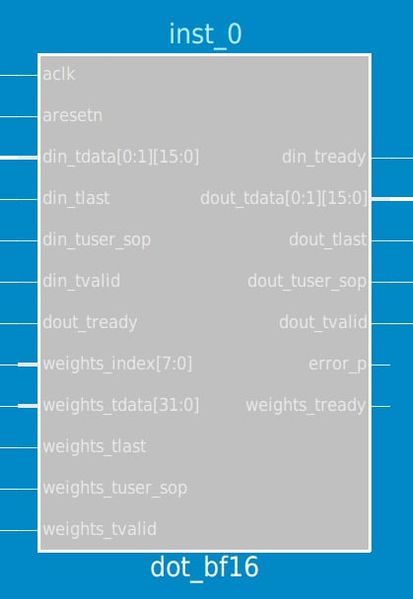
Hello Altera Community. I have a module called "dot_bf16" that uses the bf16 floating point format to calculate dot product and I am wondering if it uses the Agilex5 AI optimized DSP blocks to do this. I can't myself see how the DSP blocks are configured because they are all encrypted. 1. Agilex™ 5 Variable Precision DSP Blocks Overview • Variable Precision DSP Blocks User Guide Agilex™ 5 FPGAs and SoCs • Altera Documentation and Resources Center This document states that there are 3 operational modes for tensor mode: 1. Tensor float point mode 2. Tensor fixed point mode 3. Tensor accumulation mode Does the FPGA AI Suite utilize any of these? I also noticed the module uses a FSM and controller.Solved130Views0likes1CommentAI Suite - Why does the Sequential IP not take a model argument?
Hello Altera Community Why does the Sequential IP not take a model argument? When targeting the Spatial IP, there is an argument where you can input your model, which is an xml file (and a bin file), exported using OpenVino. Then it will convert these weights and such to .mif files for the FPGA to load. This is easy to understand. The Sequential IP is a lot harder to understand. I get that the architecture file does all the fpga block related configuration. But I don't understand how it will know which weights to use. Does the Sequential IP only work for the pre defined example graphs?Solved183Views0likes4CommentsAI Suite - Various Questions
Hello Altera Community I have a few questions about the AI Suite 1. Estimating whether a model will fit on an FPGA using a formula Suppose I have a neural network with x amount of layers and y amount of neurons in each layer. Then say I have a baord with an amount of DSP/ALMs/LUTs What could be an approximating formula (It does not need to be accurate). And what are the typical limiting factors? 2. Impact of the enable_parameter_rom parameter Is it correctly understood that this parameter determines whatever the mif (Memory initialization files) containing the weights are put inside a rom or external memory? Does this actually impact the speed? I would assume that the external memory might be faster than some of the bottleneck components in the AI IP block. 3. Any architecture options for the Spatial IP? My model uses a 16bf * 6 input, so I think it would make sense to increase the input stream size so it matches. But I don't know if the same options from the sequential IP also applies to the spatial IP, since the example is just two lines.Solved109Views0likes1Comment