Forum Discussion

Altera_Forum's avatar
Altera_Forum
Icon for Honored Contributor rankHonored Contributor
15 years ago

USB-Blaster

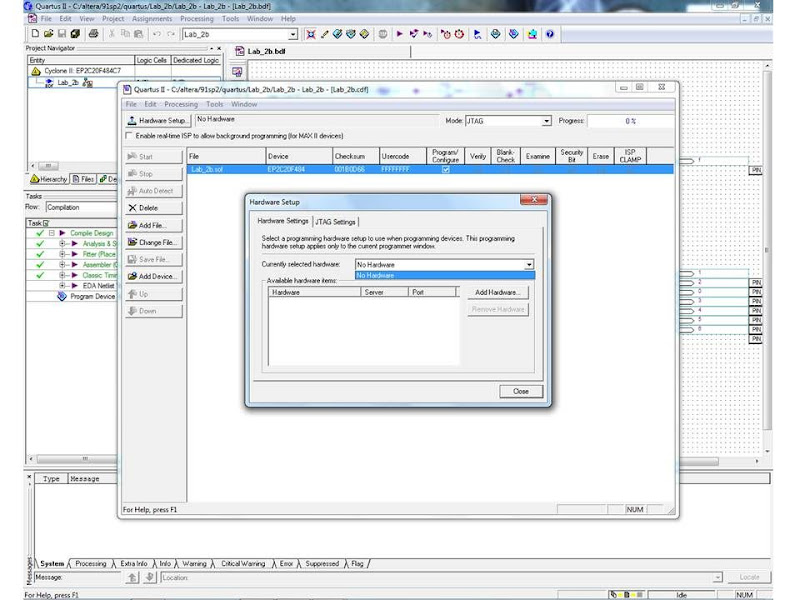
I am using Quartus II v9.1 in conjunction with a Cyclone II for a class at the university. I have successfully programmed the Cyclone II at school, but have been unable to get Quartus to recognize the USB-Blaster at home. My OS is Windows 7 Home Premium Edition (64 bit). I downloaded the drivers from v10, as recommended on the Altera website, and USB-Blaster appears in my devices panel when it is plugged in, but when I go into Programmer>Hardware Setup, the only thing listed in the drop down is No Hardware. I have seen a similar thread that mentioned something about unsigned drivers, and when I check the drivers, while there is one for 64 bit, only one has a certificate, and it is for 32 bit. Is this my problem? And, if so, what can I do to fix this?

10 Replies

  • Altera_Forum's avatar
    Altera_Forum
    Icon for Honored Contributor rankHonored Contributor

    --- Quote Start ---

    I have seen a similar thread that mentioned something about unsigned drivers, and when I check the drivers, while there is one for 64 bit, only one has a certificate, and it is for 32 bit. Is this my problem? And, if so, what can I do to fix this?

    --- Quote End ---

    So I took the advice from the other thread and deleted all of the drivers and downloaded the drivers from v7.2sp3. The device shows ready to use, but still does not appear in my hardware settings dropdown.
  • Altera_Forum's avatar
    Altera_Forum
    Icon for Honored Contributor rankHonored Contributor

    --- Quote Start ---

    Please manually install drier through windows 7 Device Manager.

    --- Quote End ---

    I have done this already.
  • Altera_Forum's avatar
    Altera_Forum
    Icon for Honored Contributor rankHonored Contributor

    When in programmer, please select USB-Blaster, then double click. If possible, provide screen.

    Also, in Windows device manger, do you see Altera USB-Blaster? It should be in the USB device category.
  • Altera_Forum's avatar
    Altera_Forum
    Icon for Honored Contributor rankHonored Contributor

    --- Quote Start ---

    When in programmer, please select USB-Blaster, then double click. If possible, provide screen.

    --- Quote End ---

    https://lh4.googleusercontent.com/_EqUHak_pMMw/TVhXEc3mcKI/AAAAAAAAAXc/Ifpl3sglKVk/s800/No_Hardware.jpg

    --- Quote Start ---

    Also, in Windows device manger, do you see Altera USB-Blaster? It should be in the USB device category.

    --- Quote End ---

    https://lh6.googleusercontent.com/_EqUHak_pMMw/TVhWuBi9ZZI/AAAAAAAAAXI/ezIrj-AeQQY/s800/Driver.jpg
  • Altera_Forum's avatar
    Altera_Forum
    Icon for Honored Contributor rankHonored Contributor

    1. Double click Add New Hardware

    2. Select USB-Blaster

    3. Double click USB-Blaster

    4. Click OK
  • Altera_Forum's avatar
    Altera_Forum
    Icon for Honored Contributor rankHonored Contributor

    --- Quote Start ---

    1. Double click Add New Hardware

    --- Quote End ---

    I get the error "Attempted to access JTAG server--internal error code 82 occurred"
  • Altera_Forum's avatar
    Altera_Forum
    Icon for Honored Contributor rankHonored Contributor

    Sorry, I can only offer my help up to this point. Please contact Altera to open a SR. Remember to give them the error code.

  • Altera_Forum's avatar
    Altera_Forum
    Icon for Honored Contributor rankHonored Contributor

    I have a similar problem on one of my PC in the following conf :

    - Windows XP SP3

    - Quartus 9.1 (no SP applied) subscription edition

    - licence on a networked licence server

    I have done many installs of Quartus and blaster so I know the process ;-)

    So, with that PC, the blaster is seen by Windows but not by Quartus Programmer.

    I must link the PC to the network to enable recognition, it seems it must see the license server.
  • Altera_Forum's avatar
    Altera_Forum
    Icon for Honored Contributor rankHonored Contributor

    Sorry about the delayed response, it was a hectic start of my week. So its possibly a licensing issue. I will have to check with Altera about this. Thanks for both of your help.