Forum Discussion

MarcoWu New Contributor
3 years agoNew ContributorUbuntu with Platform designer font and icon size
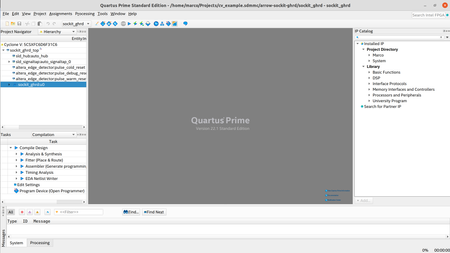
Hi: I have a laptop with Ubuntu 20.04, after installed Intel Quartus Prime Std 22.1 and Pro23.1, I found the font and icon size are too small as the attached picture. Please share the method to enl...

RichardT_altera Super Contributor
3 years agoSuper ContributorI found this article useful on how to change the font size. Please check the attached link.
https://www.macnica.co.jp/en/business/semiconductor/articles/intel/133574/
Regards the Nios II for Eclipse,
1. On the Eclipse toolbar, select Window → Preferences.
2. Set the font size (General → Appearance → Colors and Fonts → Basic → Text Font):
3. Save the preferences.
Best Regards,
Richard Tan
p/s: If you find any answers from the community or Intel Support to be helpful, we encourage you to mark them as the best answer or rate them 4/5 in the survey.

MarcoWuNew Contributor
3 years agoNew ContributorHi Richard:
Thanks, with Pro version, it's works. But still no solution for standard verion....>_<...
Best regards
Marco Wu


