Forum Discussion

 Occasional Contributor
saving the examined data of Max V failed --- in the Intel Quartus Prime lite 22.1

 Super Contributor
Hi,
Thank you for contacting Intel community.
Created a Project by wizzard - selected the correct Chip
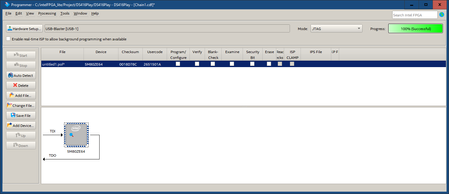
Open the Programmer - Add device - select chip
check the box for Examine and start
Progress 100% success
From the steps mention above, you mention that you have check the 'examine' box and start. However in the photo, I did not see the examine box has been checked. Is the photo correct?
Can you provide us the .qar file for your design? So we can tested from our end.
Regards,
Aiman
 TN-Notebooks3 years ago
Hallo
Regarding the Photo : the check Boxes change after examine. On the Photo the Result is shown.
I have no .qar File because i just want to readout and clone the Chip.
You can confirm this behavior with every chip you have.
Check the Link in the text - this is a known Bug from Versions 18.1 and up ? already.
additional i open a further Issue
here you see some more Photos .
Regards
Tom


