Forum Discussion

LChow3 Occasional Contributor
2 years agoOccasional ContributorReplacement of ModelSim
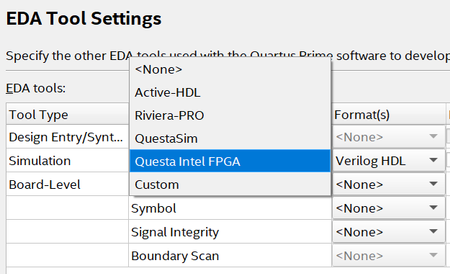
In the past, I used ModelSim for functional simulation. I just started to use Quartus Lite v.23. During the EDA Tool Settings, do I choose QuestaSim or Questa Intel FPGA? How do I launch Que...

RichardT_altera Super Contributor
2 years agoSuper ContributorThere are a few things that you can troubleshoot:
- Ensure that your Operating System is supported. Window 11 is not officially supported. https://www.intel.com/content/www/us/en/support/programmable/support-resources/design-software/os-support.html#tab-blade-1-1
- Check your system resources, including memory, CPU usage, and disk space. Make sure you have enough available resources
- If you are running antivirus software, try to temporarily any antivirus or firewall software, as they may be interfering with the software.
- Try restarting Questa and your computer. This can help clear any temporary issues that may be causing the error.
- Run Questa as administrator. Make sure all your folder are not in read-only options.
- You may install currprocess https://www.nirsoft.net/utils/cprocess.html and disable all the software running behind in the background.
Regards,
Richard Tan

Lisze New Contributor
2 years agoNew ContributorThanks Richard.
Sorry that I couldn't login earlier with my institution account, I attempted many times, still failed.
Eventually, I used my gmail to create another account.
Since I'm using Windows 11, so I am now using v.20.1 with ModelSim.


