Forum Discussion

 New Contributor
Questa Intel FPGA Starter Edition does not recognise license file on Linux Mint
Hello
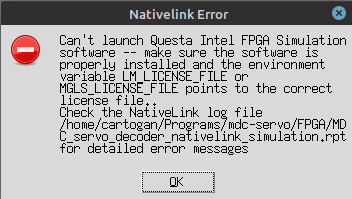
I'm having an issue with setting up a free fixed license for Questa Intel FPGA Starter Edition. The LM_LICENSE_FILE environment variable is set correctly and it is recognised by Quartus as shown in the first screenshot. However, when attempting to start a simulation Quartus throws the nativelink error shown in the second screenshot. The file MDC_servo_decoder_nativelink_simulation.rpt contains the folowing:
Info: Start Nativelink Simulation process

========= EDA Simulation Settings =====================

Sim Mode              :  RTL
Family                :  max10
Quartus root          :  /opt/intelFPGA_lite/21.1/quartus/linux64/
Quartus sim root      :  /opt/intelFPGA_lite/21.1/quartus/eda/sim_lib
Simulation Tool       :  questa intel fpga
Simulation Language   :  systemverilog
Simulation Mode       :  GUI
Sim Output File       :
Sim SDF file          :
Sim dir               :  simulation/modelsim

=======================================================

Info: Starting NativeLink simulation with Questa Intel FPGA software
Sourced NativeLink script /opt/intelFPGA_lite/21.1/quartus/common/tcl/internal/nativelink/modelsim.tcl
Error: Can't launch Questa Intel FPGA Simulation software -- make sure the software is properly installed and the environment variable LM_LICENSE_FILE or MGLS_LICENSE_FILE points to the correct license file.
Error: NativeLink simulation flow was NOT successful


================The following additional information is provided to help identify the cause of error while running nativelink scripts=================
Nativelink TCL script failed with errorCode:  issued_nl_message
Nativelink TCL script failed with errorInfo:  Can't launch Questa Intel FPGA Simulation software -- make sure the software is properly installed and the environment variable LM_LICENSE_FILE or MGLS_LICENSE_FILE points to the correct license file.
    while executing
"error "$emsg" "" "issued_nl_message""
    invoked from within
"if [ catch {exec $vsim_cmd -version} version_str] {
		set emsg "Can't launch $tool Simulation software -- make sure the software is properly installed..."
    (procedure "launch_sim" line 88)
    invoked from within
"launch_sim launch_args_hash"
    ("eval" body line 1)
    invoked from within
"eval launch_sim launch_args_hash"
    invoked from within
"if [ info exists ::errorCode ] {
                set savedCode $::errorCode
                set savedInfo $::errorInfo
                error $result $..."
    invoked from within
"if [catch {eval launch_sim launch_args_hash} result ] {
            set status 1
            if [ info exists ::errorCode ] {
                set save..."
    (procedure "run_sim" line 74)
    invoked from within
"run_sim run_sim_args_hash"
    invoked from within
"if [ info exists ::errorCode ] {
            set savedCode $::errorCode
            set savedInfo $::errorInfo
            error "$result" $savedInfo ..."
    (procedure "run_eda_simulation_tool" line 334)
    invoked from within
"run_eda_simulation_tool eda_opts_hash"
I have tried generating a license for each of the two NIC IDs displayed in the License Setup window and I've also tried adding these IDs as companion computers to the license for my other PC (which works fine). I got the same error every time.
The version of Quartus is 21.1.0 Build 842 10/21/2021 SJ Lite Edition and my PC runs Linux Mint 20.3 x86_64 with kernel 5.4.0-120-generic.
3 Replies
 AR_A_Intel
Super Contributor
Hi Sir
Welcome to INTEL forum. To further understand the issue, could you get me the:
1) error.log file
2) Screenshot of Quartus II>>tools>>license setup
3) Machine OS information
4) Quartus version used
5) License.dat file
For privacy, reply/attach file in private message.
- AR_A_Intel
Continue support in private message mail. This thread will be transitioned to community support. If you have a new question, feel free to open a new thread to get the support from Intel experts. Otherwise, the community users will continue to help you on this thread. Thank you
 VladimirGaristov
Summary from my conversation with AR_A in private messages:
- Linux Mint is not a supported OS for Questa, so nothing they can do. Understandable, they can't possibly support every single distro.
- I suspect the issue is common to all recent Debian-based distros because the same issue is present on the latest version of Debian but not on Arch.