Forum Discussion

 New Contributor
Questa – Altera FPGA Edition simulator licensing
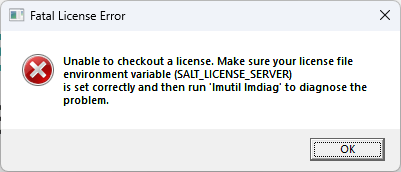

 Super Contributor
Hi Eduardo,
It appears that the version of Questa you have installed no longer reads the LM_LICENSE_FILE variable. Newer versions of Questa® Altera® FPGA Edition require the license to be configured using SALT_LICENSE_SERVER instead.
Please follow the instructions under “Setting Up the Questa® Altera® FPGA Starter Edition Software License” for your operating system (Windows or Linux) in the link below:
https://docs.altera.com/r/docs/683472/25.3/altera-fpga-software-installation-and-licensing/questa-altera-fpga-edition-and-questa-altera-fpga-starter-edition-software-license
SALT_LICENSE_SERVER environment variable doesn't exist in my environment.
> That’s expected. The SALT_LICENSE_SERVER environment variable does not exist by default—you will need to create it manually and set it according to your license configuration.
Additionally, please verify that the license.dat file contains the appropriate feature for your edition:
intelqsim → Questa® FPGA Edition
intelqsimstarter → Questa® FPGA Starter Edition
intelqsimstarter will Not works for Questa® FPGA Edition.
Regards,
Richard Tan
 New Contributor
Hello Richard,
Thank you very much for your quick feedback.
I went through the link you provided above and I proceeded as follows:
- I removed LM_LICENSE_FILE env variable from my environment and I replaced it by SALT_LICENSE_SERVER, which points to the .dat license file. When doing that Questa Altera Starter FPGA Edition tried to start but I got the following errors in its gui
and a bit after this the error window below
When looking inside the license file I only find intelqsimstarter, which from your explanation above looks like the right feature.
Regarding "invalid host" error, when looking inside the license file i find the 2 lines below
which I also think are correct. PC name and relevant MAC address appear below. I realized yesterday that the MAC address corresponds to the ethernet adapter of my dock, that is, when my laptop is not connected to the dock, I don't see this ethernet adapter. Anyway i don't think this is a problem, because when running these tests I am always connected to the dock, so the relevant ethernet adapter is always present as can be seen in ipconfig /all command output below.
Another perhaps useful feedback to narrow down the problem here is that I tried this license configuration with an older Questa starter installation (when it was called Questa-Intel instead of Questa-Altera), and for this version it works. Below you can see a screenshot of the gui when starting the simulator
So the question is, how should I proceed to make it work for Questa Altera Starter FPGA Edition-64 2025.2?
- eduardo-delcastillo5 months ago
Hello Richard,
Today I got access to SSLC so I generated from there the evaluation licenses, following the procedure described in the link you provided and I finally managed to make starter and not starter versions of the simulator work in my computer.
- RichardT_altera5 months ago
I’m glad to hear that it is working now. Were you able to determine what caused the invalid host error?
My assumption is that it was likely related to the license file, especially since the issue was resolved after regenerating a new license.
Regards,
Richard Tan


