Forum Discussion

 New Contributor
Multiple uses of core partition
Hi,
I am beginner at Quartus Prime Pro 22.2.
I have a .qdb file of core partition (only includes luts, ffs) from another project. I want to use that block in my project multiple times (etc 64 times).
In block-based design tutorial, I have to create a black-box module and create partition on black-box block. Then import .qdb file. Do I have to create 64 black-box modules and create 64 partitions? How do I use multiple times a final snapshot of a block?
Hi,
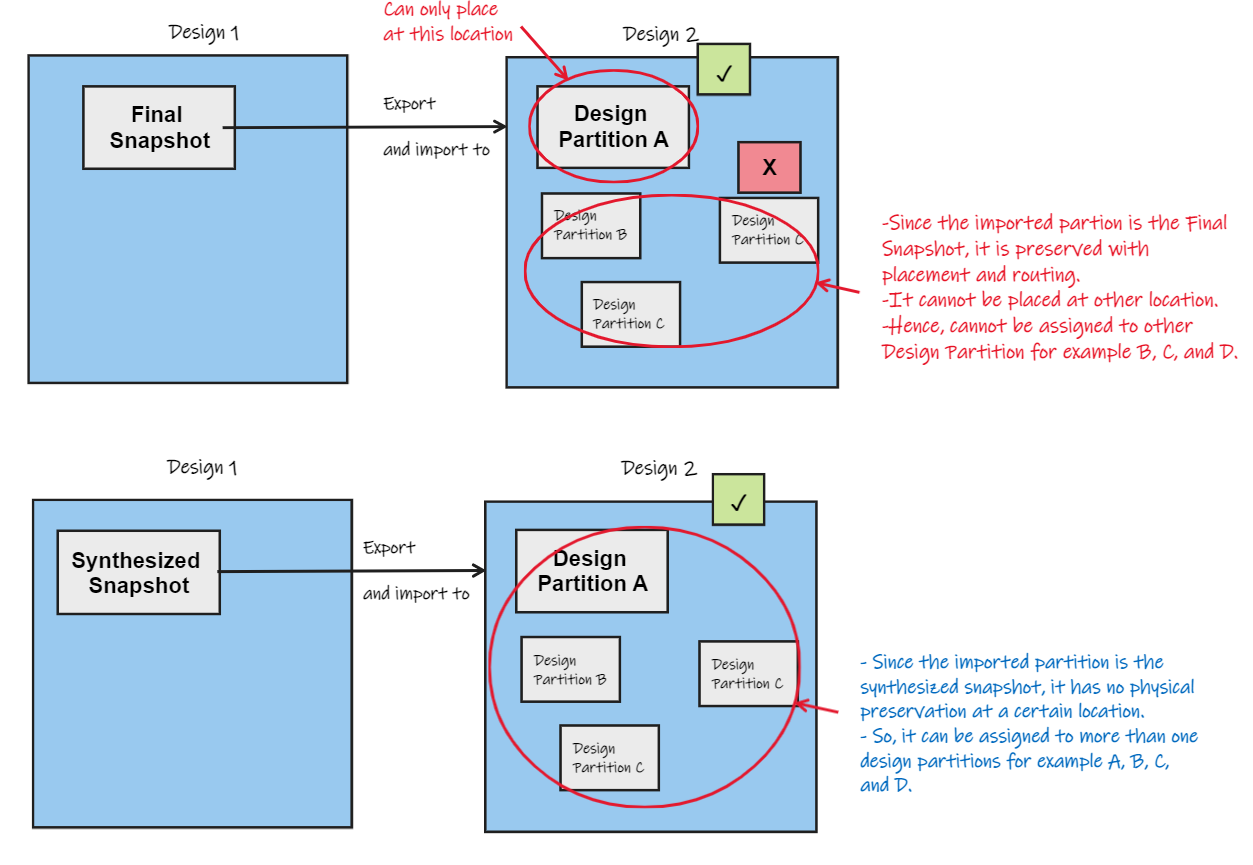
Yes, @sstrell is right. If you want to import the design partition and reuse it multiple times, you would need to choose the synthesized snapshot.
Because the final snapshot preserves placement and routing (can be assigned to only one design partition) while the synthesized snapshot does not have physical preservation (can be assigned to more than one design partition).
You may check out the documentation for the difference of partition snapshot:
Thanks.
Best Regards,
Ven Ting
12 Replies
 sstrell
Super Contributor
Yes. Your .qdb should be the synthesized snapshot of your design. In the destination (consumer) project, you would need to create a partition for each instance and select this .qdb for each of those partitions.
 mustafaarslan
Thank you for your reply.
Can I add multiple partitions and .qdb files with just editing .qsf file? I think I can achieve my goal with editing .qsf file for multiple instance.
- sstrell
Sure. Copy and paste and customize the names.
 VenT_Altera
Frequent Contributor
Hi,
Yes, you would need to create a black-box module and instantiate 64 times in the top-level module.
You may add the partitions using GUI or editing the .qsf file.
Thanks.
Best Regards,
Ven Ting
- VenT_Altera
Hi,
May I know any updates from you?
Thanks.
Best Regards,
Ven Ting
- mustafaarslan
Thanks for replies.
Editing .qsf file solves the adding multiple partitions. But Quartus gives me an error:
" The Partition Database File "../**_final.qdb" implements a partition that was preserved at the "final" snapshot and is assigned to 4 design partitions. Only Partition Database Files preserved at the "synthesized" snapshot can be imported into more than one design partition. "
My goal is decreasing the Compilation (mostly Fitter) time but do "synthesized" snapshots help in this situation? I expected a "final" snapshot can be used multiple times. I wish Fitter can replace the final snapshots in the device map.
- sstrell
You can't use a final snapshot because then all the copies would be placed in the exact location right on top of each other which obviously can't work. You have to use the synthesized snapshot so each copy can be placed in its own unique location.
- VenT_Altera
Hi,
Yes, @sstrell is right. If you want to import the design partition and reuse it multiple times, you would need to choose the synthesized snapshot.
Because the final snapshot preserves placement and routing (can be assigned to only one design partition) while the synthesized snapshot does not have physical preservation (can be assigned to more than one design partition).
You may check out the documentation for the difference of partition snapshot:
Thanks.
Best Regards,
Ven Ting
- VenT_Altera
- VenT_Altera
Hi,
Is the link provided helpful? May I know any updates from you?
I look forward to hearing from you soon.
Thanks.
Best Regards,
Ven Ting
- mustafaarslan
I understand it, thank you for replies.
- VenT_Altera
Hi,
I’m glad that your question has been addressed, I now transition this thread to community support. If you have a new question, feel free to open a new thread to get the support from Intel experts. Otherwise, the community users will continue to help you on this thread. Thank you.
Best Regards,
Ven Ting
p/s: If any answer from the community or Intel Support are helpful, please feel free to give best answer or rate 9/10 survey.