Forum Discussion

BA26 New Contributor
5 years agoNew ContributorModelSim executable Error Message
Hello,
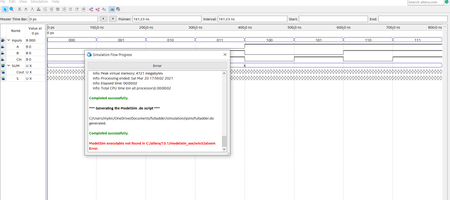
I have downloaded Quartus Prime Lite 20.1.1 again and continue to receive this error message every time I try to use the University Waveform VWF:( ModelSim executable not found in C:/altera/...

Nurina Regular Contributor
5 years agoRegular ContributorHi Brianna,
You need to specify your ModelSim executable directory. To do this, go to Tools>Options>EDA Tools Options.
At the ModelSim directory, add an extra "/" at the end of the path name like so: "C:/altera/13.1/modelsim_ase/win32aloem/"
There is an old discussion thread regarding this issue that you can refer to: https://community.intel.com/t5/Intel-Quartus-Prime-Software/Can-t-launch-the-Modelsim-Altera-Software/td-p/163728
I hope this solves your issue. Let me know if your issue persists.
Regards,
Nurina
 BA265 years ago
Hi Nurina,
Ok, so I added the extra "/" add the end of the Modelsim executable Directory and I still received the same error message.


