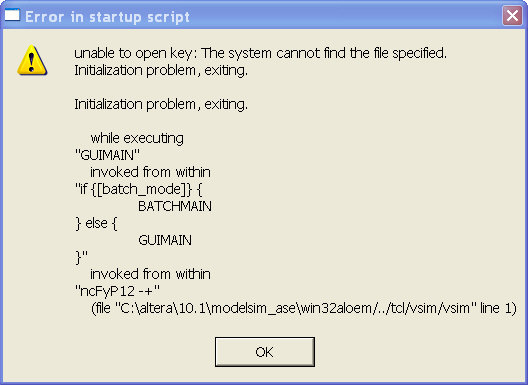
Dear Fellow Forum users,
Well after more than a week I still have not received any useful solutions or assistance or telephone contact from Altera official support, they don't even appear to be interested in being paid to resolve the issue.
I received more intelligent answers on this forum by far....
Guess I will move on back to Xilinix products to complete this new design.
I've included the copy of my fantastic support dialog for for anyone who might think that is a viable support path. See below.......Start at bottom.
This will probably be take down as it does not reflect well on Altera support.
Rather disappointing at the least...
Brooks
--------------------------------------------------------
1/28/2011 09:51 AM From Customer
Kenny,
Your answer is cryptic at best. It is completely unclear as to what you are suggesting and it is unclear where you able to determine the path information related to the product installation since I have not provided that data to you.
None the less, this is not the install path that I used, however I did attempt an install in a directory other than the default of
C:\altera\10.1 ensuring no spaces were used, with no success.
WHY HAVE WE NOT BEEN TELEPHONED AS REQUESTED SEVERAL DAYS BACK TO SET UP A PAID SUPPORT AGREEMENT AND GET THIS ISSUE RESOLVED?
WE HAVE EXHAUSTED 3X THE COST OF THE PAID PRODUCT PRICE IN WASTED ENGINEERING EFFORT.
WE ARE MOVING TO ANOTHER VENDOR IN THE MEAN TIME AS ALTERA CLEARLY IS NOT INTERESTED IN PROVIDING US HELP (PAID OR NOT) IN A TIMELY FASHION.
WHAT SAY YOU ALTERA SUPPORT?
Brooks
-----------------------------------------------------------------------
1/26/2011 05:36 PM To Customer
Dear Brooks,
We had some feedback from the customer,
The error shows the installation path as
F:\Program Files\Alter@\80sp1\modelsim_ae.
Is this ACDS 8.0SP1 installation, or did you install ACDS 10.1 modelsim-altera at this location?
Also, ACDS 10.1 installer does NOT allow users to install in any path that has spaces in it. However I see spaces in customer's installation path. Could you help to change this and see it resolve?
Thanks
Best regards
kenny
-----------------------------------------------------------------------
1/25/2011 07:18 PM To Customer Dear Brooks,
Thanks for your feedback,
I am sorry that I do not have solution yet for your issue, I had consult our development team and will feedback to you as soon as possible once they found the work around for this.
Sorry for the inconvenience cause,
Thanks
Best regards
Kenny
-----------------------------------------------------------------------
1/25/2011 07:50 AM From Customer
I am using Windows XP Pro Service Pack 3. Single user on a laptop with admin privileges. I even tried requesting and installing a license from Altera for the Web version and ModelSim-Altera Version (Free) yesterday via the Quartus II licensing setup pull down with no different results.
I also uninstalled the free version, installed the paid version just to see if the error message changed, it did not. I then uninstalled the paid version.
Please review the posts I placed on the forum at:
(This forum link)
We have the MaxPlusII 10.2 installed also on this machine along with other development software. This appears to be a licensing issue and we need to resolve it ASAP. I am going into a engineering meeting today to inform my customer of our lack of progress in getting this resolved.
If a service agreement for telephone support is needed to resolve this then please contact me to get it in place. We have the resources for this however we cannot delay this issue any further or we will be forced to migrate to another vendor.
Getting the correct person or persons help is crucial in resolving this issue. Again we cannot resolve this using a 24 to 48 hour ping pong of support messages as we are currently experiencing.
I look forward to hearing back from Altera shortly.
Thank you,
Brooks
-----------------------------------------------------------------------
1/24/2011 11:58 PM To Customer
Dear Brooks,
Thanks for using Altera My Support,
May I know what operating system that you were using?
Thanks
Best regards
kenny
-----------------------------------------------------------------------
1/24/2011 10:18 AM From Customer
This item is reaching critical mass. After spending the entire weekend uninstalling / reinstalling, clearing the registry, etc etc. We still see the issue.
We need to help resolving this issue ASAP.
We may have a conflict perhaps with our MAXPLUSII licensing that is causing the issue?
Please advise,
Brooks

 Honored Contributor