Forum Discussion

 Contributor
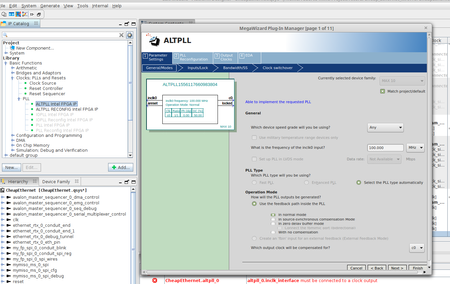
Linux Qsys Now "platform designer", ALT_PLL Altera FPGA IP doesn't save, crash.

 New Contributor
Hello, I know this is quite an old thread, nevertheless I have the exact same problem with the Platform Designer. I tested versions 18.1 and 20.1 (Standard edition) with the exact same behavior. It is not possible to add an ALTPLL component in the Platform Designer. The wizard appears (you then have to resize it, otherwise it will crash), you can make your adjustments an when you click finish nothing happens, no error message nothing.
When opening a QSYS file that already contains a PLL, it is possible to open the settings (i.e., the Mega Wizard) but changes have no effect.
Is Quartus under Linux. Are there any suggestions how to work around this problem?
 sstrell5 years ago
Super Contributor
You probably should start a new thread on this.
New components get added to the bottom of the System View (System Contents). You don't see it anywhere and no messages in the Messages window about it?


