Forum Discussion

 New Contributor
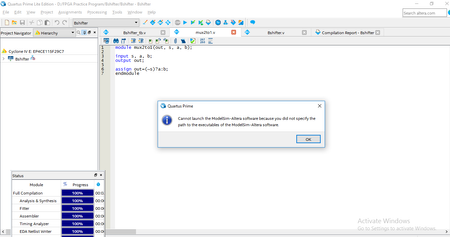
How to specify a path to the executables of the ModelSim-Altera software?
- 6 years ago
Go to Tools > Options > EDA Tool Options.
Check that the path to the ModelSim-Altera software is correctly set to: <install_directory>\win32aloem (for example, C:\intelFPGA\18.1\modelsim_ae\win32aloem)
p.s. Don’t forget to Reply, and Select the Best Solution. :)

 Super Contributor
You might need to provide further detail on why you are not able to view the waveform. Try to go through an example design/online tutorial to check where goes wrong.
RTL simulation is to check the design functionality without taking into account the delays of the lookup tables. Gate level simulation can also be zero delays but is more often used in unit delay or full timing mode.
Post-synthesis and post-fit gate-level simulations run significantly slower than RTL simulation. Intel FPGA recommends that you verify your design using RTL simulation for functionality and use the Timing analyzer for timing.
You can learn more about simulation from the link below:
https://www.intel.com/content/www/us/en/programmable/documentation/gft1513990268888.html
 PSriv86 years ago
Thank you for your reply. It helped a lot.


