Forum Discussion

 New Contributor
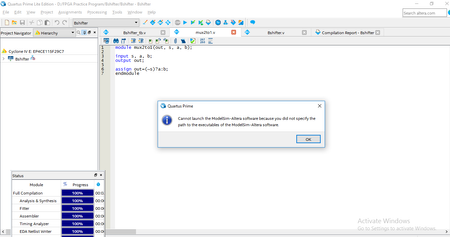
How to specify a path to the executables of the ModelSim-Altera software?
- 6 years ago
Go to Tools > Options > EDA Tool Options.
Check that the path to the ModelSim-Altera software is correctly set to: <install_directory>\win32aloem (for example, C:\intelFPGA\18.1\modelsim_ae\win32aloem)
p.s. Don’t forget to Reply, and Select the Best Solution. :)

 Super Contributor
Go to Tools > Options > EDA Tool Options.
Check that the path to the ModelSim-Altera software is correctly set to: <install_directory>\win32aloem (for example, C:\intelFPGA\18.1\modelsim_ae\win32aloem)
p.s. Don’t forget to Reply, and Select the Best Solution. :)
 PSriv86 years ago
Thank you so much for the solution, now the modelsim is accessible automatically. However, I am not able to view the waveform. Do I need to add the variables to view waveform. Also, would you please tell me the difference between RTL simulation and Gate Level Simulation? I am sorry if my questions are very basic, I am a beginner therefore having many doubts.
 Patan3 years ago
How about Quartus 11.1 version, I can't find any modelsim_ase folder in the installed directory.
Please check the below image.
 Sabarinathanmohan1 year ago
Good morning,
On my PC, I am using the version of 13.1 Quartus II software and I followed the above step as per this version . But still it's not working.
and when we click the RTL simulation it shows "Native link error".
