Forum Discussion

Rainwang Contributor
2 years agoContributorhow to by pass a non-intel device in quartus prime pro programmer?
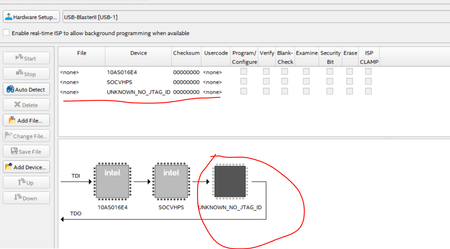
Hi, i am using quartus prime pro 23.4, and i connected the JTAG of the ethernet PHY chip on my board into the jtag chain for BSCAN usage. but now when l tried to detect the jtag chain in the program...
 2 years agoHi,
did you try specified procedure in Quartus manual?
2.4.2. Editing the Details of an Unknown Device
When the Intel Quartus Prime Programmer automatically detects devices with shared JTAG IDs, the Programmer prompts you to specify the device in the JTAG chain. If the Programmer does not prompt you to specify the device, you must manually add each device in the JTAG chain to the Programmer, and define the instruction register length of each device.
To edit the details of an unknown device, follow these steps:
1. Double-click the unknown device listed under the device column.
2. Click Edit.
3. Change the device Name.
4. Specify the Instruction register length.
5. Click OK.
6. Save the .cdf file.
FvM Super Contributor
2 years agoSuper ContributorHi,
did you try specified procedure in Quartus manual?
2.4.2. Editing the Details of an Unknown Device
When the Intel Quartus Prime Programmer automatically detects devices with shared JTAG IDs, the Programmer prompts you to specify the device in the JTAG chain. If the Programmer does not prompt you to specify the device, you must manually add each device in the JTAG chain to the Programmer, and define the instruction register length of each device.
To edit the details of an unknown device, follow these steps:
1. Double-click the unknown device listed under the device column.
2. Click Edit.
3. Change the device Name.
4. Specify the Instruction register length.
5. Click OK.
6. Save the .cdf file.
did you try specified procedure in Quartus manual?
2.4.2. Editing the Details of an Unknown Device
When the Intel Quartus Prime Programmer automatically detects devices with shared JTAG IDs, the Programmer prompts you to specify the device in the JTAG chain. If the Programmer does not prompt you to specify the device, you must manually add each device in the JTAG chain to the Programmer, and define the instruction register length of each device.
To edit the details of an unknown device, follow these steps:
1. Double-click the unknown device listed under the device column.
2. Click Edit.
3. Change the device Name.
4. Specify the Instruction register length.
5. Click OK.
6. Save the .cdf file.

RainwangContributor
2 years agoContributorthank you for the reply, it solved my question.
thank you again!


