Forum Discussion

 New Contributor
gate level simulation with fiftyfivenm_atom_pack library not found
Dear all,
we tried to do post-simulation through Quartus standard 20.1
using ModelSIM as simulator
FPGA device is 10M04DAU324C8G
Here's our step for doing simulation
1. generate a new project and select device 10M04DAU324C8G
2. add TOP file and bypass input to output directly
3. compile project in Quartus
do Analysis & Synthesis
do Fitter(Place & Route)
do EDA Netlist Writer
4. run gate level simulation
Tools -> Run Simulation Tool -> Gate Level Simulation
5. ModelSIM shows error
We tried to fix this problem by add library in do file
However, there seem not competely solve the problem
Are we doing something wrong with this simulation?
And why do file generated by Quartus doesn't include the library?
Can someone help us with the problem?
Thanks.
7 Replies
- RichardT_altera
Super Contributor
I have attached a simple design with testbench so you can successfully run the gate-level simulation using Modelsim or Questa.
- Open the simple_design.qar and change the EDA executable paths to a valid path.
- Run EDA Netlist Writer.
- Run Gate-level simulation.
You can compare it with yours to check the simulation flow.
I recommend to upgrade the design to the latest Quartus Standard version 22.1 and the simulator tool to Questa instead of Modelsim, as Modelsim has been obsolete from Quartus Pro 20.3 or Quartus Standard 21.1 onwards.Best Regards,
Richard Tan
p/s: If you find any answers from the community or Intel Support to be helpful, we encourage you to mark them as the best answer or rate them 4/5 in the survey.
- RichardT_altera
May I know does my latest reply help?
Do you need my help to debug your design? If so, please share your .qar design.
Best Regards,
Richard Tan
 WNC_HowardHuang
Hi,
Thanks for RichardTanSY_In
tel's reply we have tried two way to do the project that you provide.
1. using Ubuntu 18.04 with Quartus 21.1 Standard and QuestaIntel
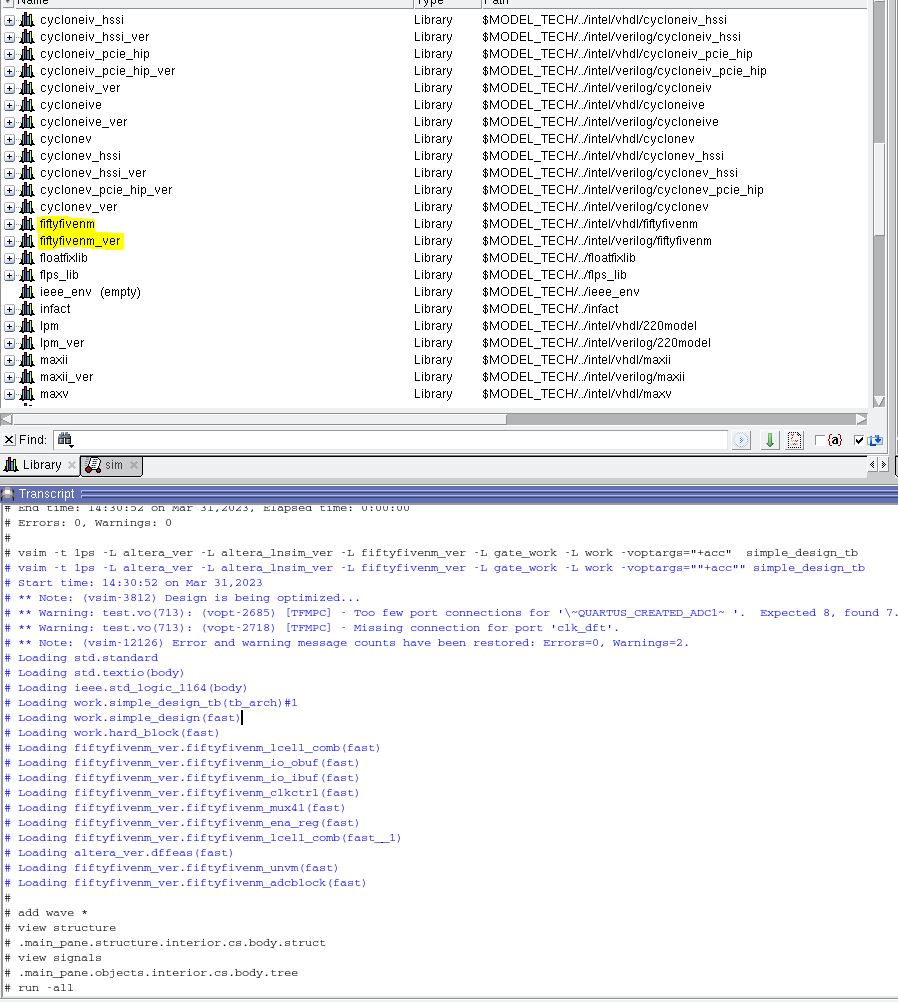
FAIL, fail to access fiftyfivenm_ver library2. using Win10 with Quartus 21.1 Standard and QuestaIntel
Success
However, we didn't figure out the differences between these two system
For both system running the same version of Quartus and QuestaIntel
Is there any suggestion with this problem
Because we still need to run this simulation on our Ubuntu system
Thanks.
- RichardT_altera
I am able simulate successfully with Quartus 22.1std and Questa Intel FPGA, using the RHEL linux system.
Do you see the fiftyfivenm and fiftyfivenm_ver in the Questa library?
There is a chance that the fiftyfivenm_ver library is not included in the Questa installation or is not properly installed.
Another potential cause is that you may not have sufficient permissions to access the fiftyfivenm_ver library or its files. Make sure that you has read and execute permissions for the library and its files. Try to check with your IT team on this.
Best Regards,
Richard Tan
- WNC_HowardHuang
Hi,
Thank you for your assistance in resolving the issue.
After investigating, we have found the root cause of the problem.
It turns out that we were using an incorrect version of the simulator.
The library we needed is only available in Quartus Standard, but we were using Quartus Prime Pro.
We apologize for any inconvenience caused and appreciate your help in resolving the issue.
Thanks.
- RichardT_altera
You're welcome, I am happy to help. ; )
- RichardT_altera
With the question addressed, I will transition this thread to community support.
If you have any further questions or concerns, please don't hesitate to reach out. Thank you and have a great day!
Best Regards,
Richard Tan
p/s: If you find any answers from the community or Intel Support to be helpful, we encourage you to mark them as the best answer or rate them 4/5 in the survey.