Forum Discussion

Altera_Forum's avatar
Altera_Forum
Icon for Honored Contributor rankHonored Contributor
11 years ago

EP2AGX125EF35 // Arria II GX FPGA Development Kit v9.0.2 // QuartusSetupWeb-14.0.0.20

I got "Arria II GX FPGA Development Kit v9.0.2" recently in which user's document indicates that it has EP2AGX125EF35.

And I have downloaded QuartusSetupWeb-14.0.0.20 to try the latest version of Quartus.

But unfortunately, in this version of Quartus, I couldn't find the matching FPGA.

How could I solve the matter?

I have just downloaded as the link. There I could not find the additional option to acquire this package info. with some other way.

https://www.dropbox.com/s/3zsamiv42wd870v/img.jpg?dl=0

And it seems that there are not exact matching ic from the accesible list from Quartus when I tried this with an older version.

There was multiple FPGAs including "EP2AGX125EF35" but I have no idea about the additional following SYMBOLS after this "EP2AGX125EF35".

Where could I have the perfect details for the product number's symbols?

Thank you!!

5 Replies

  • Altera_Forum's avatar
    Altera_Forum
    Icon for Honored Contributor rankHonored Contributor

    Refer to the overview for the arria ii device family (http://www.altera.com/literature/hb/arria-ii-gx/aiigx_51001.pdf) document for a full description of the product markings.

    The part number you've specified in your post is missing the speed grade information that is present on all the manufactured parts. 'EP2AGX125EF35' needs some additional characters after it - such as 'C5'.

    There may also be an additional 'N' for lead-free, but Quartus doesn't care about that.

    Quartus needs to know the this for the particular device fitted. So, it's expecting a part number with the 'C5' (or similar).

    I don't have Aria devices installed on my installation of Quartus, so I can't check. If you're still having trouble let me know and I can easily add them to my installation.

    Regards,

    Alex
  • Altera_Forum's avatar
    Altera_Forum
    Icon for Honored Contributor rankHonored Contributor

    Thank you for your kind reply, Alex.

    From the reference document, the full P/N is,

    EP2AGX125EF35C4ES.

    And then, I might want to run different versions of the Quartus because the older versions might be more familiar sometimes.

    It means that, i want to freely add or remove the device information whichever the version of the quartus is.

    Do you have the good solution?

    Have a good day!

    Robinus Fuser.

    VLSI Design Lab.

    Konkuk Univ.

    Seoul, Korea.
  • Altera_Forum's avatar
    Altera_Forum
    Icon for Honored Contributor rankHonored Contributor

    'ES' stands for Engineering Sample. These devices often appear on development boards. You should specify the part number exactly, including the 'ES'. See the attached image showing how it appears in Quartus 13.1.

    Engineering sample parts that appear on development boards tend to remain on the list of a available parts with new versions of Quartus. I've checked and this particular part is available in 12.1sp1 too. So, it should be in Q14.0 too. (I don't have it installed so can't check.)

    --- Quote Start ---

    I want to freely add or remove the device information whichever the version of the Quartus is.

    --- Quote End ---

    You can't use versions of Quartus that don't support this device. However, once you've specified the part in your project you should be able to switch between versions of Quartus that do support it - if you wish.

    Cheers,

    Alex
  • Altera_Forum's avatar
    Altera_Forum
    Icon for Honored Contributor rankHonored Contributor

    http://postfiles1.naver.net/20141209_256/canvasne_14180541302543mh9e_png/01.png?type=w3 ([url="http://postfiles1.naver.net/20141209_256/canvasne_14180541302543mh9e_png/01.png?type=w3)"]IMG1[/URL]

    img2 (http://postfiles8.naver.net/20141209_55/canvasne_1418054130492dcirl_png/02.png?type=w3)

    Unfortunately, I couldn't find the device from my Quartus 14.0.

    IMG1 >> Attempt when initiating a project.

    IMG2 >> Attempt when changing the target device from existing project.

    From both IMGs I can't find the specific device.

    There might be 2 options,

    1) Is it the final solution to download and install 13.1?

    2) On your advice, I am supposed to download and apply any devices. Where could I find? I failed to find... Sad.

    Thank you in advance!

    Robin.
  • Altera_Forum's avatar
    Altera_Forum
    Icon for Honored Contributor rankHonored Contributor

    Make sure you've downloaded and added Aria II devices to your Quartus installation.

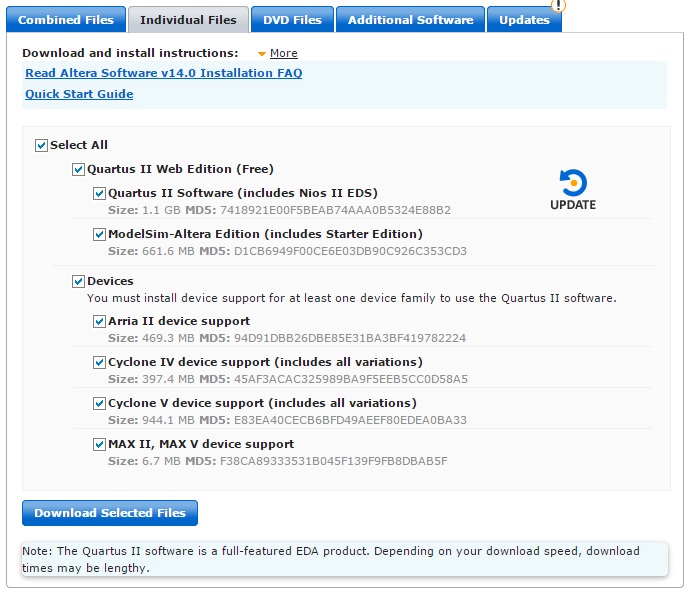
    Download the Aria II devices file from the quartus ii web edition (http://dl.altera.com/14.0/?edition=web) download page. Deselect everything except the 'arria ii device support' and download the selected files.

    To add the devices - run Quartus and go to 'Tools' -> 'Install Devices...' and point the installer at the folder with the Aria II device file (*.qdz) in.

    You should then be able to find the device.

    Cheers,

    Alex