Forum Discussion

EBarc1 New Contributor
4 years agoNew ContributorCan't open project / permission error
Hello,
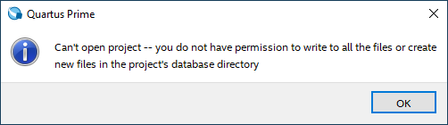
I keep getting this a lot, and the only way to solve it is to move my project files to some very specific folder:
I tried this: https://www.intel.com/content/www/us/en/support...

dperea_uscNew Contributor
1 year agoNew ContributorIf anyone finds this later, this is an error with how the attributes are set with the project files. See following link:
https://www.intel.com/content/www/us/en/support/programmable/articles/000084612.html
To solve this:
1. Open a command shell (Start menu -> Run... -> Enter cmd and press OK).
2. Change to the project directory, i.e. cd <project path> and press Enter.
3. Run the one of the following commands:
attrib -R /S /D *
This should clear the write protection flags for all the files and subdirectories in this project direcotry.
It is not necessary to delete or reinstall any files or directories.

Tech_CrocoNew Contributor
1 year agoNew ContributorYou GOAT.


