Forum Discussion

EBarc1 New Contributor
4 years agoNew ContributorCan't open project / permission error
Hello,
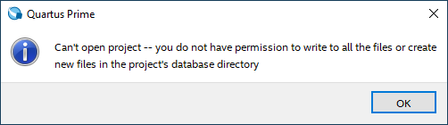
I keep getting this a lot, and the only way to solve it is to move my project files to some very specific folder:
I tried this: https://www.intel.com/content/www/us/en/support...

dperea_uscNew Contributor
1 year agoNew ContributorIf anyone finds this later, this is an error with how the attributes are set with the project files. See following link:
https://www.intel.com/content/www/us/en/support/programmable/articles/000084612.html
To solve this:
1. Open a command shell (Start menu -> Run... -> Enter cmd and press OK).
2. Change to the project directory, i.e. cd <project path> and press Enter.
3. Run the one of the following commands:
attrib -R /S /D *
This should clear the write protection flags for all the files and subdirectories in this project direcotry.
It is not necessary to delete or reinstall any files or directories.

AthmaneNew Contributor
1 year agoNew ContributorWorked perfectly thanks!


