Forum Discussion

 New Contributor
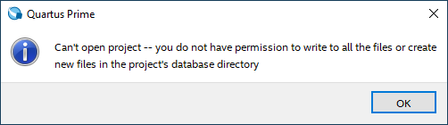
Can't open project / permission error

 Super Contributor
Eduardo,
May I know what Quartus version you are using?
Can you try to reinstall Quartus and see if it is still persist?
Otherwise this could be due to permission issue on your local machine which you need to allow all to read and write to/from
 New Contributor
I was originally using 20.1. Then, because of this, I tried installing 21.1, and nothing changed.
Also, I tried several times to run Quartus in administrator mode, and nothing changed. I'm also logged as the admin of this machine.
Several other engineering programs work on that same folder of that project. For example:
E:\Important\Sync\EE\Projects\Portable Pad\FPGA
E:\Important\Sync\EE\Projects\Portable Pad\Firmware
E:\Important\Sync\EE\Projects\Portable Pad\PCB
So I don't see how permission issues would affect just Quartus Prime. Note that I also tried moving the FPGA folder all around, even to the desktop, but nothing helps. Quartus just didn't like my PC.
But, as seeing its not a common issue with Quartus Prime, I guess its just some other program I have or something here that's causing this conflict.


