Forum Discussion

 Occasional Contributor
Altera SSLC License
 Occasional Contributor
Yes I have purchased a license but can't manage to use the SSLC to activate it and bind it to a computer.
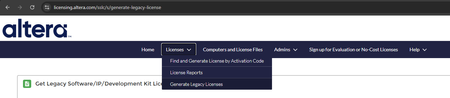
Menus are missing, and License Assistant is missing as well as explained in the opening post.

 Super Contributor
I'd contact your distributor to make sure they have added your license to the SSLC.
- covfefe5 months ago
The relevant menus is what is missing on the Altera SSLC site.
The previous Intel SSLC site worked fine.- sstrell5 months ago
What I'm saying is the menu might be dynamic. If you don't have a license to activate/generate because your distributor hasn't enabled it yet, the menu options may not be there. I don't have those options either, but I don't have any licenses to set up.
This is a guess since the Altera SSLC is new.
- covfefe5 months ago
Got it. There is not Altera SSLC contact info, so I need to wait until someone working there sees this post.
thanks anyway!
 paveetirrasrie_Altera4 months ago
Frequent Contributor
Hello,
APologies for the delayed response.
I would agree with Sstrell suggestion. Please reach out to your local distributor if they've enabled the license in SSLC.
Kindly do let me know if you've further issue on this matter.
Regards,
Pavee
- paveetirrasrie_Altera4 months ago
Hello,
We do not receive any response from you to the previous reply that I have provided. This thread will be transitioned to community support.
If you have a new question, feel free to open a new thread to get the support from Intel experts.
Otherwise, the community users will continue to help you on this thread.
Thank you.- covfefe4 months ago
What do you mean? I answered that I need help from Altera to restore these options:
The relevant menus is what is missing on the Altera SSLC site.
The previous Intel SSLC site worked fine.


