Forum Discussion

rlutch New Contributor
5 years agoNew ContributorUsing ModelSim in Eclipse
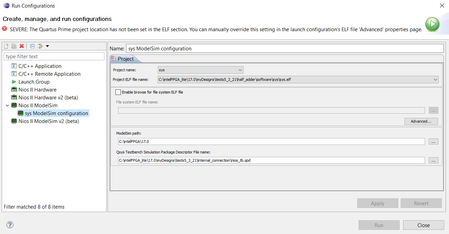
Hi all, I've been having trouble running my Eclipse systems as Nios II ModelSim. Running as Nios II hardware is okay for me. I am using the same .elf file that was working with the hardware simulatio...

EricMunYew_C_Intel Frequent Contributor
5 years agoFrequent ContributorRight click your project folder, click Run As and Nios II Modelsim.

rlutchNew Contributor
5 years agoNew ContributorThanks for the reply, however following those steps is what gave me the window in the post. I actually figured it out since posting, I'll leave the solution here if anyone else is having the same problem. You have to select the appropriate path for modelsim, for me this was: C:\intelFPGA_lite\17.0\modelsim_ase\win32aloem
Then you have to click 'advanced' and specify the working directory for your quartus project, then click apply and run


