Forum Discussion

 New Contributor
Purchase of New Intel FPGA Development Board
 5 years ago
Thanks for the Kudos. I do understand . . . I have had the same issues.
From a high level / top level viewpoint, you will be able to update the RELEASE version of the download if need.
Overall here are the details:
Basically, there is no First Stage Boot Loader with Nios (compared to something like Zynq 7000 series for example.) The Cyclone 10 LP does not have an ARM A53 or A9 in it . . . so you will have to use Nios and Nios can boot directly from internal memory if the program fits within your internal RAM. For most Nios programs, say 64K to 128Kbytes of memory is sufficient ... and the Cyclone 10 LP should have enough internal RAM (and I believe it also has HyperRam attached to it that you can access) that you should be okay.
Basically, you can program the flash memory through the USB blaster, and when the FPGA boots the Nios program will be in the flash. You just have to convert the ELF file in Eclipse using mem_init_generate for make targets in Eclipse to convert the ELF to hex, and then attach the hex to your Quartus project and compile ... and the Nios instructions will be in the external flash memory. So in summary:
1. Develop your C in Eclipse, JTAG downloading your design and testing
2. When finished, convert ELF to hex with mem_init_generate in Eclipse
3. Attach hex to Quartus project
4. Compile Quartus project
5. Program flash memory with Quartus programmer
When you power cycle, you should see your Nios software executing (such as through Uart, led, etc.)
Regards, James
 New Contributor
Dear James;
Thank you for your reply. You got another KUDO!
I definitely understood your answer for question 1 and got the "gist" of the answer for question 2.
However, the quote below is the context to which question 2 is based:
"...Intel MAX 10 FPGA, pre-programmed System Manager ASSP functions (Not programmable by the user)"
Can anyone tell me what "...(Not programmable by the user)" means in terms of software development limits?
Does this mean that I cannot modify the first stage bootloader or modify the "control" handoff? In other words, if there is a problem with the RELEASE version of the download, I can't remedy my problem?
 Contributor
Thanks for the Kudos. I do understand . . . I have had the same issues.
From a high level / top level viewpoint, you will be able to update the RELEASE version of the download if need.
Overall here are the details:
Basically, there is no First Stage Boot Loader with Nios (compared to something like Zynq 7000 series for example.) The Cyclone 10 LP does not have an ARM A53 or A9 in it . . . so you will have to use Nios and Nios can boot directly from internal memory if the program fits within your internal RAM. For most Nios programs, say 64K to 128Kbytes of memory is sufficient ... and the Cyclone 10 LP should have enough internal RAM (and I believe it also has HyperRam attached to it that you can access) that you should be okay.
Basically, you can program the flash memory through the USB blaster, and when the FPGA boots the Nios program will be in the flash. You just have to convert the ELF file in Eclipse using mem_init_generate for make targets in Eclipse to convert the ELF to hex, and then attach the hex to your Quartus project and compile ... and the Nios instructions will be in the external flash memory. So in summary:
1. Develop your C in Eclipse, JTAG downloading your design and testing
2. When finished, convert ELF to hex with mem_init_generate in Eclipse
3. Attach hex to Quartus project
4. Compile Quartus project
5. Program flash memory with Quartus programmer
When you power cycle, you should see your Nios software executing (such as through Uart, led, etc.)
Regards, James
- James_B5 years ago
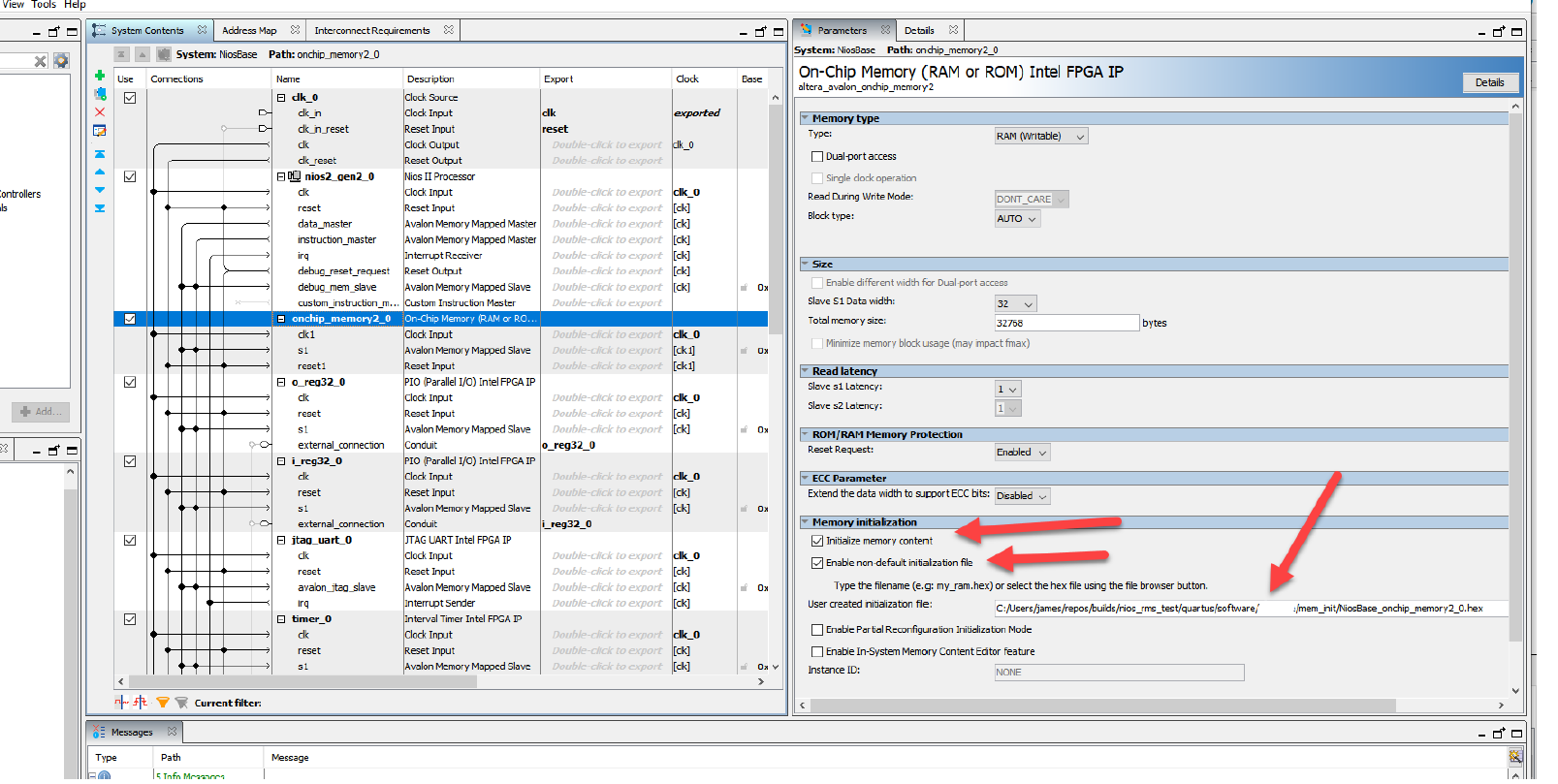
I needed to add one more thing:
1. Develop your C in Eclipse, JTAG downloading your design and testing
2. When finished, convert ELF to hex with mem_init_generate in Eclipse
3. Attach hex to Quartus project
3a) Add hex file to on chip memory in Platform designer - memory initialization option
3b) Add hex file to quartus project
4. Compile Quartus project
5. Program flash memory with Quartus programmer
When you power cycle, you should see your Nios software executing (such as through Uart, led, etc.)
 praveenkumar5 years ago
Occasional Contributor
hi james , can u help me with the flashing through genric tri state controller and nios 2 flash programmer because i got errors with that
like error code 8
and i flashed with the quartus programmer that s working fine by memory initialization.
i have active parallel config nor flash 256mb p3365nm technology