Forum Discussion

Daniel__Liu New Contributor
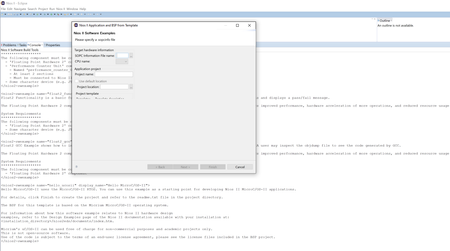
3 years agoNew ContributorProblem with "New - Nios II Application and BSP from template".
Hi,
The problem happened when I wanted to create "New - Nios II Application and BSP from template". My Quartus is 21.2 pro. I reinstalled WSL 1 and Ubuntu 18.04 LTS. But it still happened.
Dos ...

ShengN_altera Super Contributor
3 years agoSuper ContributorHi,
I don't have that problem at creating new Nios II Application and BSP from template (Hello MicroC/OS-II) with Quartus Prime Version 21.2.0 build 72 Pro Edition Eclipse.
Installing steps:
- Install Quartus Prime Version 21.2.0 build 72 Pro Edition software.
- Install the Nios® II SBT for Eclipse follow this link https://www.intel.com/content/www/us/en/support/programmable/articles/000086893.html
- Install the additional distro packages follow this link https://www.intel.com/content/www/us/en/support/programmable/articles/000074066.html
- Turn on Windows Subsystem for Linux in Turn Window features on or off. Set the proper WSL in Powershell follow this link https://learn.microsoft.com/en-us/windows/wsl/basic-commands
- Created a new environment variable in Windows: Name: WSLENV, Value: SOPC_KIT_NIOS2/p
KDB link below probably can help you out as well:
https://www.intel.com/content/www/us/en/support/programmable/articles/000076060.html
OS used: Windows 10 Enterprise 21H2 19044.2130 64-bit
RAM: Does your PC has enough memory ram?
Check the project file attached.
Best regards,
Sheng
p/s: If any answer from the community or Intel Support are helpful, please feel free to give best answer or rate 4/5 survey.


