Forum Discussion

 Occasional Contributor
NiosV and juart-terminal
 5 months ago
Summary:
- printf(%f) always prints 0, even if the variable contains valid floating-point number.
Change the On-Chip Ram size from decimal (such as 167.5KB / 167500 bytes) to binary (such as 167KiB / 171008 bytes). - Character é is printed wrongly.
Change the active code page of Windows's command prompt from 437 to 65001 (UTF-8)
- printf(%f) always prints 0, even if the variable contains valid floating-point number.
 Contributor
Hi ETang2 ,
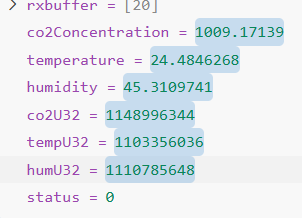
The problem is when after this breakpoint i execute the code step by step the printf print the wrong values in juart-terminal.
Noted, sorry for misinterpreting your first post.
You are right that there is something fishy here.
- Breakpoint before printf shows printed variables are memcpy correctly from intermediary value.
- Execute the code step-by-step, and yet the printed variables shows 0.
Please allow me some time to think this through.
On the 2nd issue:
It seems also that there is print problem as the accentuated character "é for example" are not printed correctly.
I believe it is due to the default code page of your Windows Command Prompt. Nios V Command Shell follows the default code page.
Can you check your code page by typing this command in the niosv-shell?
If the results is 437, then this code page is unable to print é. The character é is stored as two bytes (0xC3 0xA9). Code Page 437 tries to read these as two separate characters (like ├⌐).
To change from Code Page 437 to UTF-8,
In my previous comment, I was running my experiment in Linux.
And Linux terminal supports UTF-8 by default (unlike Windows Command Prompt).
Regards,
Liang Yu


